Business Model Canvas in a Pitch Deck: When to Use One
Should you put a business model canvas or lean canvas in your pitch deck? Five real slides show when a canvas helps investors, how to make it readable.
Business Model Canvas Slide: Fill It With Facts, Mark What Is Unproven, or Leave It Out
The business model canvas, a one-page grid of nine boxes from key partners to revenue streams, and its cousin the lean canvas are taught in almost every startup course. Many founders then paste the grid straight into their pitch deck. Investors rarely read it: nine boxes of short phrases on one slide is too much text to take in, and most of the phrases ("marketing and advertising", "customer support") could describe any company. This guide uses five real slides to show when a canvas helps an investor, how to fill one so it says something specific, and when to replace it with a simpler business model slide.
TL;DR
Use a canvas in the main deck only if every box says something specific to you, with numbers where you have them; otherwise move it to the appendix and put a one-line business model on the main slide. GradGears comes closest: its customer box gives "12 million Community College Students" and "1132 Community College Districts and Campuses", and its revenue box separates what is free from what is paid. Common Ground shows the other good use: a dated lean canvas draft with a legend highlighting what changed since the last version.
Five canvas slides, read in full
Each slide was rendered from the original deck at full size and read in full. Figures are as the slides state them; we did not check them against outside sources.
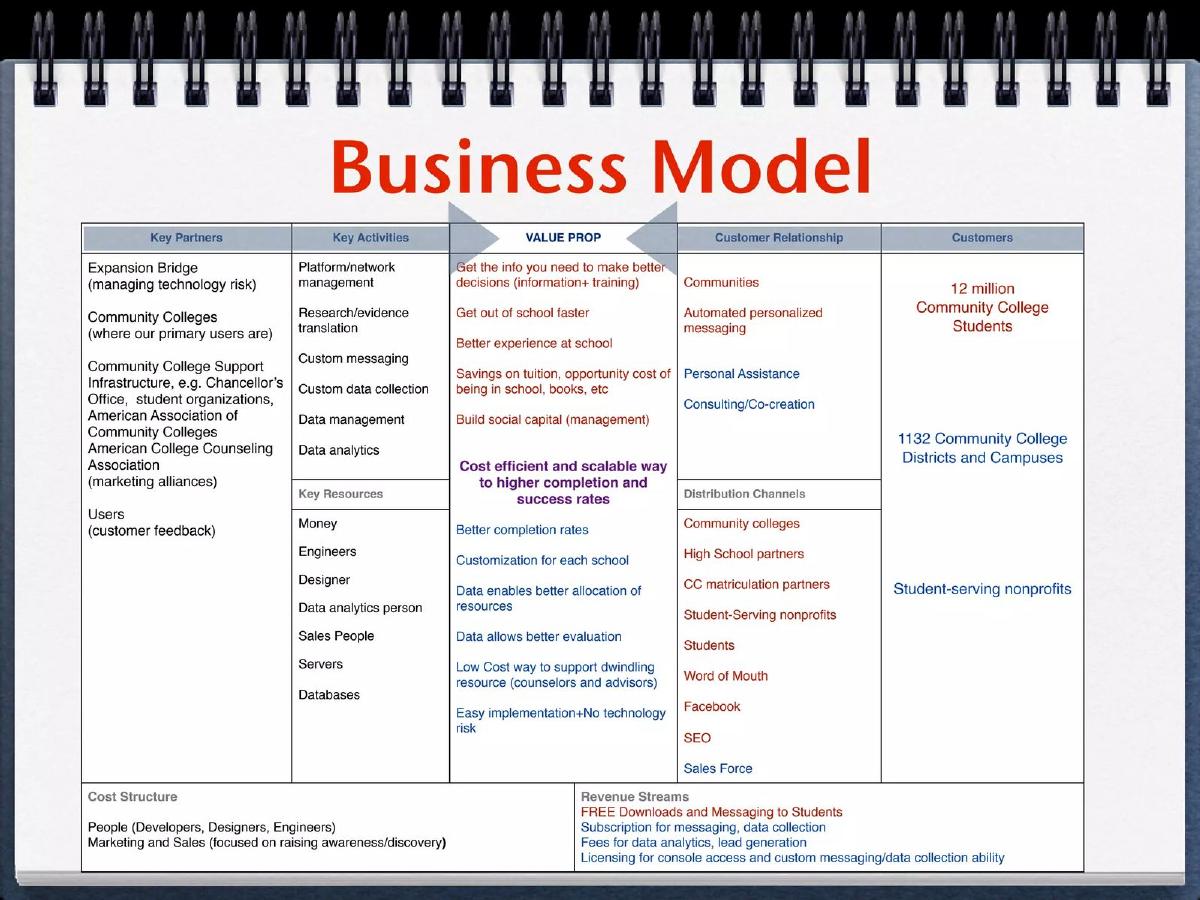
GradGears business model slide — slide 5
Student support platform for community colleges. Business model slide in canvas form.
GradGears deck, slide 5. Exact stored slide matched to this analysis.
Our analysis: The most specific canvas in the set.
Evidence and limitation: Sized customer groups; free and paid separated; partners with reasons; no prices.
What a founder can adapt: Add a price to the revenue box and cut general lines such as "Money" and "Servers".
Supporting analysis
What the deck claims: Customers: "12 million Community College Students", "1132 Community College Districts and Campuses", "Student-serving nonprofits"; Revenue: "FREE Downloads and Messaging to Students", "Subscription for messaging, data collection", "Fees for data analytics, lead generation", "Licensing for console access...".
Presentation choice: Shows how numbers and reasons in a few boxes make a canvas useful.
When it does not fit: Listing revenue streams without saying which earns money today.
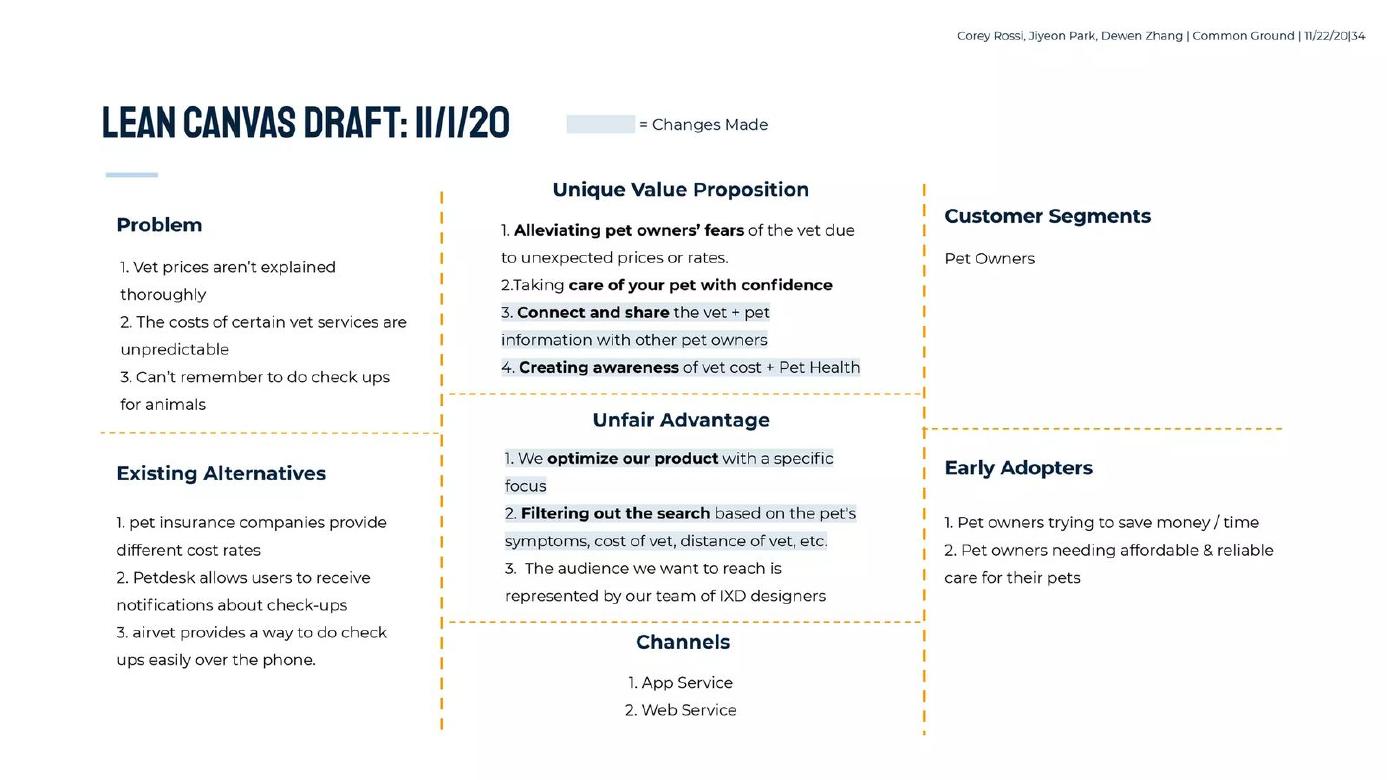
Vet-cost app built in a design course. Lean canvas draft, one of several versions in the deck.
Common Ground deck, slide 36. Exact stored slide matched to this analysis.
Our analysis: The canvas used as a learning record.
Evidence and limitation: Dated version with changes highlighted; named alternatives; weak unfair advantage.
What a founder can adapt: In a fundraising deck, show only the latest version with one line on what changed.
Supporting analysis
What the deck claims: "LEAN CANVAS DRAFT: 11/1/20"; "= Changes Made"; Existing Alternatives: "Petdesk allows users to receive notifications about check-ups", "airvet provides a way to do check ups easily over the phone"; Unfair Advantage: "We optimize our product with a specific focus".
Presentation choice: Highlighting changes shows what the team learned.
When it does not fit: Calling a general intention an unfair advantage.
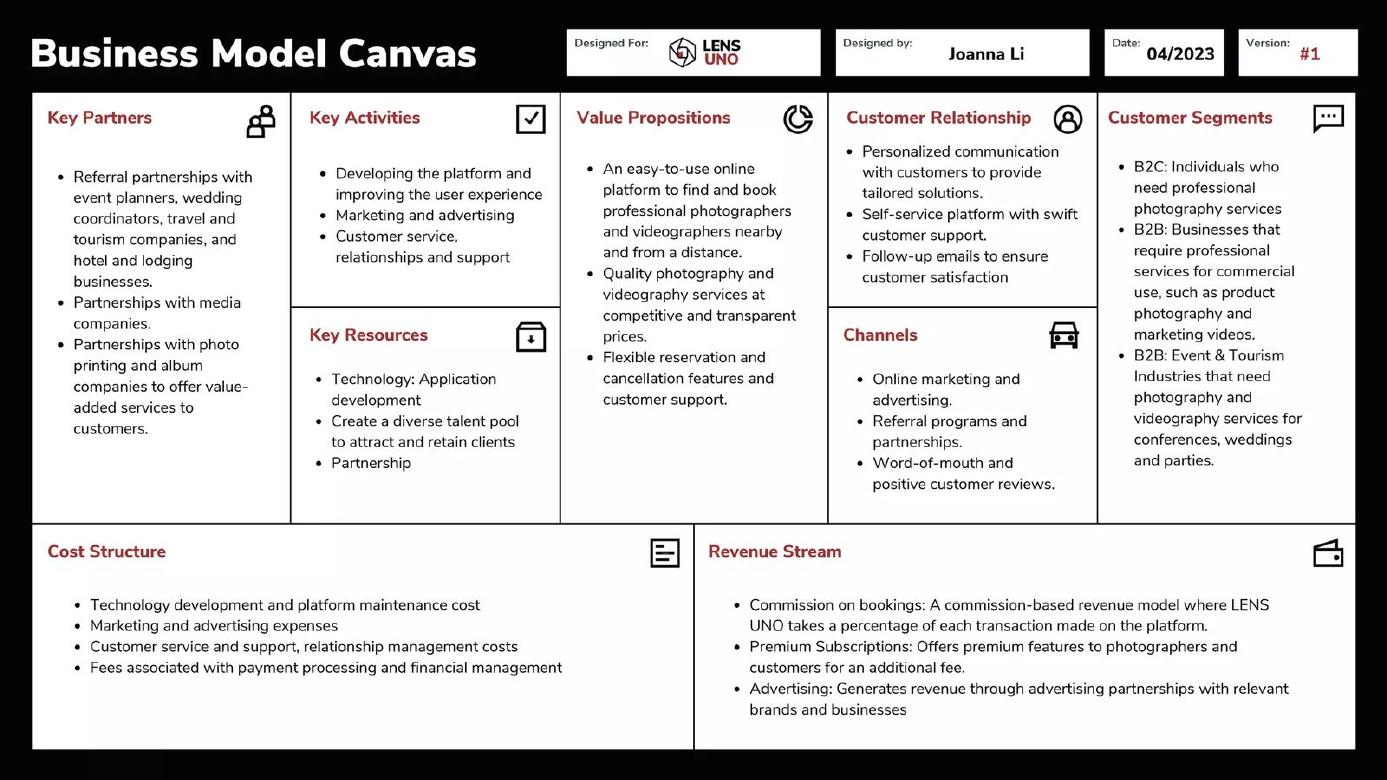
Photographer and videographer booking platform. Business model canvas slide.
Lens Uno deck, slide 10. Exact stored slide matched to this analysis.
Our analysis: Clean layout, little specific content.
Evidence and limitation: Dated and versioned; three revenue models with no rates; most lines general.
What a founder can adapt: Build the slide around the referral partners and the commission rate.
Supporting analysis
What the deck claims: "Date: 04/2023", "Version: #1"; Revenue Stream: "Commission on bookings", "Premium Subscriptions", "Advertising"; Key Partners: "Referral partnerships with event planners, wedding coordinators, travel and tourism companies, and hotel and lodging businesses."
Presentation choice: Shows that a tidy grid is not the same as a clear business model.
When it does not fit: Three revenue models at once with no order or prices.
Location-based marketing for shops. First of two canvas slides (B2B and B2C).
G-Gate deck, slide 5. Exact stored slide matched to this analysis.
Our analysis: A warning: a workshop output pasted into a pitch.
Evidence and limitation: Some specific segments and revenue types; template prompts, credits and project number left in.
What a founder can adapt: Remove prompts and credits, and merge the two canvases into one who-pays slide.
Supporting analysis
What the deck claims: "Business Model Canvas (B2B)"; "DESIGNED FOR: Project 3168, GGate"; "DATE: 17th August 2021"; Customer Segments: "Local shops - looking to do marketing but have zero/limited marketing capability"; footer: "This work is licensed under the Creative Commons Attribution-Share Alike 3.0 Unported License."
Presentation choice: Shows how leftover template text lowers trust in sound content.
When it does not fit: Two full canvases for one company.
Tool for building business model canvases. Slide titled as a problem.
Startupality deck, slide 6. Exact stored slide matched to this analysis.
Our analysis: A warning: a canvas whose purpose and text are both hard to read.
Evidence and limitation: Small sticky notes; unclear whether the canvas is the business model or the product.
What a founder can adapt: Show it as a product screenshot with a caption, or as the business model with a matching title.
Supporting analysis
What the deck claims: "Lack of market awareness"; "The Business Model Canvas", "Designed by Startupality"; sticky notes including "First time entrepreneurs", "Premium users", "Investor subscriptions"; "Validating business model", "Tracking the customer interviews".
Presentation choice: Shows why a canvas needs a clear title and readable boxes.
When it does not fit: A problem title over a business model grid.
Whether each slide gives specific content, prices, a date or version, and a clean, readable layout.
Example
Specific content
Prices
Date or version
Clean and readable
GradGears
Yes, sized customers
No
No
Dense but readable
Common Ground
Alternatives named
No
Yes, changes marked
Yes
Lens Uno
Mostly general
No
Yes
Yes
G-Gate
Some
No
Yes
Template text left in
Startupality
Some, hard to read
No
No
No
Key Takeaways
A canvas is a working tool, not a pitch slide by default.
Replace general phrases with specific facts and numbers.
Say who pays, for what and how much in the revenue box.
Date it and mark what changed or what is still untested.
Remove template prompts and credits before sharing.
Decide whether your canvas belongs in the deck
Answer each prompt before including a canvas.
Who pays. Does the revenue box say who pays, for what and how much?
Customer. Does the customer box name your first group and its size?
Generic lines. Which lines would fit any company, and can you cut them?
Proven. Which boxes are tested with customers, and which are assumptions?
Placement. Does the canvas say more than your one-line business model? If not, move it to the appendix.
Copyable framework: [Customer group, size] pays [price] per [unit] for [what]. [User group] uses it [free/paid]. Tested: [boxes]. Assumed: [boxes]. Version [n], [month year].
Illustrative example 1 — written by us
Before: A nine-box canvas with "Marketing", "Customer support" and three revenue streams, no prices.
After: "Colleges (1,100 campuses) pay $8 per student per year for the analytics console. Students use the app free. Tested: student use, college interest. Assumed: price. Version 3, March 2024."
What improved: Our illustrative rewrite; the price and version are invented for the example. It answers who pays, how much and what is still assumed in one line.
The question this guide answers
Founders ask whether they should put a business model canvas or lean canvas in their pitch deck, and if so how. The business model guides cover how to explain the way a company makes money: who pays, the price, how often. Some of them mention canvas slides in passing, as examples of slides that list categories without prices. None answers the question directly: when a canvas is worth including, how to fill it so an investor learns something, and what to do instead.
The question matters because a canvas is easy to make and looks complete. Every box is filled, so the slide seems to cover the whole business. But an investor looks for a few things on a business model slide: who the customer is, what they pay, and why they will keep paying. A canvas can bury those answers in a grid where they carry the same weight as "Staff training" or "Servers".
How we chose and read the examples
We searched saved slide text in the teardown library for "business model canvas", "lean canvas" and the canvas box names appearing together, and left out mining, resource and listed-company presentations. About twenty slides matched, from roughly a dozen decks. We kept five slides from five decks that show different uses: GradGears (college student support), Common Ground (a vet-cost app built in a design course), Lens Uno (photographer booking), G-Gate (location-based marketing) and Startupality (a tool that helps founders build canvases).
Each slide was rendered from the original deck at full size and read in full. The G-Gate slide's header and footer are in very small print, so we rendered it again at a larger size to read them. Quotes are the slides' own. We did not check any figure against outside sources.
The strongest pattern: specific content in the boxes that matter
GradGears, which built a student support platform for community colleges, titles its slide simply "Business Model" and uses the canvas layout on a notebook-style background. Two boxes stand out. The customers box lists "12 million Community College Students", "1132 Community College Districts and Campuses" and "Student-serving nonprofits". A reader can see at once how large each group is, and which one is the institution that would pay.
The revenue box separates free from paid: "FREE Downloads and Messaging to Students", then "Subscription for messaging, data collection", "Fees for data analytics, lead generation" and "Licensing for console access and custom messaging/data collection ability". The key partners box explains why each partner is there, in brackets: "Expansion Bridge (managing technology risk)", "Community Colleges (where our primary users are)", "Users (customer feedback)".
The slide also uses colour: red text for the student side and blue for the institution side, running across the value proposition, channels, customers and revenue boxes. This is not explained in a legend, but it lets a careful reader follow each group across the grid.
What it still lacks is a price. The revenue box names four ways to charge but no amount, so the reader can't estimate what a college pays. And the grid holds about fifty phrases, including "Money", "Servers" and "Databases" under key resources, which add little. Cutting the weaker boxes to one line each and adding a price would make this a strong business model slide.
A canvas that shows how the model changed
Common Ground's deck comes from a design course; the slide footer names three students and a date. Its slide is titled "LEAN CANVAS DRAFT: 11/1/20", and a small legend reads "= Changes Made", with changed lines highlighted in light blue. The deck contains several such drafts in a row, one for each version.
The lean canvas swaps some of the original boxes for ones closer to an early startup's questions: "Problem", "Existing Alternatives", "Unique Value Proposition", "Unfair Advantage", "Early Adopters". Common Ground's existing alternatives box is specific: "pet insurance companies provide different cost rates", "Petdesk allows users to receive notifications about check-ups", "airvet provides a way to do check ups easily over the phone." Its early adopters box is narrower than its customer box: "Pet owners trying to save money / time" against simply "Pet Owners".
This is the canvas used as it was designed: as a record of what the team believes, revised as it learns. For an investor, the highlighted changes are the most useful part, because they show what the team learned. The weakness is the unfair advantage box. "We optimize our product with a specific focus" and "The audience we want to reach is represented by our team of IXD designers" are not advantages a rival couldn't copy. A course deck can show its working; a fundraising deck should show only the latest version, with one line on what changed and why.
A tidy canvas that says little
Lens Uno, a platform for booking photographers and videographers, shows a clean canvas with a header block: "Designed For: LENS UNO", "Designed by: Joanna Li", "Date: 04/2023", "Version: #1". The date and version number are good habits. They tell the reader how current the thinking is.
The content is less useful. Most lines would fit any online marketplace: "Marketing and advertising", "Customer service, relationships and support", "Technology development and platform maintenance cost". The revenue box lists three models at once: "Commission on bookings", "Premium Subscriptions" and "Advertising", with no commission rate, no subscription price and no sign of which comes first.
The more specific lines are in key partners: "Referral partnerships with event planners, wedding coordinators, travel and tourism companies, and hotel and lodging businesses". That is a real choice about how to find customers. A reader would learn more from a slide built around it, with the commission rate and one partnership that exists today, than from the full grid.
Warning: the template left in
G-Gate's slide is titled "Business Model Canvas (B2B)", and the next slide in the deck is a second canvas for its consumer side. The B2B canvas is a screenshot of an online whiteboard. Its header reads "DESIGNED FOR: Project 3168, GGate", "DESIGNED BY: Goh Hong Hui, Edge" and "DATE: 17th August 2021". Each box still carries the template's small grey prompt questions, and the footer keeps the template credits: "'Business Model Canvas' is a derivative of 'The Business Model Canvas' by https://www.strategyzer.com/canvas/busi..." and "This work is licensed under the Creative Commons Attribution-Share Alike 3.0 Unported License."
The content has some substance: customer segments of "Local shops - looking to do marketing but have zero/limited marketing capability", "Events Organizers" and "Global brands", and revenue from "Marketing advertisement subscription fees", "Transactional fees" and "Platform set up fees". But the leftover prompts and credits, and an internal project number, make the slide read as a workshop output rather than something prepared for an investor.
Two canvases for one company also double the reading. If a business has two sides, one slide showing who pays and who uses, with the price for each, does the job of both grids.
Warning: a canvas no one can read
Startupality sells a tool that helps founders build their canvas and track customer interviews, so a canvas on its slides makes sense. Its slide is titled "Lack of market awareness", shows a canvas covered in coloured sticky notes labelled "Designed by Startupality", and ends with two lines: "Validating business model" and "Tracking the customer interviews".
At presentation size the sticky notes are hard to read, and the slide doesn't say whether the canvas is Startupality's own business model or a picture of what the product does. Read closely, it appears to be Startupality's own: customer segments include "First time entrepreneurs" and "Students with a side project", and revenue streams list "Premium users", "Consulting services" and "Investor subscriptions". The title, though, names a problem, not a business model.
The lesson is to decide what the canvas is for. If it is your product, show it as a product screenshot with a caption. If it is your business model, give it a business model title and make the key boxes large enough to read.
When to include a canvas, and when to leave it out
Include it in the main deck if your business has several parties whose roles are hard to explain in a sentence, such as a platform where students use the product free and colleges pay, and if you can fill the important boxes with specific facts. Even then, consider showing only the boxes that matter: customers, value proposition, channels and revenue.
Move it to the appendix if most boxes contain general phrases, or if the main business model slide already says who pays, what and how often. An investor who wants the full picture can find it there. Several decks in the library do this; Book BB, for instance, places its canvas on page 38.
Leave it out if it only repeats what other slides say. The main business model slide should answer three questions in large type: who pays, how much, and how often. If the canvas can't answer those more clearly than a single sentence, the sentence is the better slide.
How to fill a canvas for investors
Start with the revenue box. Write who pays, for what, and how much: "Colleges pay $X per student per year for the analytics console." If you have more than one revenue stream, put them in order and mark which one earns money today.
Make the customer box specific. Name the first group you sell to and how many there are, as GradGears does. If you have early adopters, say what makes them different from everyone else.
Cut any line that would fit any company. "Marketing", "Customer support", "Servers" and "Engineers" tell an investor nothing. Replace them with the one activity or resource that is hard for others to copy, or leave the box short.
Mark what is proven. Use a legend, as Common Ground does for changes: one colour for what is tested with customers, another for assumptions. That turns the canvas from a list into a picture of what you know.
Clean the template. Remove prompt questions, credits, internal project numbers and sticky-note clutter. Keep the date and version number.
What a canvas cannot show
A canvas lists the parts of a business but doesn't show how well they work. It has no space for growth, retention, margins or how long customers take to pay back what it cost to win them. Those belong on the traction and unit economics slides.
It also gives every box the same weight. In most startups one or two boxes, usually the customer and the channel, decide whether the business works. A canvas can hide that. Saying in the slide title which box is the key question, for example "Our model depends on colleges paying for analytics", restores the emphasis.
Common mistakes
General phrases. Cut lines that would fit any company.
No prices. Say what the payer pays in the revenue box.
Template left in. Remove prompts, credits and project numbers.
Every box equal. Name the key question in the title.
Unreadable size. Show fewer boxes in larger type, or move it to the appendix.
Diagnostic checklist
Revenue box says who pays, what and how much.
Customer box names a sized first group.
No lines that fit any company.
Date, version and proven vs assumed marked.
Template text removed and type readable.
Frequently asked questions
Should I put a business model canvas in my pitch deck?
Only if every box says something specific to you and it explains your model better than one sentence. Otherwise put it in the appendix.
Business model canvas or lean canvas?
The lean canvas suits very early companies because it asks about the problem, alternatives and early adopters. Either way, investors read the content, not the format.
Can I show more than one version?
In a course or update to existing investors, yes, as Common Ground does. In a fundraising deck, show the latest version and one line on what changed.
What should replace the canvas on the main business model slide?
One line on who pays, how much and how often, with the price and the first customer group in large type.
How we chose these examples
Corpus: published pitch deck teardowns on StartupFundraising.com. Founder-uploaded private decks are excluded.
Selection (2026-10-01): we searched extracted slide text for business model canvas, lean canvas and canvas box names, excluded mining, resource and listed-company presentations, and kept five slides from five decks showing different uses.
Review: all five slides were rendered from the source decks at full size on 2026-10-01 and read in full against company, deck and page number; the G-Gate header and footer were also rendered larger (editorial model review, with AI assistance in drafting). No person has yet completed a human review. Figures were not checked against outside sources.