How solution slides change from pre-seed to Series B: from showing what the product does to naming the old way it replaces.
Solution Slides by Stage: Real Pre-Seed to Series B Examples
Eight solution slides from pre-seed, seed, Series A and Series B decks, shown in full. Early slides show what the product does for one user; later slides add what it replaces, a measured result and how it fits the tools a buyer already owns.
TL;DR
At every stage the solution slide should say what the product does for one customer. What changes is what surrounds that. Pre-seed slides show the product working: ChangeforCause shows the round-up screen with "Costco Inc. +$0.20". Seed slides compare the product with the current way: GlobalWonks is "Faster than identifying, contracting, and paying for an external expert". Series A slides add a measured result: Vue Storefront says "Reduce frontend implementation cost by 60%". Series B slides name the incumbent category and the existing stack: Tines opens with what "Traditional SOAR platforms require"; Chili Piper maps each product to the CRM and email tools it plugs into.
Solution slides from pre-seed, seed, Series A and Series B decks
Each example shows the exact stored slide above its analysis and links to the full teardown. Pre-seed first, then seed, Series A and Series B. Claims are as shown on the slides; we have not verified them.
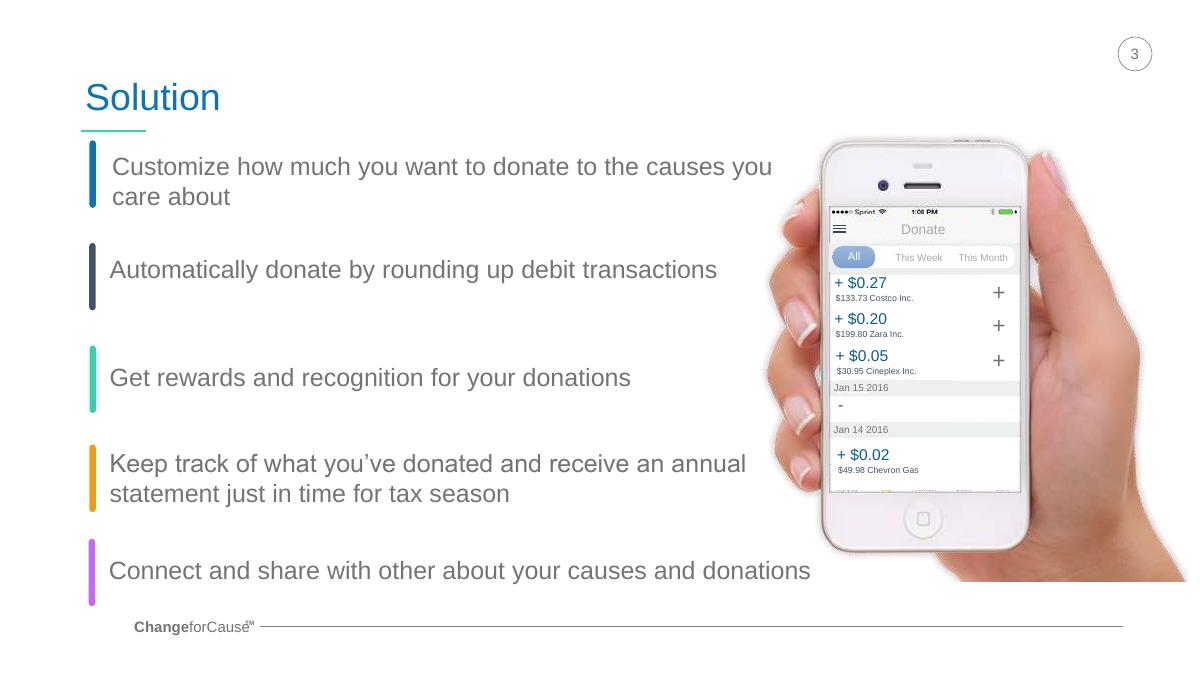
ChangeforCause solution slide — slide 3
Pre-seed. Round-up donations app. Phone screens with captions.
ChangeforCause deck, slide 3. Exact stored slide matched to this analysis.
Our analysis: A clear pre-seed solution: the investor sees exactly what a user does and gets.
Evidence and limitation: Product screens showing the round-up in action; no figures.
What a founder can adapt: Show one screen of the product doing its main job, with a caption per step.
Supporting analysis
What the deck claims: "Customize how much you want to donate to the causes you care about." "Automatically donate by rounding up debit transactions", with a screen showing "Costco Inc. +$0.20" and "Zara Inc. + $0.05". "Keep track of what you've donated and receive an annual statement just in time for tax season." "Get rewards and recognition for your donations."
Presentation choice: Real-looking transactions make the mechanism obvious in seconds.
When it does not fit: Four benefits compete; lead with the round-up and cut the rest to one line.
Meta Innovations deck, slide 3. Exact stored slide matched to this analysis.
Our analysis: The weak example in this set: it explains how the system works, not what changes for the user.
Evidence and limitation: A description of the technology; no user, outcome or figure.
What a founder can adapt: Turn each technical bullet into what a named user can now do.
Supporting analysis
What the deck claims: "Bluetooth Low Energy end-point that communicates securely to the application on a smartphone." "This is cloud based and can be controlled via a dedicated gateway." "Meta App operating these devices can control third party devices that conform to industry standards and open interfaces." "App capabilities that perform data analytics."
Presentation choice: Included as a contrast; compare it with ChangeforCause on the same stage.
When it does not fit: Leading with protocols; investors need the user and the outcome first.
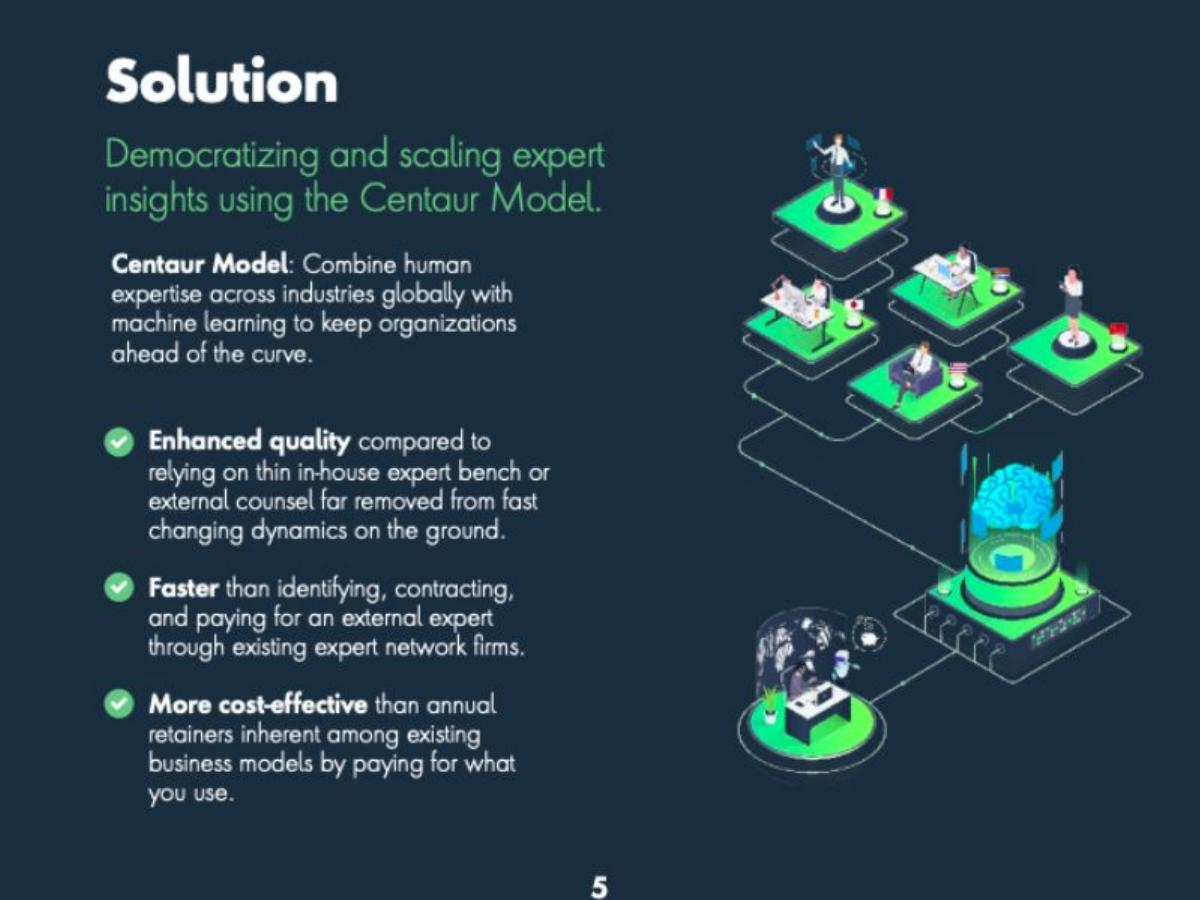
Seed. Expert insight network. Model statement plus three comparisons.
GlobalWonks deck, slide 5. Exact stored slide matched to this analysis.
Our analysis: The seed step up: each benefit is stated against how customers buy expertise today.
Evidence and limitation: Three comparisons with named current options; no figures.
What a founder can adapt: Write each benefit as "better than [current option] because [reason]".
Supporting analysis
What the deck claims: "Democratizing and scaling expert insights using the Centaur Model." "Combine human expertise across industries globally with machine learning." "Enhanced quality compared to relying on thin inhouse expert bench or external counsel." "Faster than identifying, contracting, and paying for an external expert through existing expert network firms." "More cost-effective than annual retainers... by paying for what you use."
Presentation choice: Quality, speed and cost are each tied to a specific alternative, which makes them checkable.
When it does not fit: "Faster" and "more cost-effective" need one number each at seed.
Seed. AI action camera and app. Hardware and app shown side by side.
Revl deck, slide 4. Exact stored slide matched to this analysis.
Our analysis: Links hardware to a user outcome: finished videos without editing.
Evidence and limitation: Product claims and a specific capability (six sensors); no comparison figures.
What a founder can adapt: End your solution with the step the customer no longer has to do.
Supporting analysis
What the deck claims: "Solution: AI Assisted Camera and App." "We've created the most stable action camera with both physical and electronic stabilization combined." "The 6 on board sensors including GPS and accelerometer record all of your motion in 3D space along with the video." "Our app uses your 3D motion data and combines it with our emotion recognition technology to find your most exciting moments and create amazing videos for you instantly, without a computer."
Presentation choice: "Without a computer" names the old way (editing footage) the product removes.
When it does not fit: "Most stable" is a superlative with no test or source on the slide.
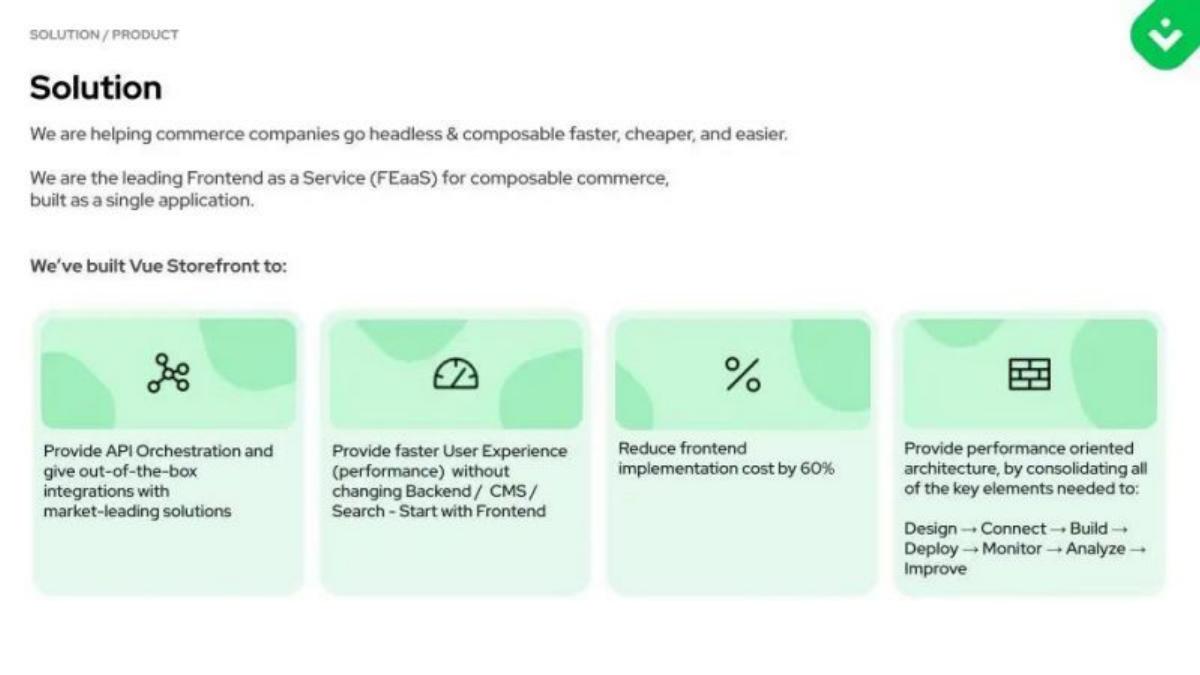
Series A. Frontend platform for commerce. One-line position plus four tiles.
Vue Storefront deck, slide 6. Exact stored slide matched to this analysis.
Our analysis: The Series A move: a named category and one measured result.
Evidence and limitation: One cost figure (60%) and a category claim.
What a founder can adapt: Add the one result customers measure, and say what they don't have to replace.
Supporting analysis
What the deck claims: "We are helping commerce companies go headless & composable faster, cheaper, and easier." "We are the leading Frontend as a Service (FEaaS) for composable commerce, built as a single application." Tiles: "Provide API Orchestration and give out-of-the-box integrations with market-leading solutions", "Provide faster User Experience (performance) without changing Backend / CMS / Search - Start with Frontend", "Reduce frontend implementation cost by 60%", and "Design → Connect → Build → Deploy → Monitor → Analyze → Improve".
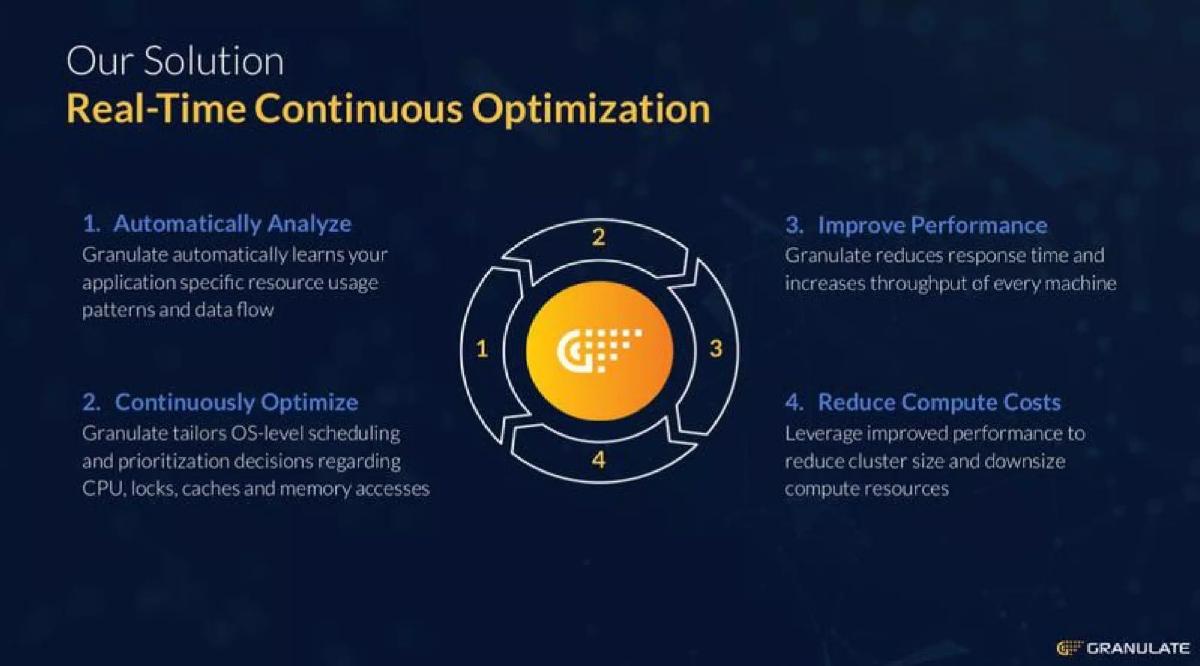
Series A. Real-time server optimisation. Four numbered steps.
Granulate deck, slide 6. Exact stored slide matched to this analysis.
Our analysis: Shows how the product produces the saving, step by step.
Evidence and limitation: A four-step chain from analysis to lower cost; no figures.
What a founder can adapt: Lay out the steps from what the product does to the money it saves.
Supporting analysis
What the deck claims: "Our Solution: Real-Time Continuous Optimization." "1. Automatically Analyze: Granulate automatically learns your application specific resource usage patterns and data flow." "2. Continuously Optimize." "3. Improve Performance: Granulate reduces response time and increases throughput of every machine." "4. Reduce Compute Costs: Leverage improved performance to reduce cluster size and downsize compute resources."
Presentation choice: Ending on "Reduce Compute Costs" ties a technical product to a budget line.
When it does not fit: At Series A, put a typical percentage on step 3 or 4.
Series B. Security automation. Incumbent statement plus three cards.
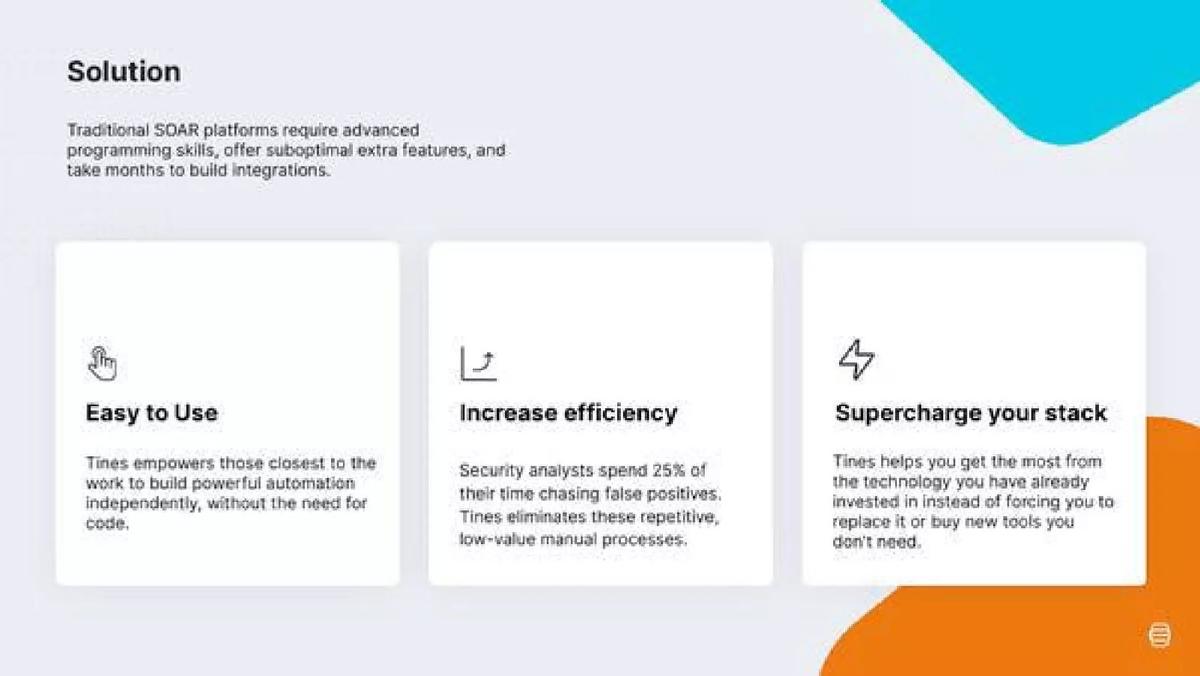
Tines deck, slide 5. Exact stored slide matched to this analysis.
Our analysis: Growth-stage framing: positions the product against the category buyers already know.
Evidence and limitation: A named incumbent category and one figure on analysts' time.
What a founder can adapt: Open with what the incumbent category requires, then answer each point.
Supporting analysis
What the deck claims: "Traditional SOAR platforms require advanced programming skills, offer suboptimal extra features, and take months to build integrations." "Easy to Use: Tines empowers those closest to the work to build powerful automation independently, without the need for code." "Increase efficiency: Security analysts spend 25% of their time chasing false positives. Tines eliminates these repetitive, low-value manual processes." "Supercharge your stack: ...instead of forcing you to replace it or buy new tools you don't need."
Presentation choice: Naming SOAR tells investors which budget Tines takes and why buyers switch.
When it does not fit: The 25% figure has no source on the slide.
Series B. Meeting scheduling for sales teams. Workflow, two products, integrations.
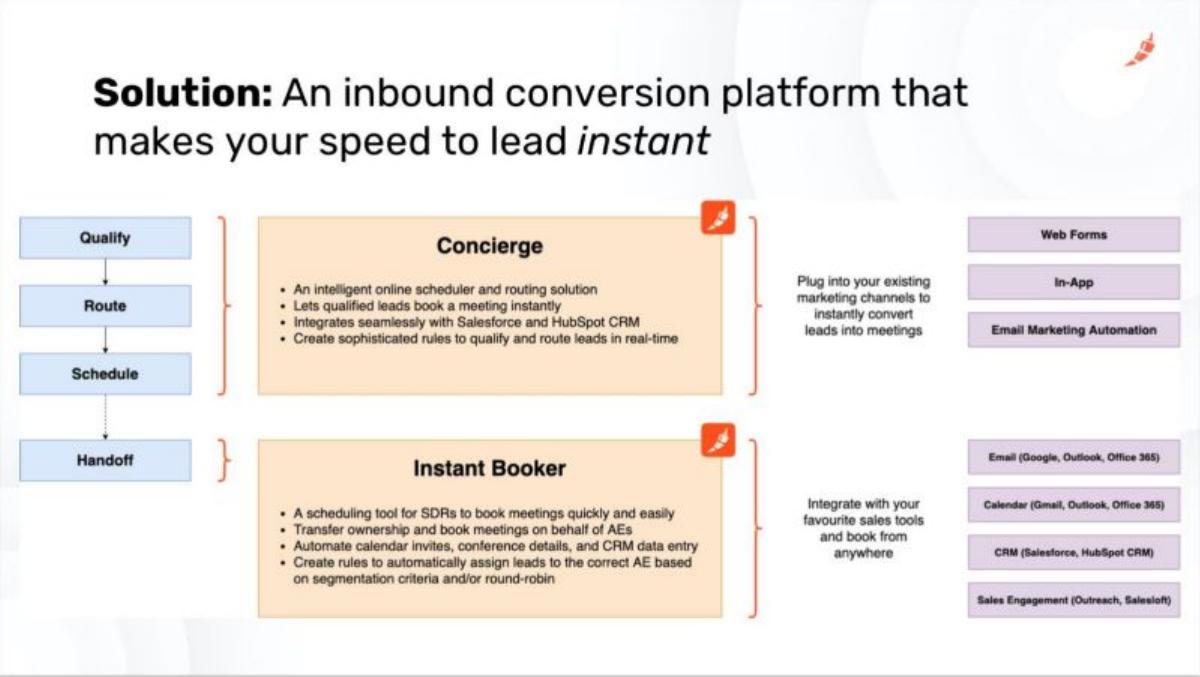
Chili Piper deck, slide 6. Exact stored slide matched to this analysis.
Our analysis: Shows a multi-product platform and exactly where it sits in the buyer's stack.
Evidence and limitation: Two products mapped to workflow steps and named integrations; no figures.
What a founder can adapt: Map each product to the step it covers and the tools it connects to.
Supporting analysis
What the deck claims: "Solution: An inbound conversion platform that makes your speed to lead instant." Workflow "Qualify → Route → Schedule → Handoff". "Concierge": "Lets qualified leads book a meeting instantly", "Integrates seamlessly with Salesforce and HubSpot CRM". "Instant Booker": "A scheduling tool for SDRs to book meetings quickly and easily". Integrations: Web Forms, In-App, Email, Calendar, CRM, "Sales Engagement (Outreach, Salesloft)".
Presentation choice: Named integrations answer "will it work with our tools?" before it is asked.
When it does not fit: Dense for one slide; at Series B one result (e.g. speed to lead) would carry more weight.
Stage, what the slide compares the product with, the evidence on the slide, and whether it includes a figure.
Example
Stage
Compared with
Evidence
Figure
ChangeforCause
Pre-seed
Nothing (product shown)
Product screens
No
Meta Innovations
Pre-seed
Nothing (technology listed)
Technical bullets
No
GlobalWonks
Seed
In-house experts, expert networks, retainers
Three comparisons
No
Revl
Seed
Editing footage on a computer
Capability claims
No
Vue Storefront
Series A
Rebuilding the backend
Cost result
Yes (60%)
Granulate
Series A
Larger clusters
Four-step chain
No
Tines
Series B
Traditional SOAR platforms
Analyst time
Yes (25%)
Chili Piper
Series B
Existing sales tools (integrates)
Workflow + integrations
No
Key Takeaways
Say what the product does for one customer, at any stage.
Pre-seed: show the product working, not a feature list.
Seed: compare it with how customers do the job today.
Series A: add one measured result.
Series B: name the category you replace and the tools you fit into.
Build your solution slide for your stage
Start with what the customer can now do, then add the comparison your stage allows.
Customer. Who uses it, in one noun (donors, analysts, sales teams).
Now can. What they can do with the product that they couldn't before.
Instead of. The current way or product category it replaces.
Evidence. Pre-seed: a product screen. Seed: a comparison. Series A+: a measured result and the tools it fits into.
Copyable framework: [Product] lets [customer] [outcome] instead of [current way]. [Evidence for your stage].
Illustrative example 1 — written by us
Before: Bluetooth Low Energy end-point that communicates securely to the application on a smartphone.
After: Homeowners control every compatible device from one phone app, instead of a separate app per device. [Add your figure, e.g. devices supported or setup time].
What improved: Our illustrative rewrite; not Meta Innovations' wording. It names the user and the old way, and leaves a marked place for a real figure.
What this guide adds
The library already covers solution slides in general and by industry. This guide compares them across funding stages, following the stage guides for problem, traction and competition slides.
Stage labels come from the stage recorded for each published teardown, all high confidence: two pre-seed, two seed, two Series A, two Series B. None of these eight decks appears in another guide.
What changes with stage, and what doesn't
Every good example here says who the product is for (donors, organisations needing experts, commerce companies, security analysts, sales teams). That doesn't change with stage.
The comparison point does. Pre-seed decks describe the product itself (ChangeforCause, Meta Innovations). Seed decks compare it with today's way of doing the job (GlobalWonks, Revl). Series A decks put a number on the result (Vue Storefront) or show the steps that produce it (Granulate). Series B decks name the incumbent category (Tines) and show fit with the buyer's existing tools (Chili Piper).
Technology alone isn't a solution. Meta Innovations lists Bluetooth, cloud and gateway but never says what a user can now do; that is the most common gap in this set.
Common mistakes
Technology instead of outcome. Say what the user can now do.
No comparison. Name the current way you replace.
Unsupported superlatives. "Most stable" or "leading" needs a test or source.
Too many features. Lead with the one that solves the problem slide's pain.
Ignoring the buyer's stack. After Series A, say what it works with and what it doesn't replace.
Diagnostic checklist
One named customer.
What they can now do.
What it replaces.
Evidence that fits your stage.
Sources for any figures.
Frequently asked questions
How we chose these examples
Corpus: published pitch deck teardowns on StartupFundraising.com. Founder-uploaded private decks are excluded.
Selection (2026-09-25): we took teardowns whose recorded stage is pre-seed, seed, Series A or Series B with high confidence, found slides whose text begins with Solution (about 163 seed, 69 Series A, 36 pre-seed and 26 Series B decks qualified), excluded any deck already used in another guide, and kept only slides with a stored image. From the remaining candidates we chose two per stage with readable, specific content, including one deliberately weak pre-seed example for contrast.
Stage is the round recorded for each teardown, not a judgment about the company today.
Review: stored slide images and extracted text were checked on 2026-09-25 and matched to company, deck and slide number (editorial model review). No person has yet completed an editorial review of this page.
Claims are as shown on the slides; we have not verified them. We make no claim that any slide caused a fundraising outcome.