How HR tech and recruiting startups present the solution in a pitch deck: show what the HR team stops doing.
HR Tech Solution Slide: Real Pitch Deck Examples
Eight solution slides from HR tech and recruiting startups, shown in full, compare how each shows the work the HR team no longer does, how the product fits beside the HR system the company already has, and whether a real product screen is shown.
TL;DR
An HR tech solution slide should show three things: the work the HR team or manager stops doing, where the product sits next to the HR system and providers the company already uses, and a real product screen. Disclo lays out four steps (collect, verify, manage, get insights) and says it integrates with the company's HR system while keeping medical details away from the employer. Omnipresent says its platform "sits between employers, employees and local payroll providers" and does not require human interaction. Factorial maps every feature into four areas on one page. Claire lists three buzzword columns (coaching, recruiting, artificial intelligence) with no screen and no workflow, which is the weaker pattern.
HR tech solution slides from real pitch decks
Each example shows the exact stored slide above its analysis and links to the full teardown. Claims are as shown on the slides; we have not verified them.
Disclo solution slide — slide 4
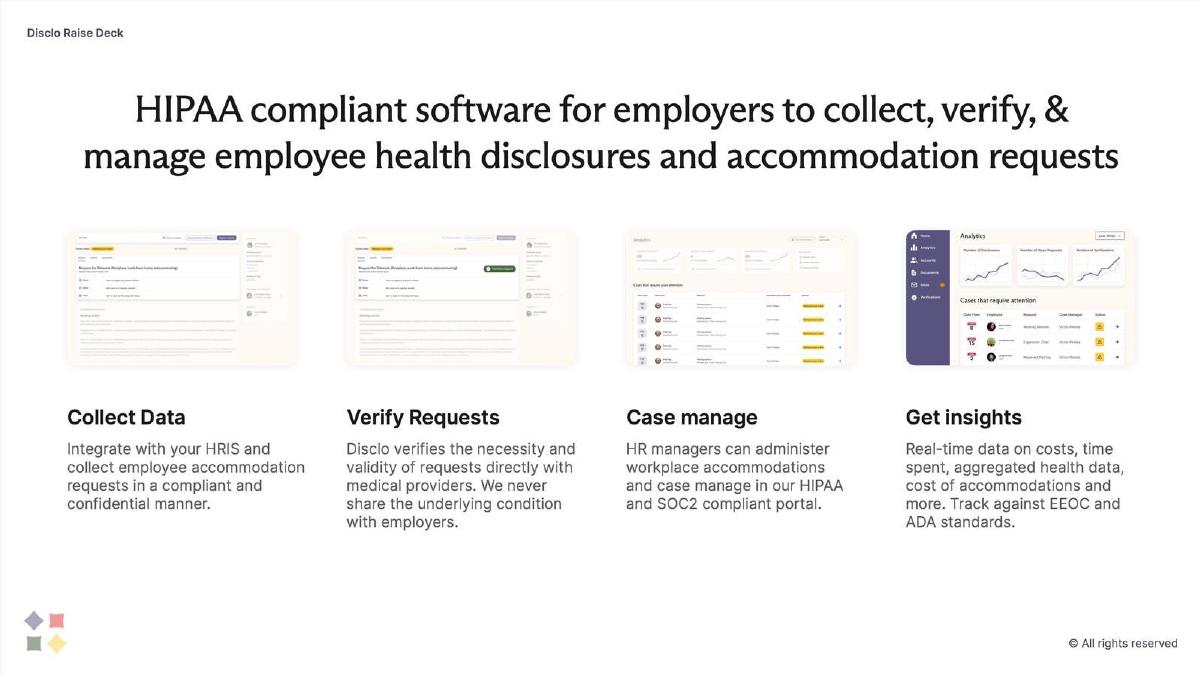
Software for employee health disclosures and accommodation requests. Four steps, each with a product screen.
Disclo deck, slide 4. Exact stored slide matched to this analysis.
Our analysis: Each step answers a point from its problem slide: medical data cannot sit in the HR system, so Disclo holds it and the employer never sees the condition.
Evidence and limitation: Product screens; no figures.
What a founder can adapt: Lay out the steps in order, and say how you connect to the HR system and what data you keep away from it.
Supporting analysis
What the deck claims: "HIPAA compliant software for employers to collect, verify, & manage employee health disclosures and accommodation requests." "Collect Data: Integrate with your HRIS and collect employee accommodation requests in a compliant and confidential manner." "Verify Requests: Disclo verifies the necessity and validity of requests directly with healthcare providers. We never share the underlying condition with employers." "Case manage." "Get insights: Real-time data on costs, time spent, aggregated health data, cost of accommodations and more."
Presentation choice: "Integrate with your HRIS" and "we never share the underlying condition" answer the two questions an HR buyer and a lawyer would ask.
When it does not fit: The screens are too small to read; enlarge one and let the others go.
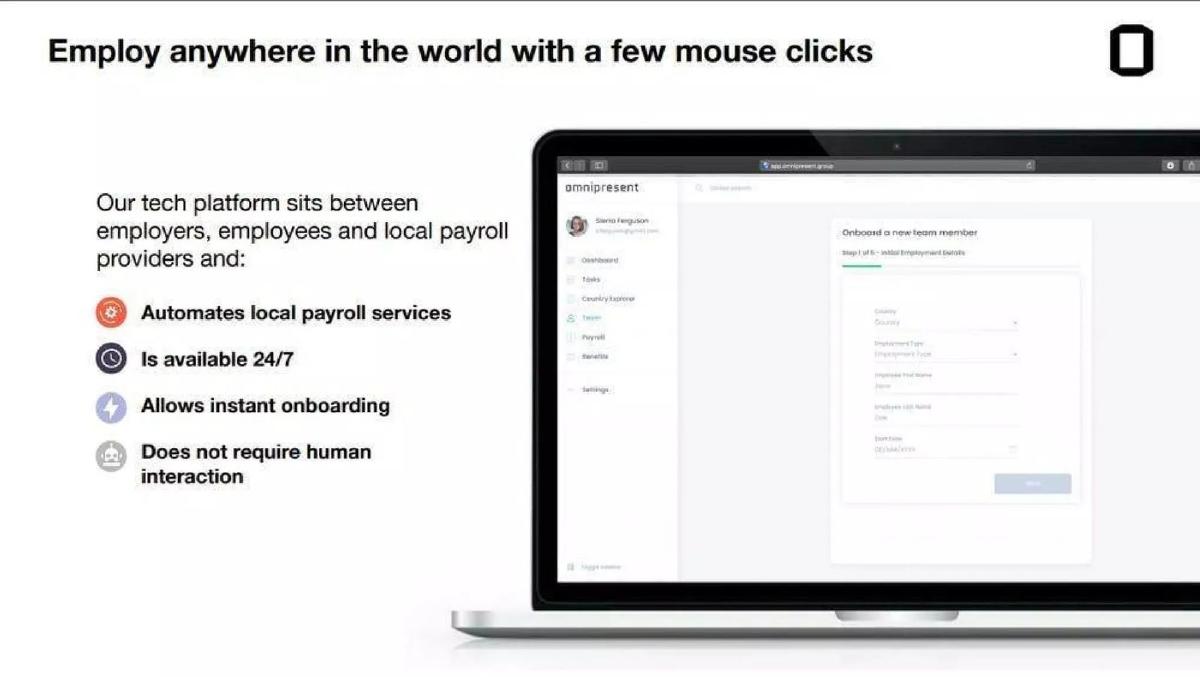
Global employment for remote teams. One headline, four benefits, one product screen.
Omnipresent deck, slide 4. Exact stored slide matched to this analysis.
Our analysis: Its problem slide listed five local providers a company needed; this slide says the platform sits between the company and those providers.
Evidence and limitation: A product screen showing an onboarding step.
What a founder can adapt: Say in one sentence what you sit between, and what the customer no longer has to set up.
Supporting analysis
What the deck claims: "Employ anywhere in the world with a few mouse clicks." "Our tech platform sits between employers, employees and local payroll providers and: Automates local payroll services, Is available 24/7, Allows instant onboarding, Does not require human interaction."
Presentation choice: "Sits between" tells investors exactly where the product fits and who it replaces.
When it does not fit: "A few mouse clicks" invites the question of how long it really takes; give the typical days to onboard.
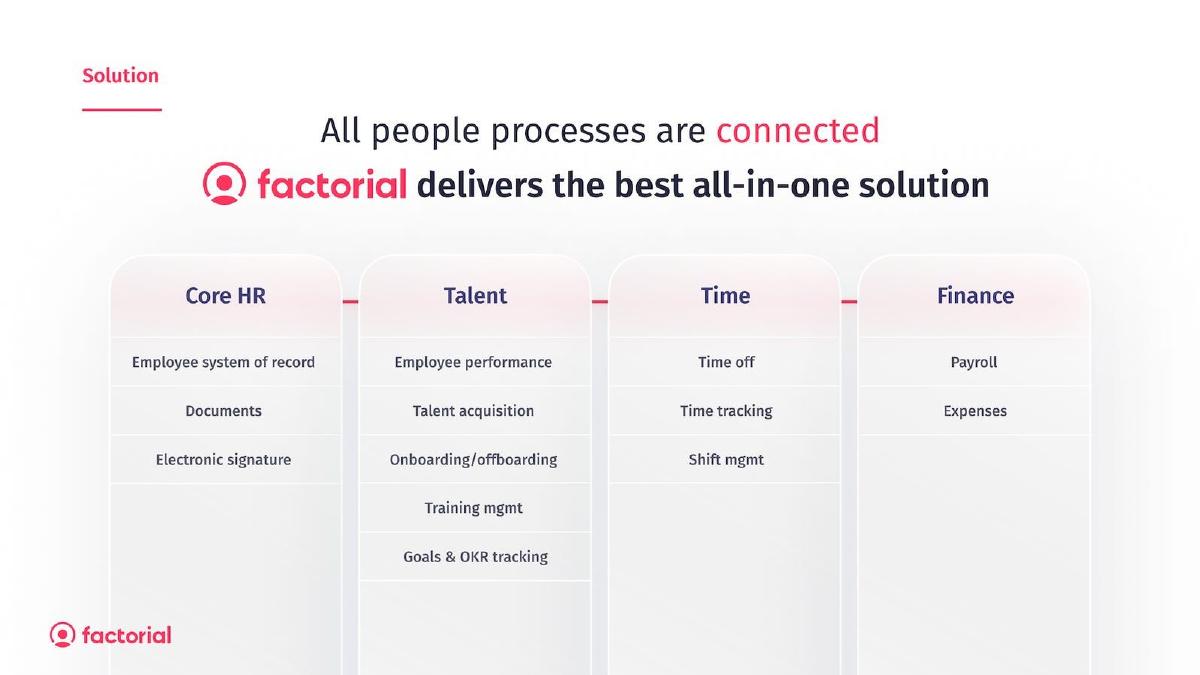
All-in-one HR software for small businesses. Every feature grouped into four connected areas.
Factorial deck, slide 6. Exact stored slide matched to this analysis.
Our analysis: Its problem slide said small businesses use spreadsheets and bookkeepers; this slide shows one product replacing all of them.
Evidence and limitation: No screens or figures.
What a founder can adapt: If you are all-in-one, group features by the team or process they serve.
Supporting analysis
What the deck claims: "All people processes are connected." "Factorial delivers the best all-in-one solution." Core HR (employee system of record, documents, electronic signature), Talent (performance, acquisition, onboarding/offboarding, training, goals & OKR tracking), Time (time off, time tracking, shift management), Finance (payroll, expenses).
Presentation choice: Grouping features into four areas makes a broad product readable in seconds.
When it does not fit: Add one screen and say which area customers start with; "best" is a claim, not a feature.
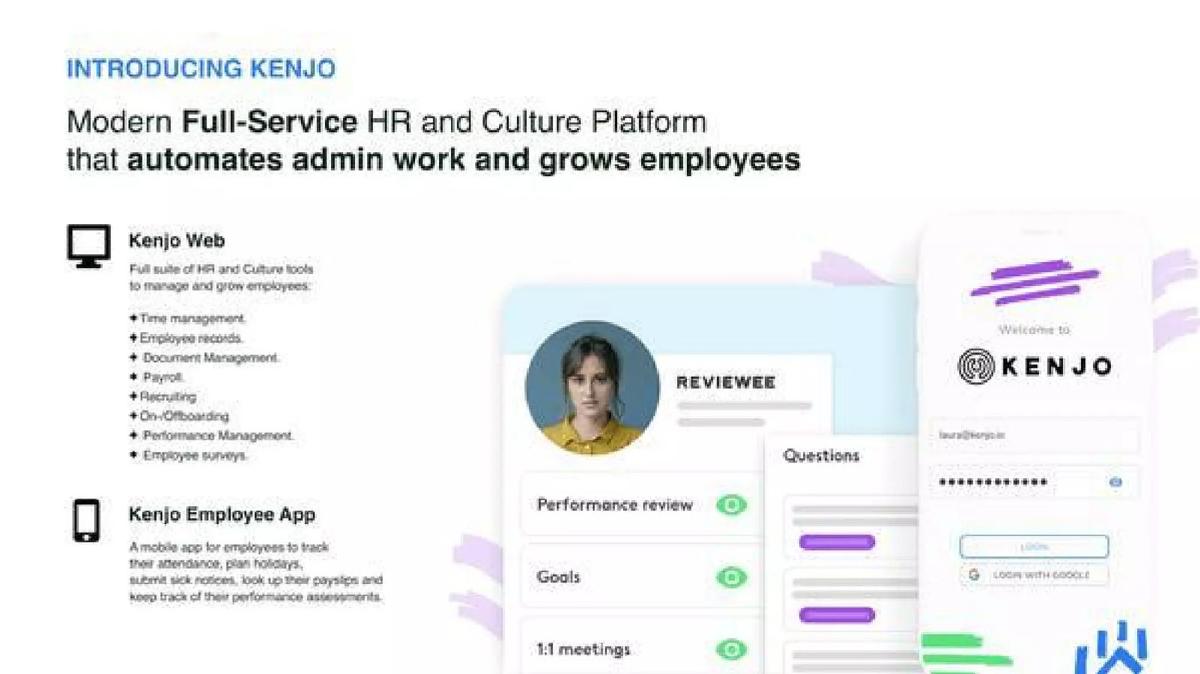
HR and culture software for mid-sized companies. The web product for HR and the app for employees, side by side.
Kenjo deck, slide 5. Exact stored slide matched to this analysis.
Our analysis: Its problem slide showed screenshots of dated HR software; this slide answers with modern screens.
Evidence and limitation: Screens of both products.
What a founder can adapt: Show the admin view and the employee view separately if both exist.
Supporting analysis
What the deck claims: "Introducing Kenjo: Modern Full-Service HR and Culture Platform that automates admin work and grows employees." "Kenjo Web: Full suite of HR and Culture tools to manage and grow employees" (time management, employee records, document management, payroll, recruiting, on/offboarding, performance management, employee surveys). "Kenjo Employee App: A mobile app for employees to track their attendance, plan holidays, submit sick notices, look up their payslips and keep track of their performance assessments."
Presentation choice: It separates what the HR team uses from what employees use, which is how HR software is actually rolled out.
When it does not fit: Pick the one admin task that saves the most time and show it, instead of listing eight modules.
Work-sample hiring. Three steps from assignment to shortlist, with a one-line tagline.
TalentAccurate deck, slide 4. Exact stored slide matched to this analysis.
Our analysis: It shows the hiring process it replaces (screening résumés) with a clear sequence and an output: 2–5 candidates.
Evidence and limitation: No screens or figures.
What a founder can adapt: End your sequence with what the buyer gets, in their units: candidates, hours or cases.
Supporting analysis
What the deck claims: "The Solution." "Real Time Assignments: 10% Day-to-day work." "Project Validation: Algorithms, Experts." "Monthly Prediction: Predict 2-5 candidates." "Demo is the new Resume."
Presentation choice: Ending on a concrete output (a shortlist of 2–5) tells the hiring manager what they receive.
When it does not fit: Add a screen of a real assignment; "algorithms, experts" is vague.
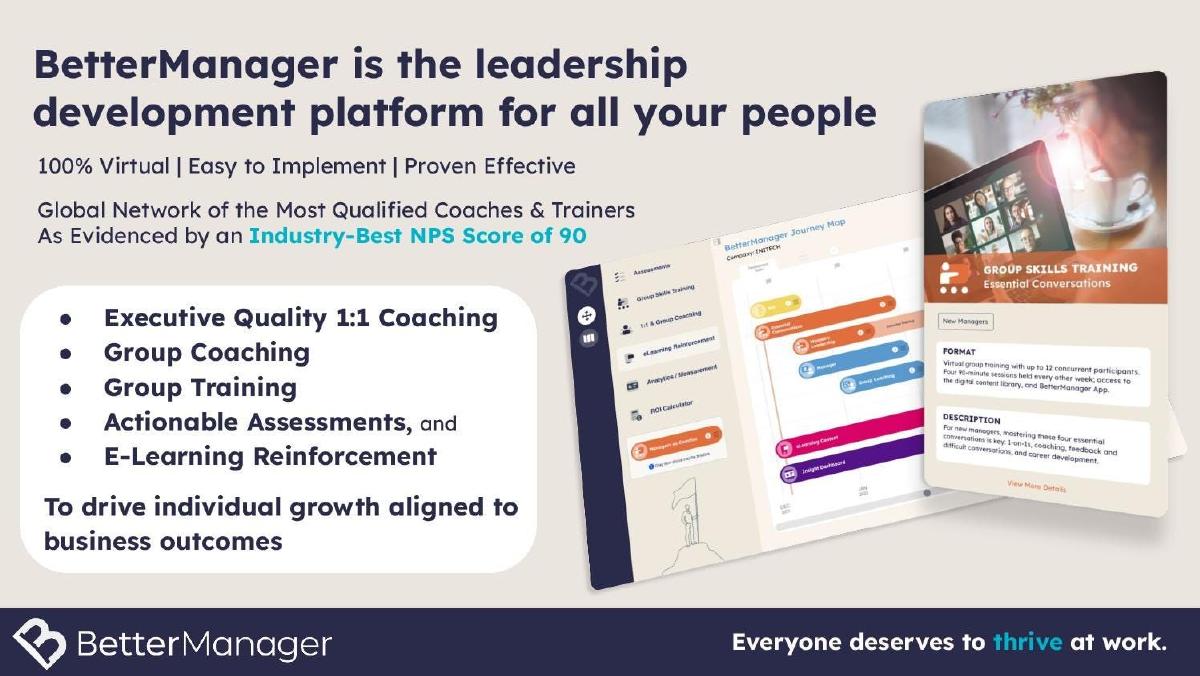
Leadership development. A partial example: a service list with one proof point, but no workflow.
BetterManager deck, slide 5. Exact stored slide matched to this analysis.
Our analysis: It gives one number buyers can check, but reads as a list of services rather than what changes for the HR team.
Evidence and limitation: An NPS score of 90, not sourced.
What a founder can adapt: Keep the proof point, and show what a manager does in week one.
Supporting analysis
What the deck claims: "BetterManager is the leadership development platform for all your people." "100% Virtual | Easy to Implement | Proven Effective." "Global Network of the Most Qualified Coaches & Trainers As Evidenced by an Industry-Best NPS Score of 90." "Executive Quality 1:1 Coaching, Group Coaching, Group Training, Actionable Assessments, and E-Learning Reinforcement."
Presentation choice: It shows how a proof point helps and how a service list without a workflow does not.
When it does not fit: "Proven effective" and "easy to implement" need evidence or should go.
AI recruiting and coaching. A weaker example, included on purpose: three columns of buzzwords and an acronym.
Claire deck, slide 3. Exact stored slide matched to this analysis.
Our analysis: Its problem slide gave an employer cost per opening; this slide never says how that cost falls or who uses the product.
Evidence and limitation: No screens or figures.
What a founder can adapt: Pick one side (the employer), show the step Claire removes, and state the saving against the problem slide's cost.
Supporting analysis
What the deck claims: "Recruitment & Coaching platform using A.I." "Coaching: Practice people skills with a machine - Democratize speech and career coaching." "Recruiting: Machine learning + Big data. Eliminate preliminary recruiting, Save time & money." "Artificial Intelligence: Accelerate AI development. Help machines understand humans." "Coaching and Learning with Artificial Intelligence, for Recruitment and Employment."
Presentation choice: It shows the minimum an HR solution slide needs: a user, a workflow and a screen.
When it does not fit: Don't spell out an acronym as your solution; it takes space and says nothing.
Whether each slide shows the work that stops, where the product fits beside existing systems, and a real product screen.
Example
Work that stops
Fits beside existing systems
Real screen
Disclo
Yes (verification, storage)
Yes (integrates with HRIS)
Yes (small)
Omnipresent
Yes (local entities, payroll)
Yes (sits between providers)
Yes
Factorial
Partly (replaces spreadsheets)
No
No
Kenjo
Partly (admin work)
No
Yes (web and app)
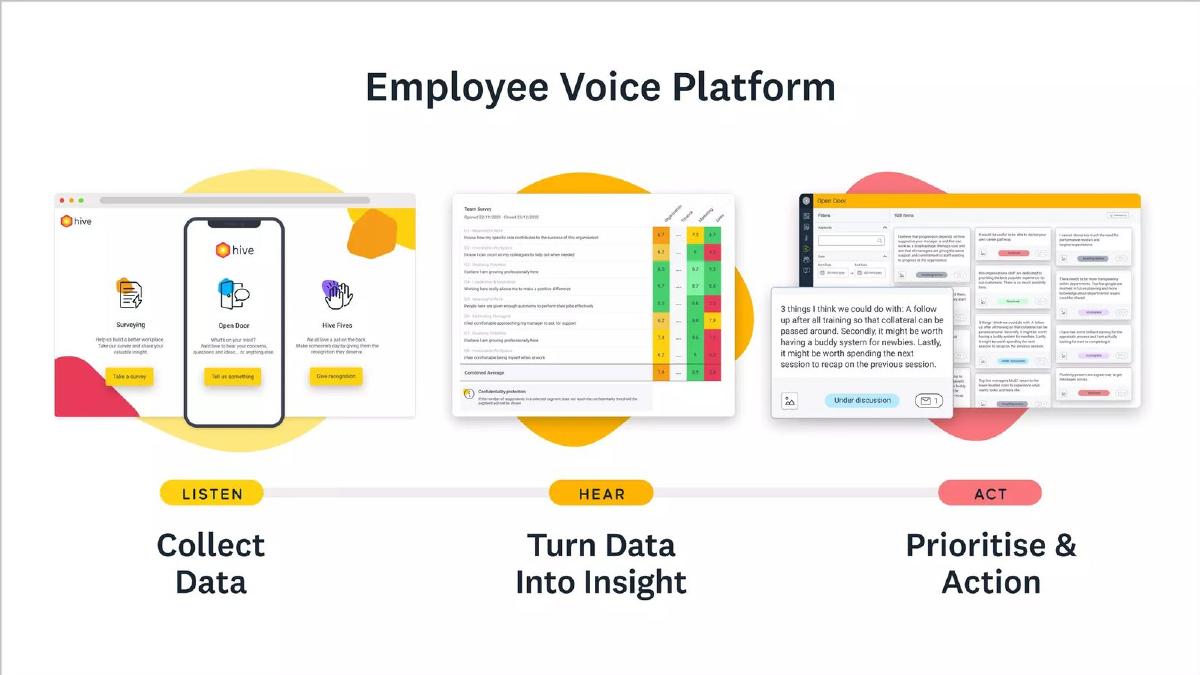
Hive
Partly
No
Yes
TalentAccurate
Yes (résumé screening)
No
No
BetterManager
No
No
Partly
Claire
No
No
No
Key Takeaways
Answer the problem slide directly: the workaround you named there should disappear here.
Show what the HR team or manager stops doing, in order, not a feature list.
Say where you sit next to the existing HR system, payroll or providers; HR buyers ask this first.
Show one real product screen with readable labels.
If employees use it too, show the employee view separately from the admin view.
Build your HR tech solution slide
One workflow, one integration answer, one screen.
Work that stops. Which step from your problem slide does the HR team or manager no longer do?
Where it fits. What does it connect to or sit beside (HR system, payroll, applicant tracking, providers)?
Screen. Which one screen best shows that step being done, and is it readable on a laptop?
Who uses it. HR admin, manager or employee? If more than one, which view do you show?
Copyable framework: [Buyer] no longer [manual step]: [product] [connects to / sits beside] [existing system] and [does the step], so [outcome in the problem slide's units].
Illustrative example 1 — written by us
Before: An AI-powered all-in-one people platform that transforms the employee experience.
After: HR managers no longer chase accommodation paperwork: the product connects to the existing HR system, verifies requests with doctors, and cuts each case from about 4 hours to under 1.
What improved: Our illustrative rewrite; the figures are invented for the example. It names the buyer, the step that stops, the integration and the saving.
What this guide adds
The general solution slide guide covers any business, and the B2B SaaS solution guide covers business software broadly. HR buyers ask a question most software buyers do not: how does this fit with the HR system, payroll provider and policies we already have? Strong HR solution slides answer that on the slide.
This guide follows on from the HR tech problem slide guide. Disclo, Omnipresent, Factorial, Kenjo and Claire appear in both, so you can see how each deck moves from its problem to its solution.
Three things an HR solution slide proves
What stops: the manual step the buyer no longer does (Disclo's verification, Omnipresent's local entities, Kenjo's admin work).
Where it fits: next to the HR system, payroll or providers already in place (Disclo, Omnipresent, Factorial).
Proof it exists: a readable product screen (Disclo, Omnipresent, Kenjo, Hive).
Common mistakes
Feature list instead of a workflow. Eight modules say what exists, not what changes for HR.
Ignoring the HR system. Say how you connect to what the company already uses.
No screen. HR buyers have seen many diagrams; show the product.
Buzzwords. "AI-powered" and "democratize" describe nothing a buyer can picture.
Disconnected from the problem. The cost on your problem slide should visibly fall here.
Diagnostic checklist
The step the buyer stops doing is shown.
It says what existing system the product fits beside.
One readable product screen is shown.
The user (HR, manager or employee) is clear.
It answers the problem slide directly.
Frequently asked questions
How we chose these examples
Corpus: published pitch deck teardowns on StartupFundraising.com. Founder-uploaded private decks are excluded.
Selection (2026-09-25): we searched extracted text of slides 2–7 in decks whose recorded sector is HR, recruiting, talent, workforce, staffing or payroll, and read slides 3–7 of the decks in the HR problem guide. Fourteen stored images were inspected. Flux's product slide was set aside because the image footer reads "Proprietary and confidential". Cleary's solution slide has no stored image. CareerApp, iMocha and Noqx were set aside as weaker than those chosen. Claire is kept as a weaker contrast.
Overlap check: none of these eight slides appears in another guide. Disclo, Omnipresent, Factorial, Kenjo and Claire appear in the HR problem guide with different slides.
Review: all eight stored slide images were inspected on 2026-09-25 and matched to company, deck and slide number (editorial model review). No person has yet completed an editorial review of this page.
Claims are as shown on the slides; we have not verified them. We make no claim that any slide caused a fundraising outcome.