Buyer vs User in a Pitch Deck: How to Show Who Uses, Who
When the person who uses your product is not the person who signs or pays, investors need to see each role.
Buyer and User Slide: Show Who Uses It, Who Decides and Who Pays
In many businesses the person who uses the product is not the person who chooses it, and neither is the person whose budget pays for it. A clinician uses the software, a hospital system signs the contract, and a finance team owns the budget. Founders ask how to show this in a pitch deck, and whether investors care. They do: the buying roles decide how long a sale takes, who you have to convince, and whether usage turns into revenue. This guide uses six slides from six startup decks to show how founders separate the roles, and where the separation breaks down.
TL;DR
If the user, the decision-maker and the payer are different people, name each role on the slide, say what each one cares about, and show how you get from the first to the last. Mathison does this most clearly: a table splits "Decision Maker" (Head of HR, Head of TA) from "Gatekeeper or Champion" (DEI leader, business unit leader, talent team member) and gives each one's role and priorities. Gable lists "Buyer" (COO, CFO) and "Decision maker" (Head of People, workspace director) separately, though it doesn't say how the two differ. BusRight shows why the choice of buyer matters: selling to schools means "5+" decision makers and a 12-18 month cycle, against "1-2" and 2.5 months for transportation directors. Coworker and Heidi Health show two routes, from the executive down and from users up; Heidi's claim that usage pressures decision makers is plausible but the slide gives no figure for how often it happens. PatientSchedulingApp names the budget holder's problem and changes its pricing to answer it.
Six slides that separate buyer and user, read in full
Each example shows which roles the slide names, what it gets right and what to add. Quotes are taken from the slide images at full size.
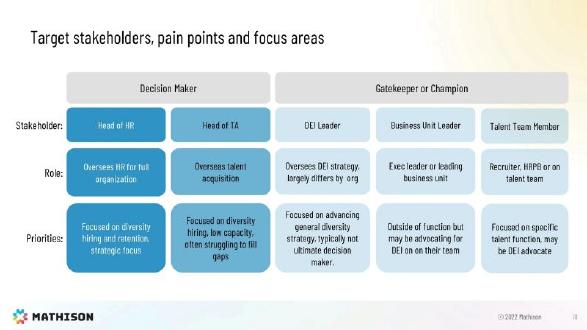
Mathison customer slide — slide 18
Diversity hiring software for employers. Slide titled "Target stakeholders, pain points and focus areas".
Mathison deck, slide 18. Exact stored slide matched to this analysis.
Our analysis: Separates signers from influencers, with each one's priority.
Evidence and limitation: Company's map of buyers; no deal counts.
What a founder can adapt: Add which role signed in deals you have won.
Supporting analysis
What the deck claims: "Decision Maker": Head of HR, Head of TA ("often struggling to fill gaps"). "Gatekeeper or Champion": DEI Leader ("typically not ultimate decision maker."), Business Unit Leader, Talent Team Member. Role and priorities for each.
Presentation choice: Warns that the keenest contact may not decide.
When it does not fit: A map with no sign it has been tested.
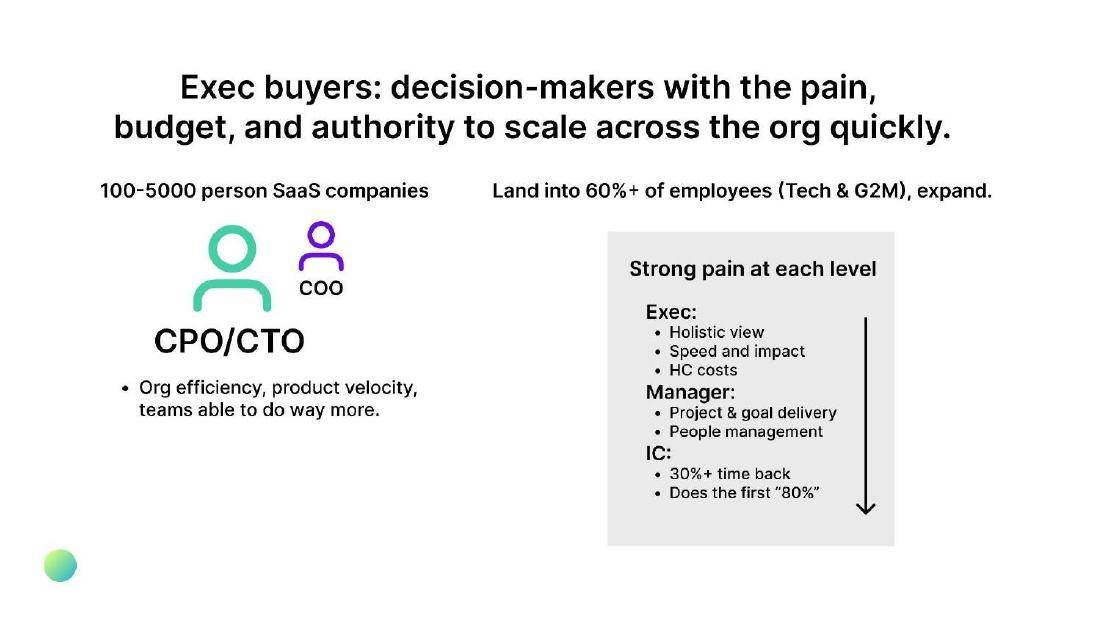
AI software for teams. Slide titled "Exec buyers: decision-makers with the pain, budget, and authority to scale across the org quickly."
Coworker deck, slide 12. Exact stored slide matched to this analysis.
Our analysis: Top-down route with a reason for each layer to adopt.
Evidence and limitation: Time-saving figure unsourced; 60% is a target.
What a founder can adapt: Source the time-saving figure and show actual adoption.
Supporting analysis
What the deck claims: CPO/CTO and COO at "100-5000 person SaaS companies"; "Strong pain at each level": exec, manager, IC ("30%+ time back"); "Land into 60%+ of employees (Tech & G2M), expand."
Presentation choice: Links the executive purchase to real use below.
When it does not fit: Presenting a penetration goal as a result.
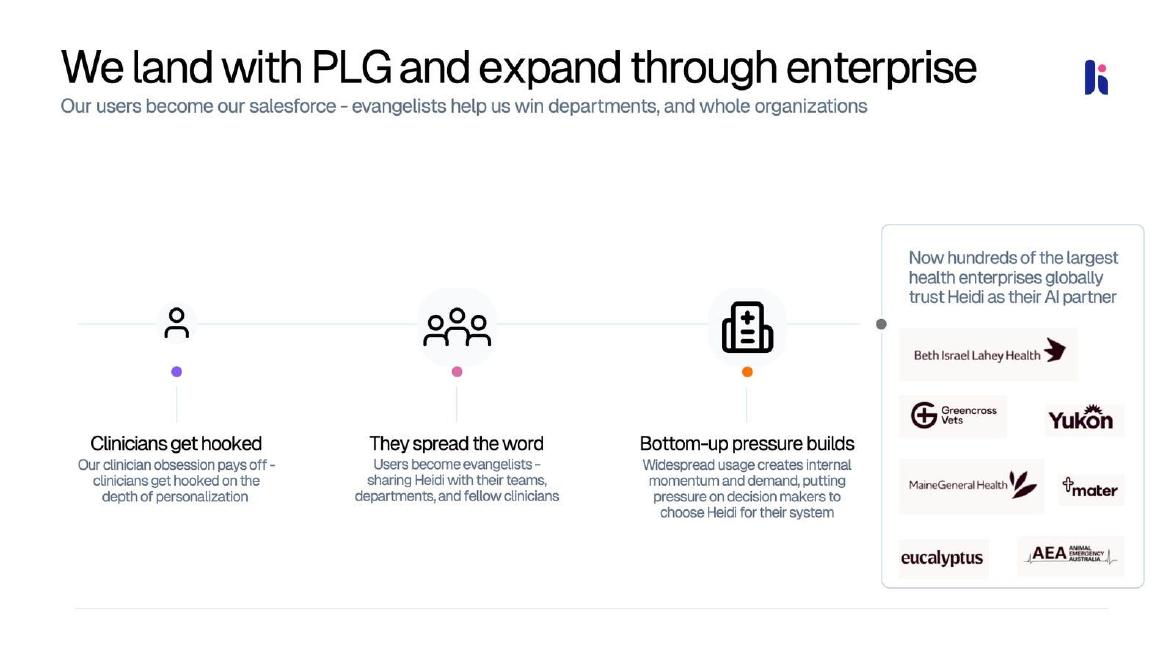
AI note-taking for clinicians. Slide titled "We land with PLG and expand through enterprise".
Heidi Health deck, slide 6. Exact stored slide matched to this analysis.
Our analysis: Bottom-up route from user to decision-maker.
Evidence and limitation: Logos and an uncounted "hundreds"; no conversion rate.
What a founder can adapt: Add how many user-led accounts became enterprise contracts, and when.
Supporting analysis
What the deck claims: "Clinicians get hooked"; "They spread the word"; "Bottom-up pressure builds" ("putting pressure on decision makers to choose Heidi for their system"); "Now hundreds of the largest health enterprises globally trust Heidi" with logos.
Presentation choice: Explains how usage reaches the person who signs.
When it does not fit: Logos standing in for a conversion figure.
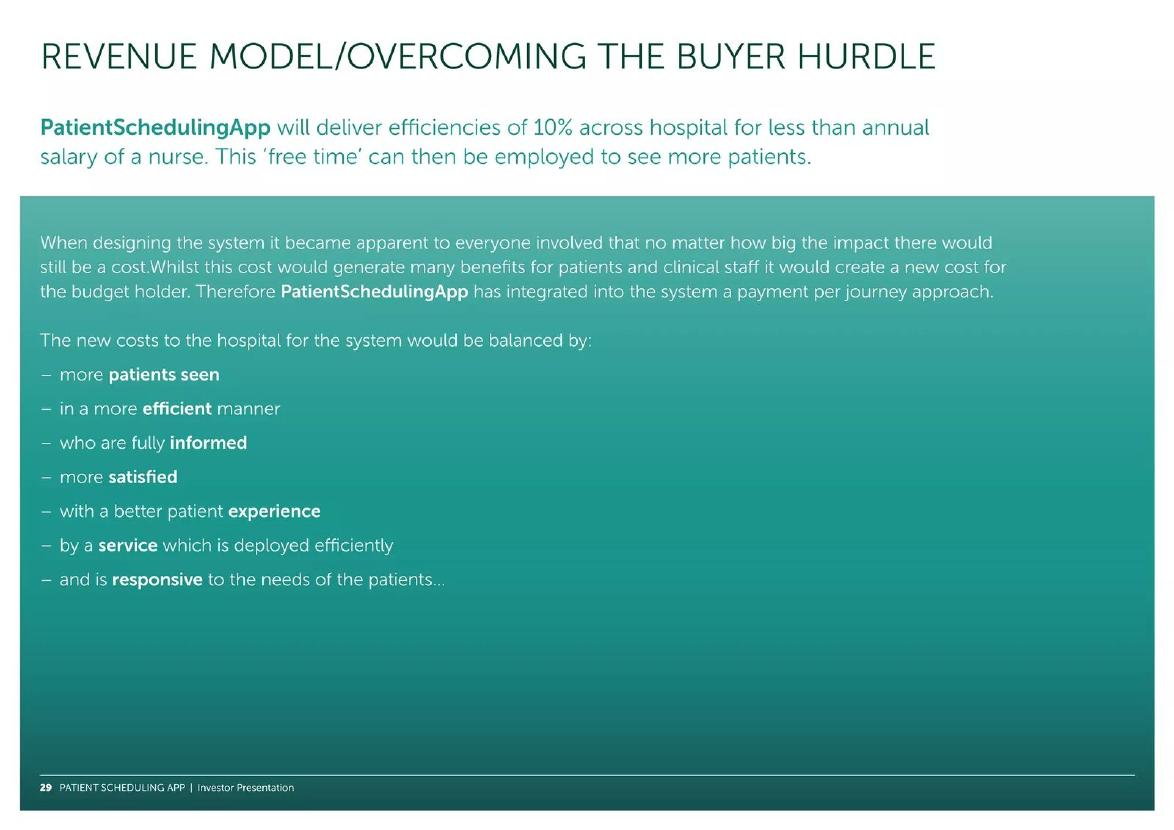
PatientSchedulingApp deck, slide 29. Exact stored slide matched to this analysis.
Our analysis: Names the payer's objection and changes pricing to meet it.
Evidence and limitation: Efficiency claim unsourced; price per journey not given.
What a founder can adapt: Show cost per journey against saving per journey.
Supporting analysis
What the deck claims: "efficiencies of 10% across hospital for less than annual salary of a nurse"; "it would create a new cost for the budget holder. Therefore PatientSchedulingApp has integrated into the system a payment per journey approach."
Presentation choice: Shows benefit and cost can land on different people.
When it does not fit: A qualitative benefit list as the only answer to the budget holder.
Whether each slide names the user, the decision-maker and the payer, and whether it shows how one reaches another.
Example
User
Decision-maker
Payer or budget
Route shown
Mathison
Champions listed
Yes
No
No
Gable
No
Yes
"Buyer", undefined
No
BusRight
No
Count only
No
Buyer choice
Coworker
Yes, by level
Yes
Implied
Top down
Heidi Health
Yes
Yes
No
Bottom up
PatientSchedulingApp
Patients, staff
No
Budget holder
Pricing change
Key Takeaways
Name user, decision-maker and payer when they differ.
Give each role's priority in its own words.
Choose the buyer with the fewest approvers.
Show how usage reaches the person who signs.
Answer the budget holder's objection in pricing.
Map your buying roles
Fill one line per role. Leave out roles that never affect a deal.
User. Who uses the product day to day, and what do they get?
Champion. Who recommends it internally, and why?
Decision-maker. Who chooses the product, and what do they need to see?
Payer. Whose budget pays, and what is their objection?
Evidence. In how many deals did this route hold, and how long did it take?
Copyable framework: Used by [user] for [benefit]. Recommended by [champion]. Chosen by [decision-maker], who cares about [priority]. Paid from [budget owner]'s budget; we answer [objection] with [pricing or proof]. Held in [N] of [M] closed deals; median [X] weeks.
Illustrative example 1 — written by us
Before: Target customers: hospitals.
After: Used by ward nurses to save 40 minutes a shift. Recommended by nurse managers. Chosen by the director of nursing. Paid from the operations budget; priced per bed so cost tracks occupancy. Held in 6 of 8 signed hospitals; median 14 weeks.
What improved: Our illustrative rewrite; all figures are invented for the example. It names each role, the objection and the evidence that the route works.
The question this guide answers
Founders selling to businesses, hospitals, schools or governments ask how to show investors who actually buys. Other guides in this library cover nearby ground. The target customer guide covers which segment and persona to go after first. The sales cycle guide covers how long it takes to close. The customer logo guide covers who has already bought. None of them answers how to show the roles inside a single customer organisation: who uses the product, who recommends it, who signs, and whose budget pays.
That question matters because each role is a separate sale. A product users love can still fail if the person with the budget sees only a new cost. A product an executive buys can still churn if nobody uses it. Investors want to see that the founder knows which person has to say yes, what that person needs to hear, and whether the plan reaches them.
How we chose and read the examples
We searched the extracted text of the slide library for phrases such as "decision maker", "buyer persona", "economic buyer", "budget holder", "champion" and "who pays", removed public companies, mining and resource companies, listed-company presentations and slides where the phrase appeared in a product description or market statistic, and viewed the remaining candidates. We kept six slides from six startup decks, each showing a different way to present buying roles. Every slide was rendered from the original deck at full size and read in full before we wrote about it; the Mathison slide, which has small type, was enlarged further.
We quote what is visible on each slide. We have not checked any company's figures or customer claims against other sources, and we make no claim that any of these slides affected a fundraising result.
Put the roles side by side with what each cares about
Mathison, which sells diversity hiring software to employers, has a slide titled "Target stakeholders, pain points and focus areas". It is a table with two groups. Under "Decision Maker" are the "Head of HR" ("Oversees HR for full organization"; "Focused on diversity hiring and retention, strategic focus") and the "Head of TA" ("Focused on diversity hiring, low capacity, often struggling to fill gaps"). Under "Gatekeeper or Champion" are the "DEI Leader" ("Focused on advancing general diversity strategy, typically not ultimate decision maker."), the "Business Unit Leader" ("Outside of function but may be advocating for DEI on on their team") and the "Talent Team Member" ("Recruiter, HRPB or on talent team"; "may be DEI advocate").
This is the clearest example in the set. It separates the people who sign from the people who influence, and it gives each a priority the sales pitch can speak to. The note that the DEI leader is "typically not ultimate decision maker" is especially useful: it tells the reader that the most enthusiastic contact may not be the one who decides, which is a common reason enterprise sales stall.
What the slide leaves out is evidence and sequence. It doesn't say which role usually starts the conversation, which one has signed in deals Mathison has won, or how many people are typically involved. Adding one line, such as "In our last ten deals, the Head of TA signed and a DEI leader introduced us in seven", would turn a sensible map into a tested one. (That line is our illustration, not Mathison's data.)
Separate buyer from decision-maker, and say why
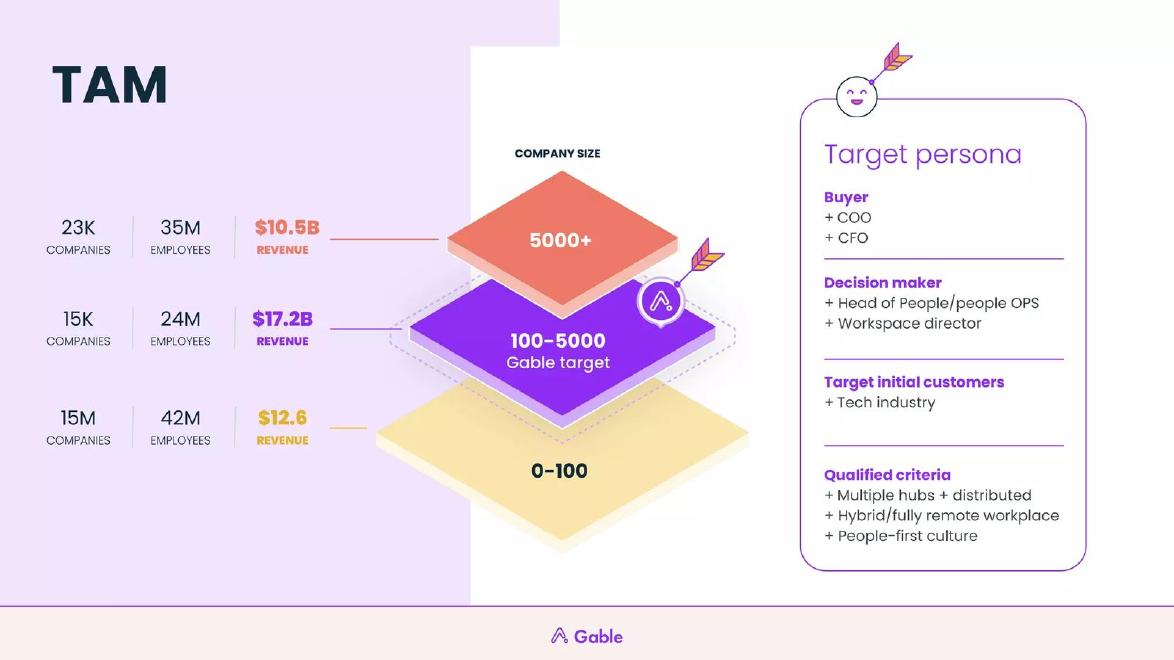
Gable, which sells workplace software for hybrid companies, puts a "Target persona" panel beside its market sizing. It lists "Buyer" ("COO", "CFO"), "Decision maker" ("Head of People/people OPS", "Workspace director"), "Target initial customers" ("Tech industry") and "Qualified criteria" ("Multiple hubs + distributed", "Hybrid/fully remote workplace", "People-first culture"). The market tiers on the left mark companies of 100-5000 employees as the "Gable target".
Splitting buyer from decision-maker is the right instinct: in workplace software, the people team often chooses the tool while the finance or operations leader approves the spend. Placing the roles next to the target company size also helps, since the buying group changes with company size.
But the slide doesn't say what the two labels mean, and in common usage they overlap. A reader cannot tell whether the COO or CFO signs and the Head of People recommends, or the other way round. A short line under each label ("chooses the product", "approves the budget") would remove the doubt.
Choose the buyer with fewer approvers
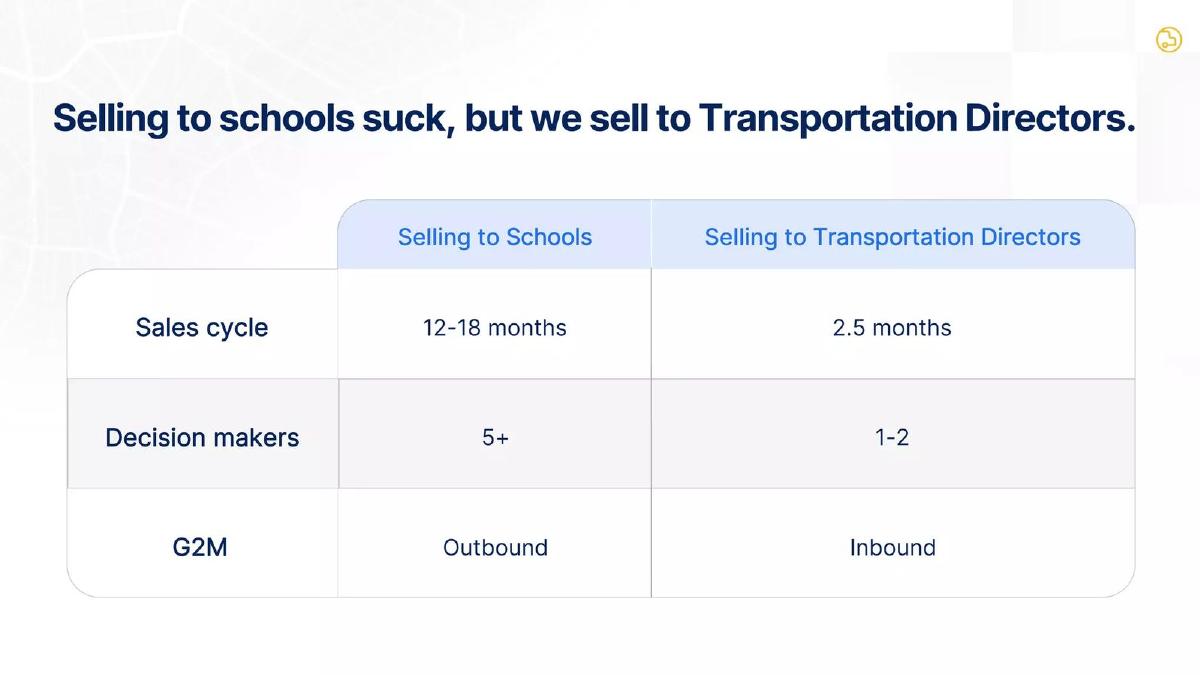
BusRight, which sells school bus routing software, titles a slide "Selling to schools suck, but we sell to Transportation Directors." A table compares the two. Selling to schools: sales cycle "12-18 months", decision makers "5+", go-to-market "Outbound". Selling to transportation directors: "2.5 months", "1-2", "Inbound".
The sales cycle guide already uses this slide to show a cycle split by buyer. The lesson here is different: the number of decision makers is shown as the cause. BusRight has found a person inside the same organisation who can buy with fewer approvals, and the slide makes that the strategy. For a founder selling into a complicated organisation, this is often the most useful question to ask: is there a role with its own budget that can say yes alone?
Two points to add if you copy this layout. Say how many customers the 2.5-month and "1-2" figures come from. And say what happens at renewal or expansion: if a larger purchase later needs the full school board, the investor will want to know when that sale begins.
Two routes to the decision-maker: top down and bottom up
Coworker, which sells AI software for teams, titles a slide "Exec buyers: decision-makers with the pain, budget, and authority to scale across the org quickly." It names the CPO/CTO, with the COO alongside, at "100-5000 person SaaS companies", and the motive: "Org efficiency, product velocity, teams able to do way more." A box headed "Strong pain at each level" then lists what each layer gets: executives ("Holistic view", "Speed and impact", "HC costs"), managers ("Project & goal delivery", "People management") and individual contributors ("30%+ time back", "Does the first '80%'"). The plan is to "Land into 60%+ of employees (Tech & G2M), expand."
This is the top-down route: sell to one person with budget and authority, then spread the product to the people below. The slide's strength is that it gives a reason for each layer to accept the product, so the executive purchase is more likely to turn into use. Its gap is evidence: "30%+ time back" has no source or sample, and "60%+ of employees" is a goal rather than a measured result.
Heidi Health, which sells AI note-taking for clinicians, shows the opposite route. Its slide, "We land with PLG and expand through enterprise", has three steps: "Clinicians get hooked", "They spread the word" and "Bottom-up pressure builds" ("Widespread usage creates internal momentum and demand, putting pressure on decision makers to choose Heidi for their system"). A panel on the right claims "Now hundreds of the largest health enterprises globally trust Heidi as their AI partner" above logos including Beth Israel Lahey Health and MaineGeneral Health.
The slide is clear that the user and the decision-maker are different people and explains how one reaches the other. What it cannot establish is how often the pressure works. The logos show organisations, not how many began as individual users, and "hundreds" is not counted. A bottom-up story is stronger with one conversion figure, such as how many organisations with active clinicians went on to sign an enterprise contract, and over what period.
Answer the budget holder's objection
PatientSchedulingApp, a hospital scheduling tool, has a slide titled "Revenue model/overcoming the buyer hurdle". It claims the product "will deliver efficiencies of 10% across hospital for less than annual salary of a nurse". It then states the problem plainly: "no matter how big the impact there would still be a cost. Whilst this cost would generate many benefits for patients and clinical staff it would create a new cost for the budget holder. Therefore PatientSchedulingApp has integrated into the system a payment per journey approach." A list follows of what balances the cost: more patients seen, more efficiently, fully informed, more satisfied, a better experience.
This is the only slide in the set that names the payer's objection and changes the business model to meet it. That is worth copying: if the benefit lands on one group (patients, clinicians) and the cost lands on another (a department budget), say so, and show what you did about it.
The slide is weaker on proof. The 10% efficiency claim has no source, the list of benefits is qualitative, and the slide doesn't say what one journey costs or how a per-journey price compares with the budget holder's current spend. A single worked example, such as the cost per journey against the saving per journey, would answer the budget holder directly.
What a buying-roles slide should include
Across the six slides, the useful elements are the same. Name each role that matters: user, champion, decision-maker, payer, and any approver with a veto such as IT security or procurement. Give each one priority in a few words. Mark which role signs. Show the route, top down or bottom up, from your first contact to the signature. And give one piece of evidence that the route works: how many deals followed it, how long it took, or how often usage led to a contract.
Keep it to the roles that change your sale. Most consumer products don't need this slide. Many business products sold to a single owner-manager don't either. It earns its place when the roles are genuinely different people, and when the difference explains your sales cycle, your pricing or your growth plan.
Common mistakes
One word for everyone. "Customer" hides who uses, decides and pays.
Undefined labels. Say what "buyer" and "decision maker" each mean.
Champion mistaken for signer. Mark who has the final say.
Bottom-up with no conversion. Show how often usage became a contract.
Ignoring the budget holder. Name their objection and your answer.
Diagnostic checklist
Each distinct role named.
A priority for each role.
Signer clearly marked.
Route from first contact to signature.
One figure showing the route works.
Frequently asked questions
Do investors care who the buyer is if users love the product?
Yes. Usage only becomes revenue when the person with the budget agrees. Show how users' enthusiasm reaches that person, and how often it has.
What is the difference between buyer and decision-maker?
Founders use the words differently. Usually one person chooses the product and another approves the spend. Define your labels on the slide so the reader doesn't guess.
Where should buying roles go in the deck?
Next to the target customer or the go-to-market plan, since the roles explain your sales cycle and channel. A separate slide is only needed when the roles are complex.
How we chose these examples
Corpus: published pitch deck teardowns on StartupFundraising.com. Founder-uploaded private decks are excluded.
Selection (2026-10-01): we searched extracted slide text for "decision maker", "buyer persona", "economic buyer", "budget holder", "champion" and related phrases, excluded public companies, mining and resource companies, listed-company presentations and unrelated uses, and kept six slides from six startup decks that each show a distinct approach.
Review: all six slides were rendered from the source decks at full size on 2026-10-01 and read in full against company, deck and page number; the Mathison slide was enlarged further (editorial model review, with AI assistance in drafting). No person has yet completed an editorial review of this page. We did not verify any company's figures or customer claims against outside sources.