How AI startups show their product: a real answer the AI gave, the tool where users meet it, the result screen, or a pipeline diagram.
AI Product Slides: Real Pitch Deck Examples
Eight product slides from AI decks (a workplace assistant, AI sales agents, visual inspection, app analytics, a salon booking bot, predictive analytics, model optimization and a decision platform), shown in full. Investors hear "AI-powered" on almost every deck, so the product slide has to show what the AI actually produces for the user. The stronger slides show a real output; the weaker ones draw the pipeline or a stack of feature boxes.
TL;DR
An AI product slide should show what the AI produces and where the user sees it. Obie shows a full chat exchange: a question, the answer, and the internal document it came from. Artisan shows its AI agent working inside Slack. Lincode shows its inspection dashboard with defects marked on real parts. Apptopia shows the estimate chart a customer gets, with the list of data products beside it. AI Beauty Bot shows the messaging apps and salon booking systems it connects to. Pecan and Pruna explain the process in a diagram. Quantexa stacks feature boxes under three verbs with no output shown, the weaker example here.
AI product slides
Each example shows the exact stored slide above its analysis and links to the full teardown. Stronger examples first. Claims and figures are as shown on the slides; we have not verified them.
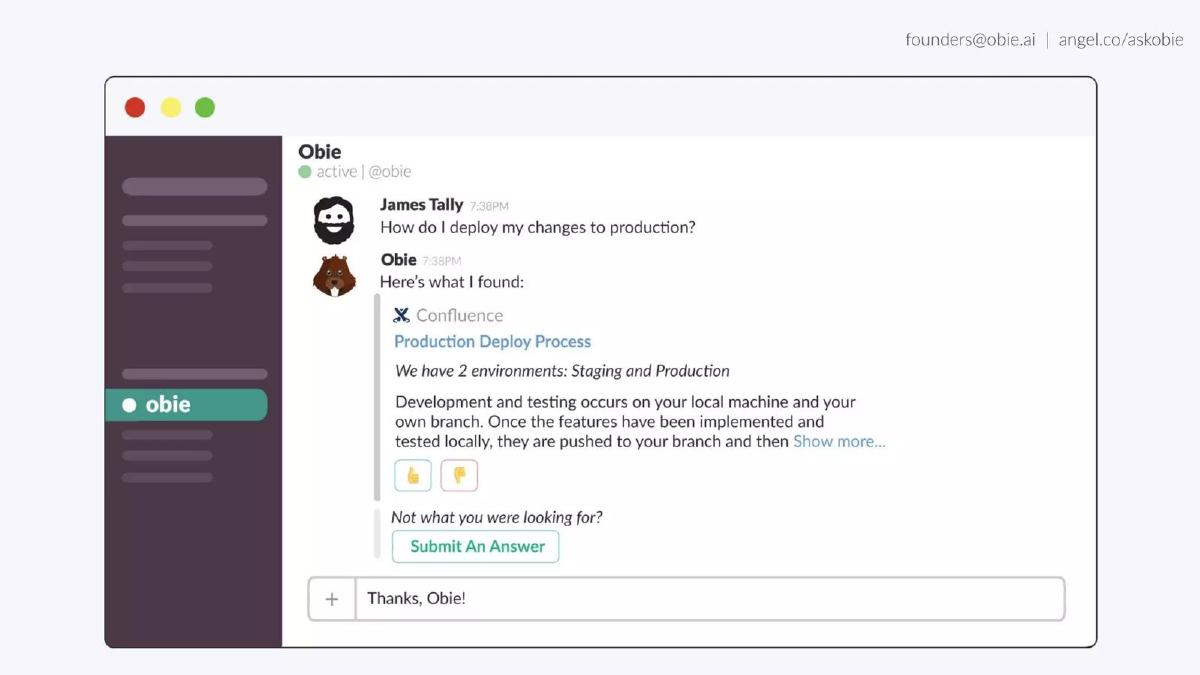
Obie product slide — slide 5
Seed stage (recorded). Workplace knowledge assistant. One chat exchange, full screen.
Obie deck, slide 5. Exact stored slide matched to this analysis.
Our analysis: The clearest example here: the investor sees a question, the AI's answer, and where the answer came from, with no explanation needed.
Evidence and limitation: One real exchange with the source document named; no usage or accuracy figures.
What a founder can adapt: Pick one common question your users ask and show the full exchange, including where the answer came from.
Supporting analysis
What the deck claims: A chat window. User: "How do I deploy my changes to production?" Obie: "Here's what I found:" with a linked Confluence page, "Production Deploy Process", and a quoted excerpt: "We have 2 environments: Staging and Production. Development and testing occurs on your local machine and your own branch..." Buttons for feedback and "Submit An Answer"; the user replies "Thanks, Obie!"
Presentation choice: Showing the cited source answers the first worry about an AI assistant (is it making things up?) before anyone asks.
When it does not fit: The slide has no caption at all; one line saying who uses this and how often would help.
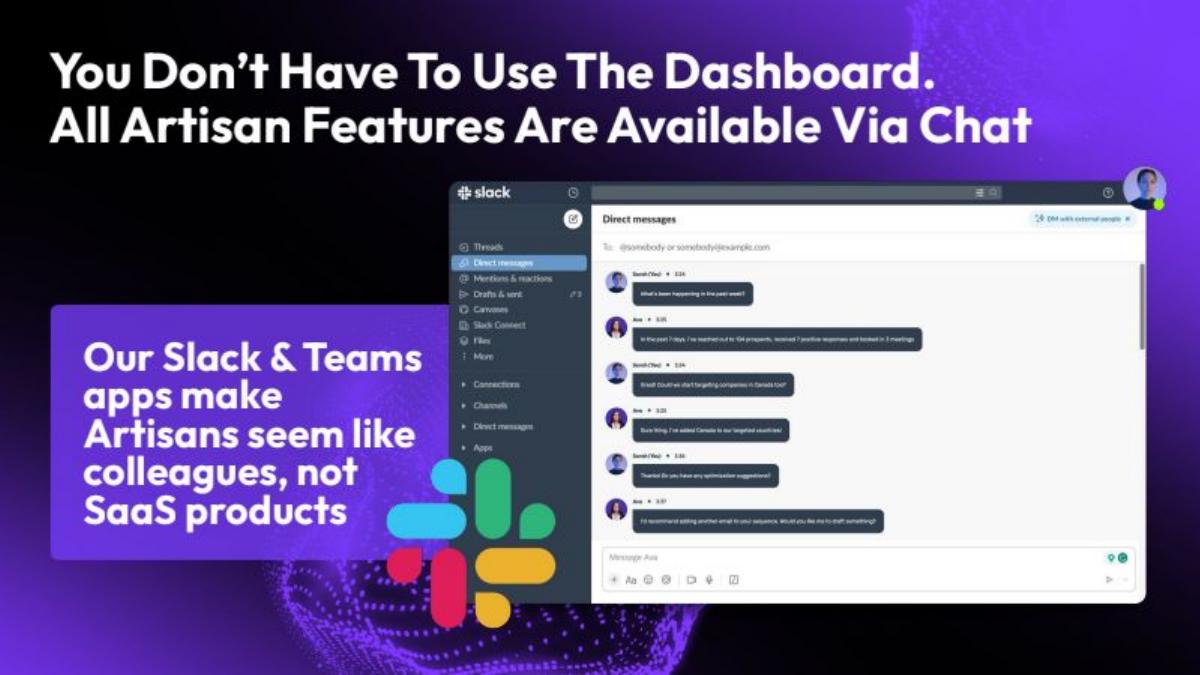
Seed stage (recorded). AI sales agents ("Artisans"). The agent working in Slack.
Artisan deck, slide 6. Exact stored slide matched to this analysis.
Our analysis: Shows where the AI lives in the user's day (their existing chat tool), which supports the "colleague" positioning.
Evidence and limitation: A real Slack screen with a conversation; the message text is too small to read at slide size, and there are no figures.
What a founder can adapt: If your AI works inside tools people already use, show it there rather than in your own dashboard.
Supporting analysis
What the deck claims: "You Don't Have To Use The Dashboard. All Artisan Features Are Available Via Chat." "Our Slack & Teams apps make Artisans seem like colleagues, not SaaS products." A Slack screenshot shows direct messages between a user and the agent.
Presentation choice: Meeting users in Slack and Teams removes the "another tool to learn" objection.
When it does not fit: Enlarge two or three messages so the investor can read what the agent actually did.
Visual inspection for manufacturers (stage not recorded). Dashboard on laptop, tablet and phone.
Lincode deck, slide 6. Exact stored slide matched to this analysis.
Our analysis: Shows the AI's output in the form a factory uses it: a part marked and rejected.
Evidence and limitation: Real screens with a pass/fail result on parts; the footer line is a future plan, not a current feature.
What a founder can adapt: Show the decision your AI makes on a real item (approved, flagged, rejected) on the screen the operator uses.
Supporting analysis
What the deck claims: "LIVIS Suite." "Dashboard." The laptop screen shows part images with outlines and a "REJECTED" status; tablet tiles read "Capture" and "Train". Footer: "Future marketplace for annotation tools, data analytics, and AR/VR companies."
Presentation choice: A "REJECTED" label on a real part is more convincing than any accuracy claim.
When it does not fit: The marketplace line in the footer is a different idea; keep future plans for the roadmap slide.
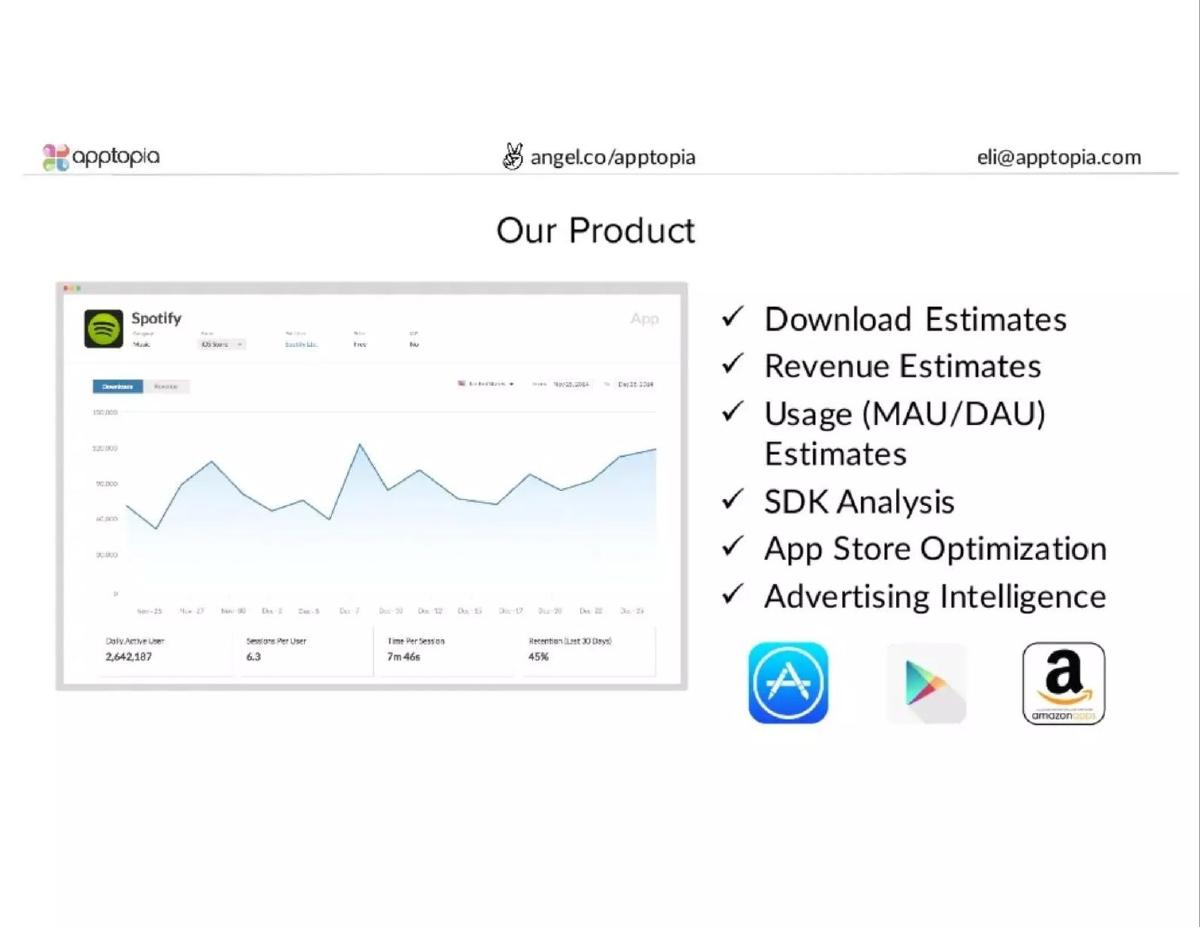
App market intelligence (stage not recorded). One product screen plus a checklist.
Apptopia deck, slide 5. Exact stored slide matched to this analysis.
Our analysis: Shows the estimate a customer buys, on an app every investor recognises, next to the full list of products.
Evidence and limitation: A real output screen with modelled numbers for a well-known app; the figures are Apptopia's estimates, not Spotify's reported data.
What a founder can adapt: Show your output on an example your audience knows, and list the other outputs beside it.
Supporting analysis
What the deck claims: "Our Product." A Spotify usage chart with daily active users "2,642,107", sessions per user "6.3" and retention figures. Checklist: "Download Estimates", "Revenue Estimates", "Usage (MAU/DAU) Estimates", "SDK Analysis", "App Store Optimization", "Advertising Intelligence". App Store, Google Play and Amazon logos.
Presentation choice: Using a famous app lets the investor judge whether the estimate looks plausible.
When it does not fit: Label estimates as estimates on the screen, so no one mistakes them for reported figures.
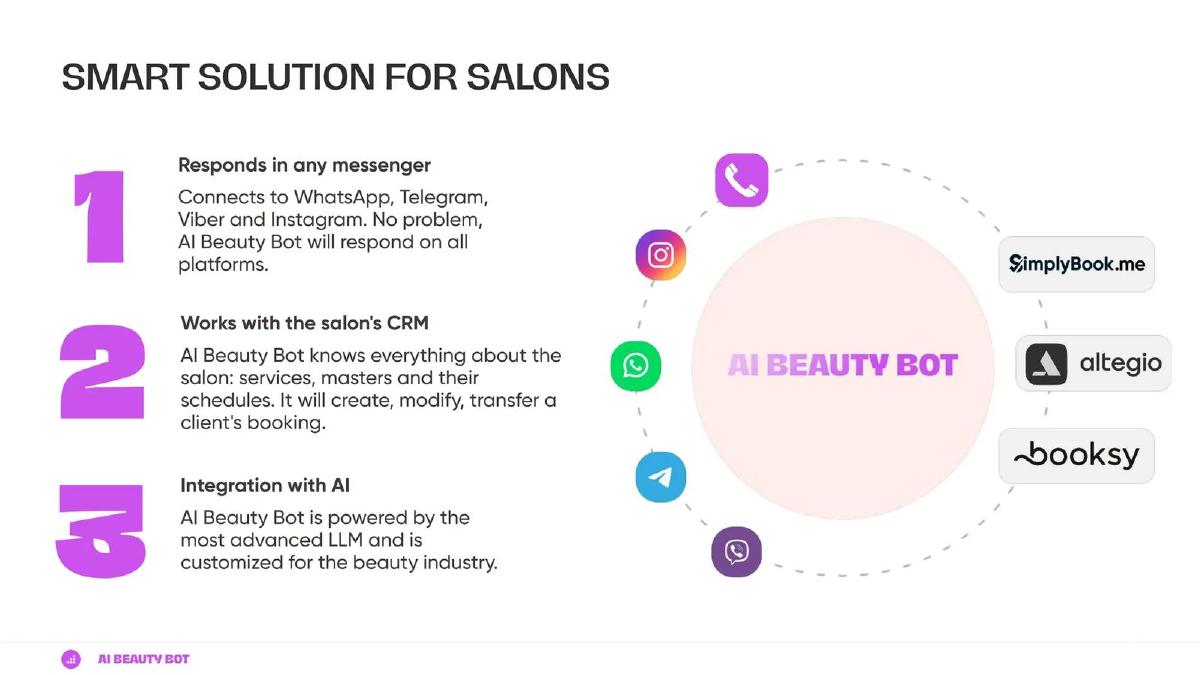
Seed stage (recorded, medium sector confidence). Booking assistant for beauty salons. Three numbered points and a connections diagram.
AI Beauty Bot deck, slide 4. Exact stored slide matched to this analysis.
Our analysis: Clearly shows where clients reach the bot and which salon systems it books into, but not the bot talking to a client.
Evidence and limitation: Named channels and booking systems; no screen of a conversation and no figures.
What a founder can adapt: Name the channels and systems you connect to, then add one real conversation that ends in a booking.
Supporting analysis
What the deck claims: "Smart solution for salons." "1 Responds in any messenger: Connects to WhatsApp, Telegram, Viber and Instagram." "2 Works with the salon's CRM: AI Beauty Bot knows everything about the salon: services, masters and their schedules. It will create, modify, transfer a client's booking." "3 Integration with AI: AI Beauty Bot is powered by the most advanced LLM and is customized for the beauty industry." Logos: SimplyBook.me, Altegio, Booksy.
Presentation choice: Naming the booking systems it works with tells a salon owner it fits what they already use.
When it does not fit: "The most advanced LLM" says nothing specific; say what the customization does for a salon.
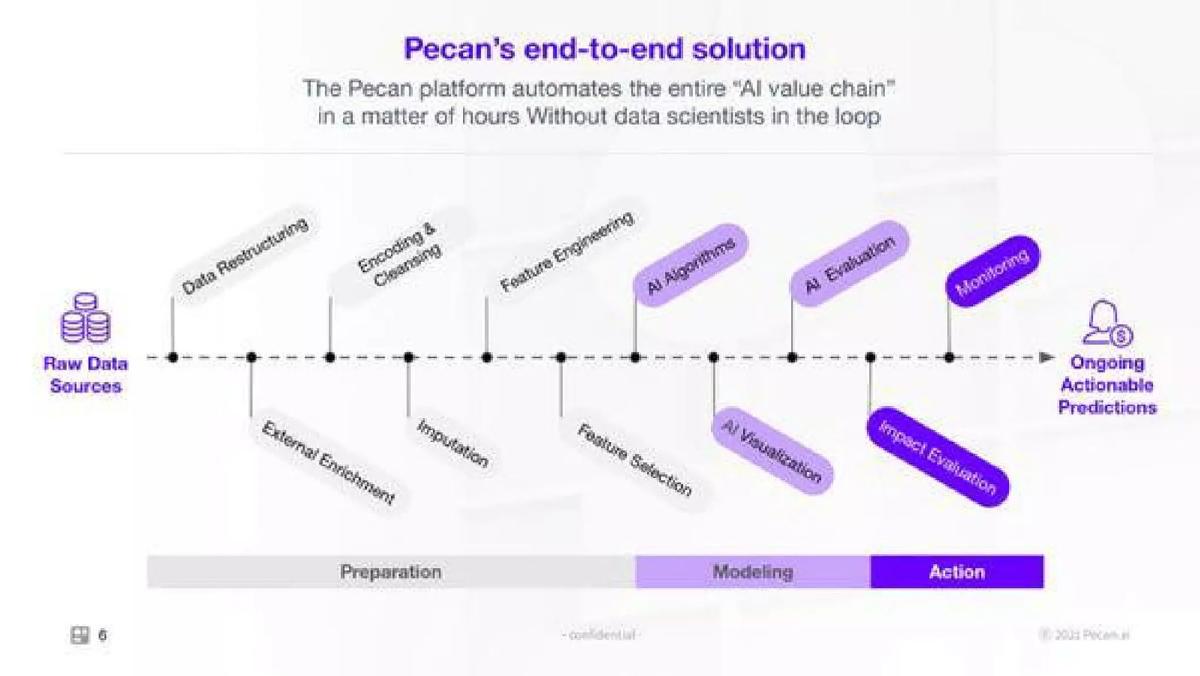
Series C (recorded). Predictive analytics. Pipeline diagram.
Pecan deck, slide 6. Exact stored slide matched to this analysis.
Our analysis: Explains what the product replaces (a data science team's steps), but the investor never sees a prediction.
Evidence and limitation: A process diagram and a speed claim ("a matter of hours"); no output screen and no source for the time claim.
What a founder can adapt: Keep a pipeline if it explains what you automate, and put one real prediction screen at the end of it.
Supporting analysis
What the deck claims: "Pecan's end-to-end solution." "The Pecan platform automates the entire 'AI value chain' in a matter of hours. Without data scientists in the loop." A line from "Raw Data Sources" to "Ongoing Actionable Predictions" through steps such as data restructuring, cleansing, feature engineering, AI algorithms, evaluation and monitoring, grouped as Preparation, Modeling and Action.
Presentation choice: Grouping the steps into three phases keeps a dense diagram readable.
When it does not fit: Twelve labelled steps is a lot for one slide; show the three phases and move the detail to the appendix.
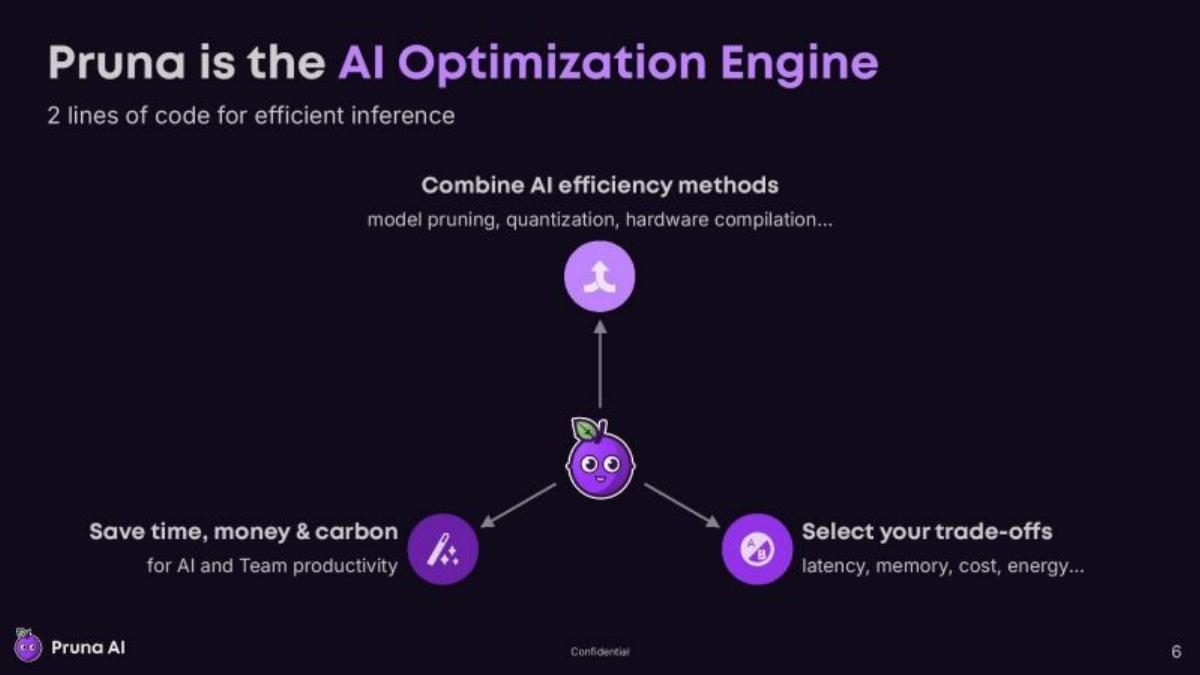
Seed stage (recorded). Model optimization for developers. Concept diagram.
Pruna AI deck, slide 6. Exact stored slide matched to this analysis.
Our analysis: Says clearly what the engine does and what the user controls, but for a developer product the two lines of code are the product and they are missing.
Evidence and limitation: A diagram and an integration claim ("2 lines of code"); the code itself and any before/after result are not shown.
What a founder can adapt: For a developer tool, show the code snippet and one before/after number (speed, memory, cost) on a named model.
Supporting analysis
What the deck claims: "Pruna is the AI Optimization Engine." "2 lines of code for efficient inference." "Combine AI efficiency methods: model pruning, quantization, hardware compilation..." "Save time, money & carbon for AI and Team productivity." "Select your trade-offs: latency, memory, cost, energy..."
Presentation choice: "Select your trade-offs" names the choice a developer actually makes.
When it does not fit: "Save time, money & carbon" needs one measured example to mean anything.
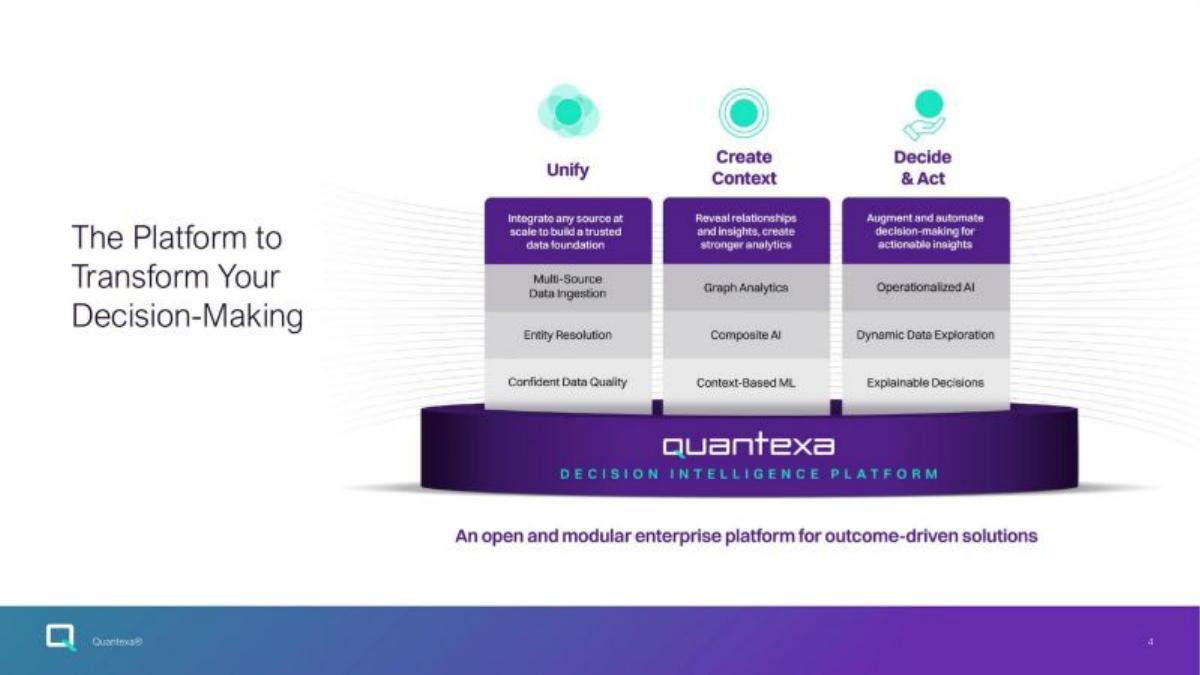
Series D or later (recorded). Enterprise decision intelligence. Feature stack.
Quantexa deck, slide 4. Exact stored slide matched to this analysis.
Our analysis: Included for contrast: the structure (unify, add context, decide) is clear, but the investor can't see a single decision the platform made.
Evidence and limitation: Feature names in boxes; no screen, no example and no figures.
What a founder can adapt: Keep the three verbs and replace the boxes with one example, such as two records matched into one customer.
Supporting analysis
What the deck claims: "The Platform to Transform Your Decision-Making." Three columns, "Unify", "Create Context", "Decide & Act", with boxes such as "Multi-Source Data Ingestion", "Entity Resolution", "Graph Analytics", "Composite AI", "Operationalized AI" and "Explainable Decisions", above the "Quantexa Decision Intelligence Platform". "An open and modular enterprise platform for outcome-driven solutions."
Presentation choice: The three verbs give a simple order, which is the useful part.
When it does not fit: Terms like "Composite AI" and "Operationalized AI" don't say what the user gets.
After: [Two customer records from different systems] → [matched into one profile, with the reason shown] → [flag raised for review]. Used in [where].
What improved: Our illustrative rewrite; not Quantexa's wording. Bracketed parts are placeholders to fill with real facts. It replaces feature names with one example of the product working.
What this guide adds
The library already has a general product slide guide, product slides by stage, and fintech, SaaS, healthcare, edtech, climate, food, media and marketplace product guides, plus AI problem, solution, market, competition, business-model, go-to-market, traction and team guides and an AI data moat guide. The AI solution guide explains how decks describe the fix; this page looks at how the product itself is shown, and at the question specific to AI products: can the investor see what the AI outputs?
Sector labels come from the sector recorded for each published teardown (AI/ML, high confidence for all except AI Beauty Bot, medium). None of these eight slides appears in another guide. Other slides from the Lincode and Pecan decks are used elsewhere in the library for different lessons.
Four ways AI decks show the product
A real output (Obie, Lincode, Apptopia): a screen with the answer, flag or estimate the user receives.
Where users meet the AI (Artisan, AI Beauty Bot): the chat or messaging apps it lives in and the systems it connects to.
Pipeline diagram (Pecan, Pruna): the steps from data to result, or what the engine combines. Explains the approach, but shows no output.
Feature stack (Quantexa): boxes of capabilities under a platform name. Quick to make, but the investor can't see the product work.
Common mistakes
No output shown. Show one real answer, flag or prediction.
Pipeline instead of product. End the diagram on a real result screen.
Unreadable screenshots. Crop and enlarge the part that matters.
Model claims without effect. "Most advanced LLM" says nothing; say what it does for the user.
Diagnostic checklist
One real AI output on the slide.
Where users see it.
How users can check it.
Screens readable at slide size.
Future plans left for the roadmap slide.
Frequently asked questions
How we chose these examples
Corpus: published pitch deck teardowns on StartupFundraising.com. Founder-uploaded private decks are excluded.
Selection (2026-09-27): we took teardowns whose recorded sector is AI/ML (high or medium confidence) with a stored slide image and readable text mentioning the product, the platform, screens or a dashboard. We viewed twelve candidates, left out slides already used in other guides and near-duplicates (Artisan's dashboard slide, Peak's pipeline, which repeats Pecan's approach), plus SmartCall and DataCulture, and kept eight that show different ways of presenting an AI product. Quantexa is included as a weaker example for contrast.
Sector is the category recorded for each teardown (confidence given in the section above). Stages are shown only where recorded (Obie, Artisan, AI Beauty Bot and Pruna AI, seed; Pecan, Series C; Quantexa, Series D or later); stage is not recorded for Lincode and Apptopia.
Review: stored slide images were checked on 2026-09-27 and matched to company, deck and slide number, and quoted text was read from the images (editorial model review). No person has yet completed an editorial review of this page.
Claims and figures are as shown on the slides; we have not verified them. We make no claim that any slide caused a fundraising outcome.