Real Estate Product Slides: 8 Real Pitch Deck Examples
How proptech and real estate startups show their product: one screen split by owner and tenant, phone screens in order, a four-step service flow.
Real Estate Product Slides: Real Pitch Deck Examples
Eight product slides from real estate and proptech decks (rental management, planning consultation, roof inspection, 3D landscape design, rental applications, heated building panels, senior-housing software and neighbourhood search), shown in full. A property product usually serves more than one person: an owner and a tenant, a developer and residents, an inspector and an insurer. The stronger slides show who uses which part; the weaker ones describe the product or point to a link.
TL;DR
A real estate product slide should show the product and say which user it serves. Castle puts one web app screen beside what owners get and what tenants get. Incitu shows three phone screens under "Informed", "Empowered" and "Impactful", each with a caption. HoverStat draws its roof inspection as four steps from drone flight to report. Simpolium shows the 2D outline a user draws next to the 3D model it produces. Mietz shows one listing screen and six feature labels. Concreate shows its heated concrete panel and the carbon grid inside it. Array shows its software on four devices with a short description. Neighborhood Match lists demo links with no screen, the weaker example here.
Real estate product slides
Each example shows the exact stored slide above its analysis and links to the full teardown. Stronger examples first. Claims and figures are as shown on the slides; we have not verified them.
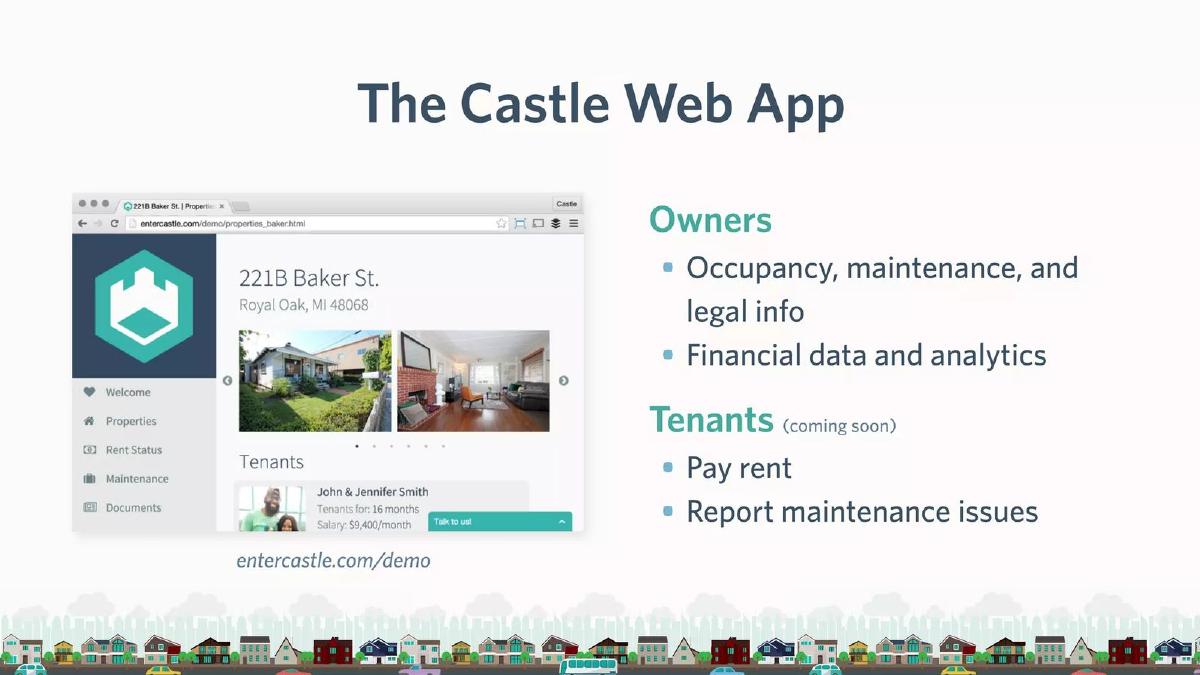
Castle product slide — slide 6
Pre-seed (recorded). Rental property management. One web app screen with two user groups.
Castle deck, slide 6. Exact stored slide matched to this analysis.
Our analysis: The clearest example here: one screen, and a plain list of what each side of a rental gets, with honest labelling of what isn't built yet.
Evidence and limitation: A real product screen and a split by user; the tenant side is marked "coming soon". No figures.
What a founder can adapt: List your user groups next to your screen and what each can do today; label anything not yet built.
Supporting analysis
What the deck claims: "The Castle Web App." A screenshot of a property page ("221B Baker St.") with photos and a tenant record. "Owners: Occupancy, maintenance, and legal info. Financial data and analytics." "Tenants (coming soon): Pay rent. Report maintenance issues." "entercastle.com/demo".
Presentation choice: Marking the tenant features "coming soon" keeps the slide accurate and shows the roadmap in one word.
When it does not fit: The screenshot text is small; enlarge the part that shows occupancy or maintenance.
Seed stage (recorded). Resident engagement for planning and development. Three phone screens in order.
Incitu deck, slide 6. Exact stored slide matched to this analysis.
Our analysis: Walks a resident from notification to AR view to giving feedback, one screen per step.
Evidence and limitation: Three real screens (map, AR view, project page) with captions; the claim that people are more receptive is not sourced on the slide.
What a founder can adapt: Use one real screen per step and a two-line caption: what the user does, what it changes.
Supporting analysis
What the deck claims: "How it works." "Informed: Users get notified about proposed developments in their areas of interest; QR's near under-review projects create awareness, in-situ." "Empowered: People are more receptive to density when it's built. Exploring the future on-site in AR makes residents more positive about- and open to- change." "Impactful: Easy participation through a mobile app, in lieu of lengthy public hearings, allows a large, diverse, representative audience to take part in the planning process." A QR code and "Download from App Store".
Presentation choice: Each caption says what the resident does and why it matters to the developer or city paying for it.
When it does not fit: The receptiveness claim needs a source or a pilot result.
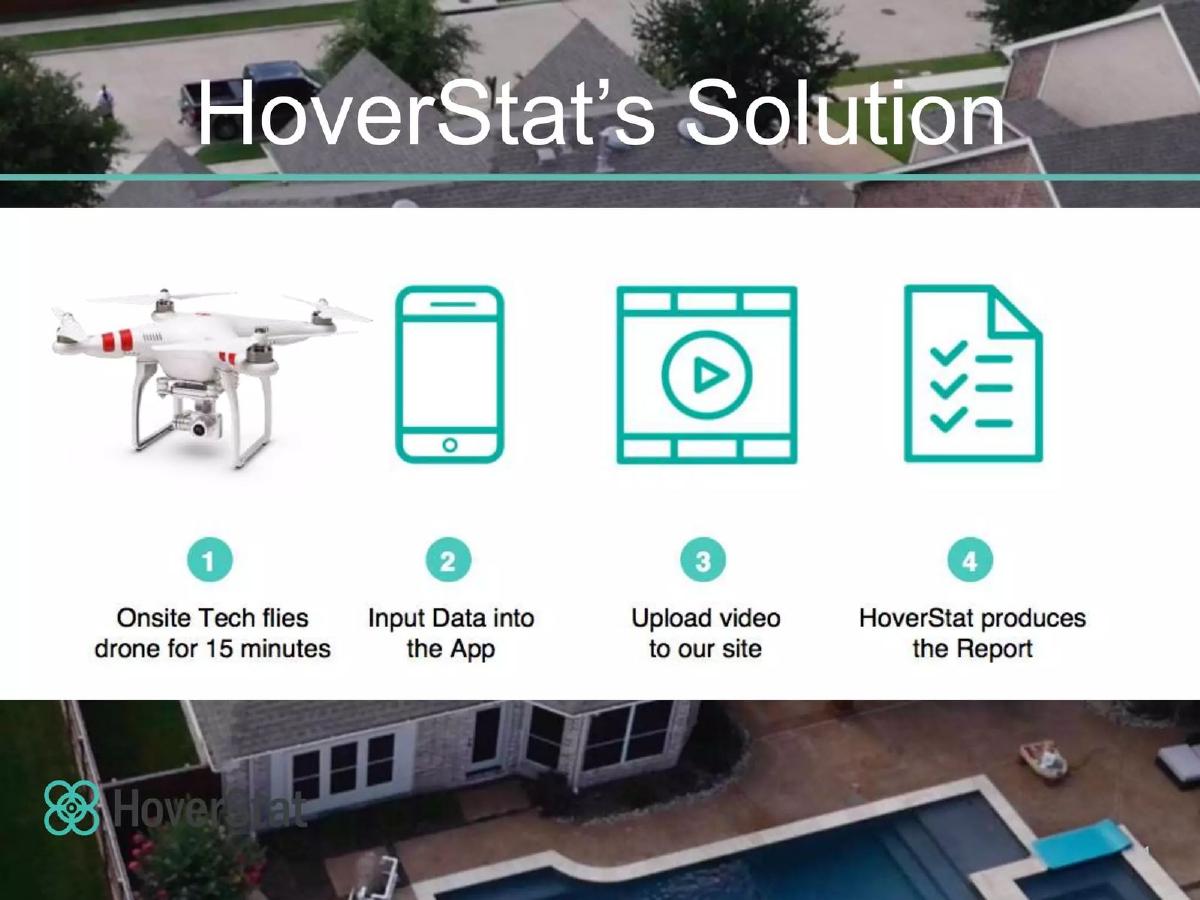
Seed stage (recorded, medium sector confidence). Drone roof inspection. Four-step service flow.
HoverStat deck, slide 3. Exact stored slide matched to this analysis.
Our analysis: Makes a service easy to follow from site visit to report, but the report (what the customer pays for) isn't shown.
Evidence and limitation: Four steps with icons and one time figure ("15 minutes"); no screen and no sample report.
What a founder can adapt: For a service product, number the steps and end on a picture of what the customer receives.
Supporting analysis
What the deck claims: "HoverStat's Solution." "1 Onsite Tech flies drone for 15 minutes." "2 Input Data into the App." "3 Upload video to our site." "4 HoverStat produces the Report."
Presentation choice: "15 minutes" on the roof is the concrete gain over sending a person up a ladder.
When it does not fit: Replace the report icon with a real report page.
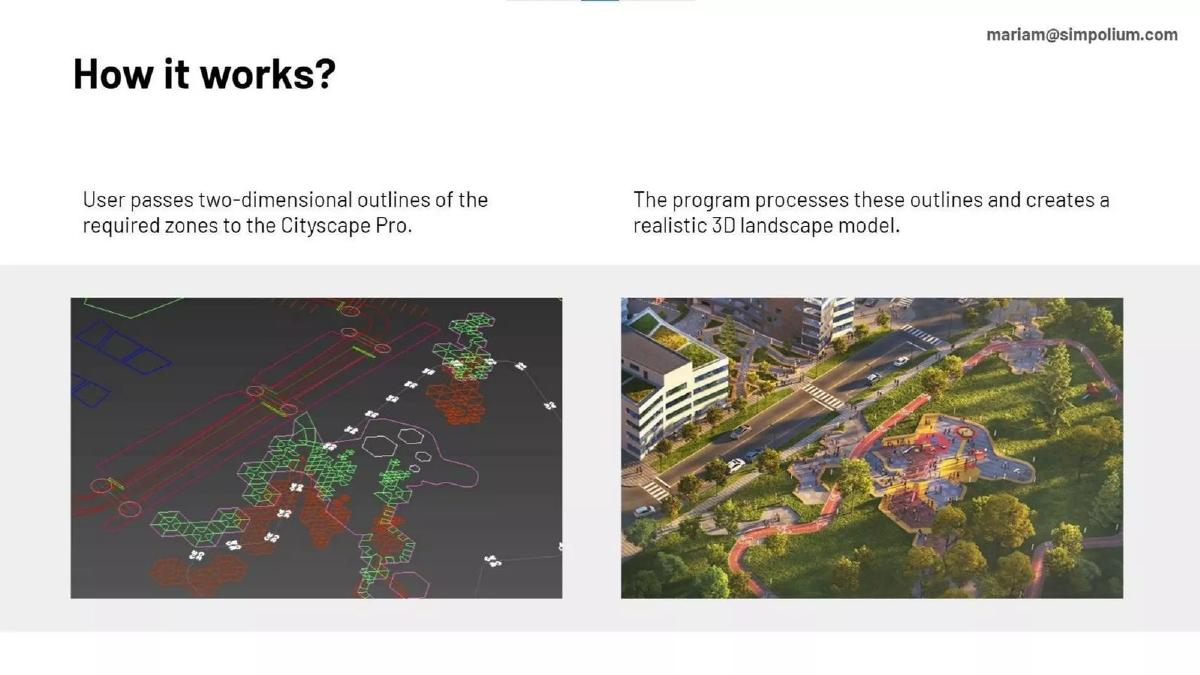
Pre-seed (recorded, medium sector confidence). Landscape design software. Input and output side by side.
Simpolium deck, slide 4. Exact stored slide matched to this analysis.
Our analysis: Shows the transformation in one glance: rough outlines in, finished 3D landscape out.
Evidence and limitation: A real input and output; how long the processing takes is not stated.
What a founder can adapt: If your product turns something into something else, show both at the same size, left to right.
Supporting analysis
What the deck claims: "How it works?" "User passes two-dimensional outlines of the required zones to the Cityscape Pro." "The program processes these outlines and creates a realistic 3D landscape model." A 2D zone drawing on the left, a rendered 3D park on the right.
Presentation choice: Placing input and output side by side lets the image do the explaining.
When it does not fit: Add the time it takes, or what it replaces, so the investor can judge the gain.
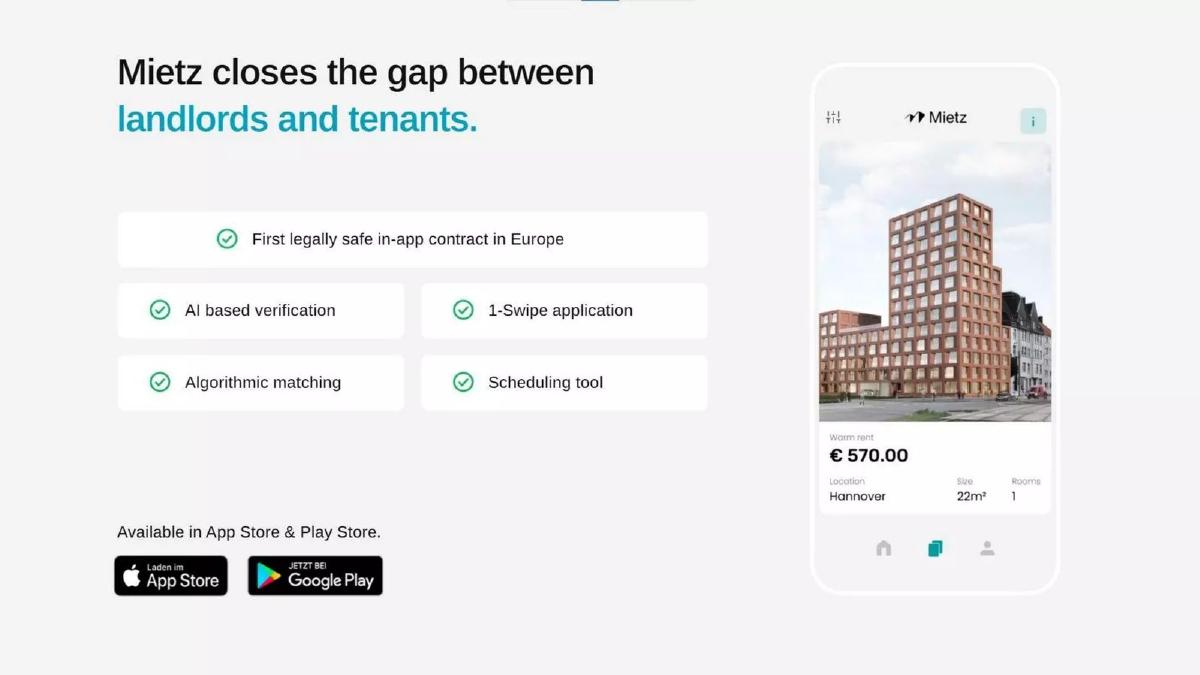
Pre-seed (recorded). Rental app for landlords and tenants. One screen and feature labels.
Mietz deck, slide 3. Exact stored slide matched to this analysis.
Our analysis: Shows the product exists and lists what it does, but doesn't say which features are for landlords and which for tenants.
Evidence and limitation: One real listing screen and six labels; "first legally safe in-app contract in Europe" is a claim with no source.
What a founder can adapt: Split the feature labels by landlord and tenant, and add the contract or application screen.
Supporting analysis
What the deck claims: "Mietz closes the gap between landlords and tenants." "First legally safe in-app contract in Europe", "AI based verification", "1-Swipe application", "Algorithmic matching", "Scheduling tool". A listing screen ("€ 570.00", Hannover). "Available in App Store & Play Store."
Presentation choice: The app store badges show the product is live, not a prototype.
When it does not fit: A "first in Europe" claim needs support or softer wording.
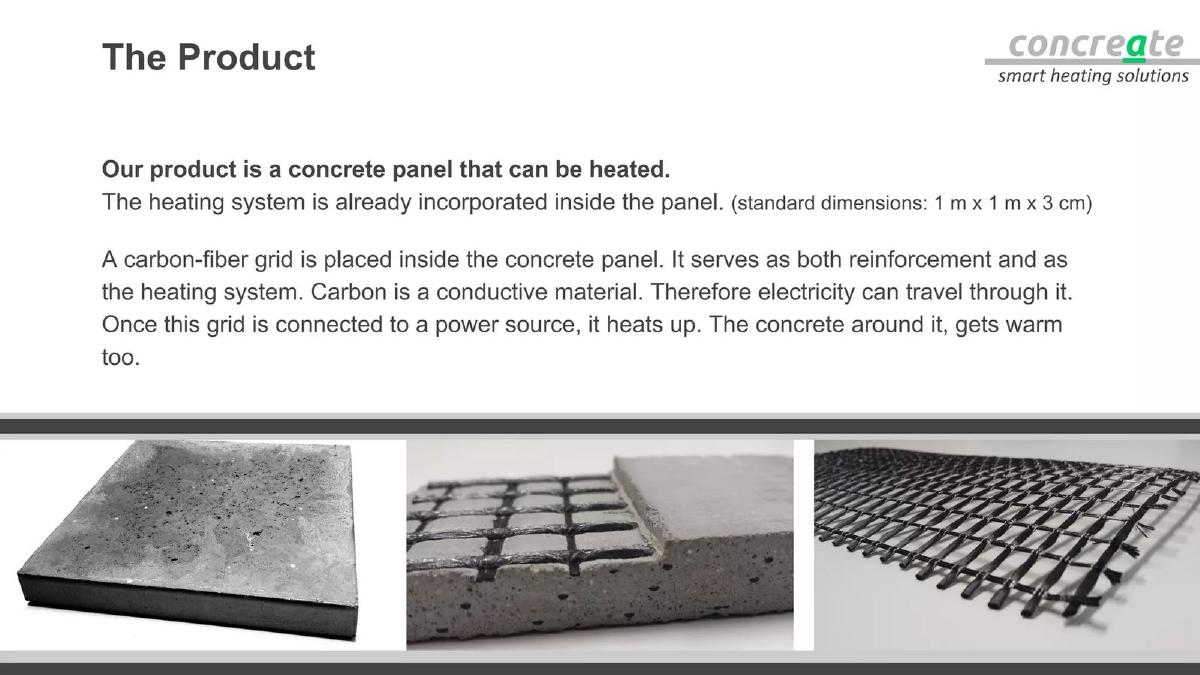
Seed stage (recorded, medium sector confidence). Heated concrete panels. Physical product with its parts.
Concreate deck, slide 6. Exact stored slide matched to this analysis.
Our analysis: Explains a physical building product clearly: what it is, its size, and how it works, with photos of each part.
Evidence and limitation: Photos of the real product and its dimensions; no heating or energy figures.
What a founder can adapt: For a hardware or material product, show the product, what's inside, and one size or spec.
Supporting analysis
What the deck claims: "The Product." "Our product is a concrete panel that can be heated. The heating system is already incorporated inside the panel. (standard dimensions: 1 m x 1 m x 3 cm)" "A carbon-fiber grid is placed inside the concrete panel. It serves as both reinforcement and as the heating system... Once this grid is connected to a power source, it heats up. The concrete around it, gets warm too." Three photos: a panel, the grid in concrete, the grid alone.
Presentation choice: Showing the grid on its own makes "heating inside the panel" easy to believe.
When it does not fit: Add one performance figure (heat-up time, energy use) against the heating it replaces.
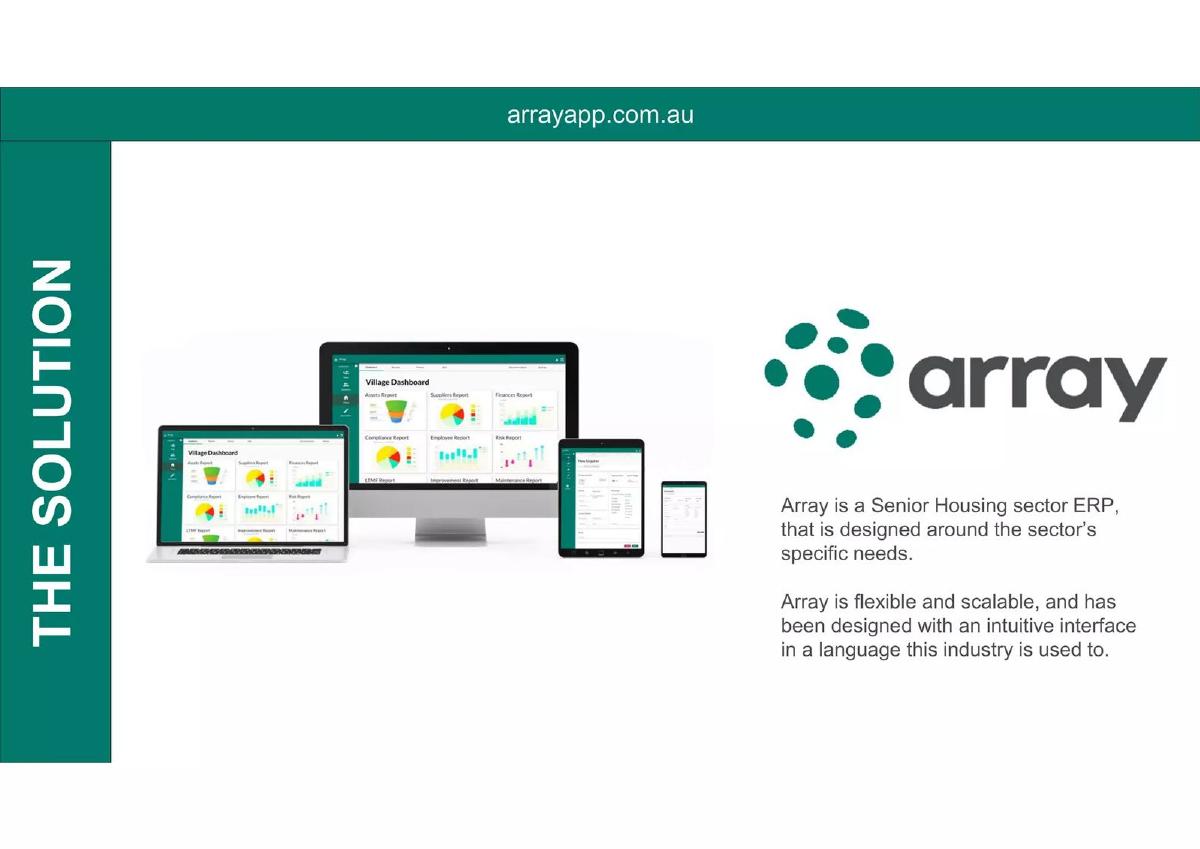
Seed stage (recorded, medium sector confidence). Software for senior-housing operators. Devices and a description.
Array deck, slide 5. Exact stored slide matched to this analysis.
Our analysis: Shows the software runs on every device, but the investor can't read what any screen does.
Evidence and limitation: Real screens, too small to read; the description uses general terms ("flexible", "scalable", "intuitive"). No figures.
What a founder can adapt: Replace the device lineup with one readable screen and a caption naming the task it handles.
Supporting analysis
What the deck claims: "The Solution." Dashboards on laptop, desktop, tablet and phone. "Array is a Senior Housing sector ERP, that is designed around the sector's specific needs." "Array is flexible and scalable, and has been designed with an intuitive interface in a language this industry is used to."
Presentation choice: Naming the sector (senior housing) tells the investor who it is built for.
When it does not fit: "Flexible, scalable, intuitive" fits any software; say what a manager does in it.
Neighborhood Match deck, slide 4. Exact stored slide matched to this analysis.
Our analysis: Included for contrast: a demo slide with nothing to see. During a pitch no one follows the links.
Evidence and limitation: Three URLs and prototype labels; no screen.
What a founder can adapt: Put one screenshot from the prototype on the slide and move the links to the appendix or follow-up email.
Supporting analysis
What the deck claims: "Demo — an evolved user experience." "V1 concept prototype: Demo Video: http://screencast.com/t/gzHxbg8o. Interactive Demo Site: http://neighborhoodmatch.weebly.com/" "V2 concept prototype: Interactive Demo Site (in progress): http://neighborhoodmatch.org/"
Presentation choice: It is honest that both versions are concept prototypes, which is useful context.
When it does not fit: Don't make a slide that only works if the investor opens a browser.
How the product is presented, whether a real screen or product is shown, and whether the slide says who each part is for.
Example
Product
Presented as
Real screen or product
Users named
Castle
Rental management
Screen + owner/tenant split
Yes
Owners and tenants
Incitu
Planning engagement
Three screens in order
Yes
Residents
HoverStat
Roof inspection
Four-step flow
No
Onsite tech
Simpolium
Landscape design
Input and output
Yes
User (not specified)
Mietz
Rental applications
Screen + feature labels
Yes
Landlords and tenants, not split
Concreate
Heated panels
Product photos + parts
Yes
No
Array
Senior-housing software
Devices + description
Too small to read
Sector only
Neighborhood Match
Neighbourhood search
Links
No
No
Key Takeaways
Say which user each part is for (owner, tenant, resident, inspector).
Show real screens in the order someone uses them.
For a service, show the steps from request to delivered result.
Show input and output side by side when the product transforms something.
Never replace the product with a link; investors won't click during a pitch.
Build your real estate product slide
Start with who uses it, then show the screen or step each of them sees.
Users. Each person who touches the product (owner, tenant, resident, inspector).
Screens or steps. One real screen or step per user action, in order.
Result. What the customer ends with: a report, a signed lease, a model, a warm floor.
Status. What is live and what is coming soon.
Copyable framework: [User A] uses it to [task] (screen). [User B] uses it to [task] (screen). They end with [result]. Live: [features]. Coming soon: [features].
After: [Screenshot: neighbourhood results for a search] Caption: [what the user entered] → [what they see]. Prototype v1; demo link in the appendix.
What improved: Our illustrative rewrite; not Neighborhood Match's wording. Bracketed parts are placeholders to fill with real facts. It replaces links with something the investor can see during the pitch.
What this guide adds
The library already has a general product slide guide, product slides by stage, and fintech, SaaS, healthcare, edtech, climate, food, media, marketplace and AI product guides, plus real estate problem, solution, market and business-model guides. The real estate solution guide explains how decks describe the fix; this page looks at how the product itself is shown, and at the question that comes up in most property products: which of the several people involved is this screen for?
Sector labels come from the sector recorded for each published teardown (high confidence for Castle, Incitu, Mietz and Neighborhood Match; medium for HoverStat, Simpolium, Concreate and Array). None of these eight slides appears in another guide. Other slides from the Castle, Simpolium and Concreate decks are used elsewhere in the library for different lessons.
Four ways real estate decks show the product
Screen plus users (Castle, Mietz, Array): one product screen with what each user gets, or the features, beside it.
Screens or steps in order (Incitu, HoverStat): the path through the product or service, one step at a time.
Before and after (Simpolium) or the physical product (Concreate): what goes in and what comes out, or the thing itself with its parts.
Links instead of product (Neighborhood Match): demo URLs listed on the slide. The investor sees nothing during the pitch.
Common mistakes
Users not named. Say which person each screen is for.
Result not shown. End on the report, lease or model the customer gets.
Unreadable device lineups. One readable screen beats four tiny ones.
Links instead of product. Put a screenshot on the slide; links go in the appendix.
Diagnostic checklist
Each user group named.
Real screens or product photos.
Steps in the order they happen.
The result the customer gets.
Live vs coming soon marked.
Frequently asked questions
How we chose these examples
Corpus: published pitch deck teardowns on StartupFundraising.com. Founder-uploaded private decks are excluded.
Selection (2026-09-27): we took teardowns whose recorded sector is proptech (high or medium confidence) with a stored slide image and readable text mentioning the product, how it works, a demo, screens, an app or features. We viewed twelve candidates, left out slides already used in other guides, slides that were not about the product (team, vision, market) and weaker duplicates of the same approach (Filio, Playhouse, Lyfe, The Co-Own), and kept eight that show different ways of presenting a real estate product. Neighborhood Match is included as a weaker example for contrast.
Sector is the category recorded for each teardown (confidence given in the section above). Stages as recorded: Incitu, HoverStat, Concreate and Array, seed; Castle, Simpolium, Mietz and Neighborhood Match, pre-seed.
Review: stored slide images were checked on 2026-09-27 and matched to company, deck and slide number, and quoted text was read from the images (editorial model review). No person has yet completed an editorial review of this page.
Claims and figures are as shown on the slides; we have not verified them. We make no claim that any slide caused a fundraising outcome.