Developer Tool Product Slides: 7 Real Pitch Deck Examples
How developer tool and infrastructure startups show their product: the end-user view and the developer view.
Developer Tool Product Slides: Real Pitch Deck Examples
Seven product slides from developer tool and infrastructure decks (an in-app command bar, a cloud hosting platform, a machine-learning feature store, engineering metrics, an API marketplace, data labeling and container deployment), shown in full. A developer product is often invisible: it runs in code, in a pipeline or behind someone else's app. The stronger slides make it visible by showing what the developer configures, what their users see, or where it sits in the work engineers already do.
TL;DR
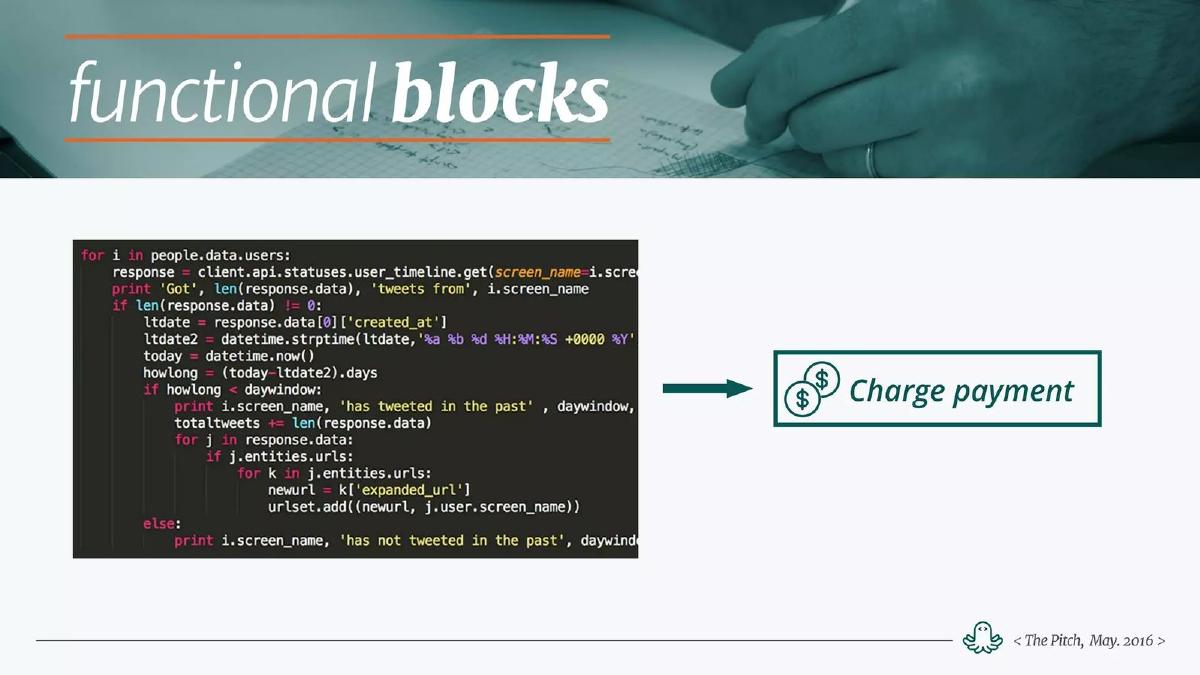
A developer tool product slide should make something invisible visible. CommandBar shows the command bar end-users see inside a web app and labels what the developer configures. Render draws the engineering lifecycle (plan, develop, build, test, deploy, operate, monitor) and lists its features under each stage. Rasgo splits its feature store into three verbs: transform, share, serve. Bliss shows its dashboard with two numbers an engineering manager would read. Rapid API shows a block of code turning into one "Charge payment" block. Scale names three components in grey boxes. DCHQ shows two icons and two phrases under a customer label, the weaker example here.
Developer tool product slides
Each example shows the exact stored slide above its analysis and links to the full teardown. Stronger examples first. Claims and figures are as shown on the slides; we have not verified them.
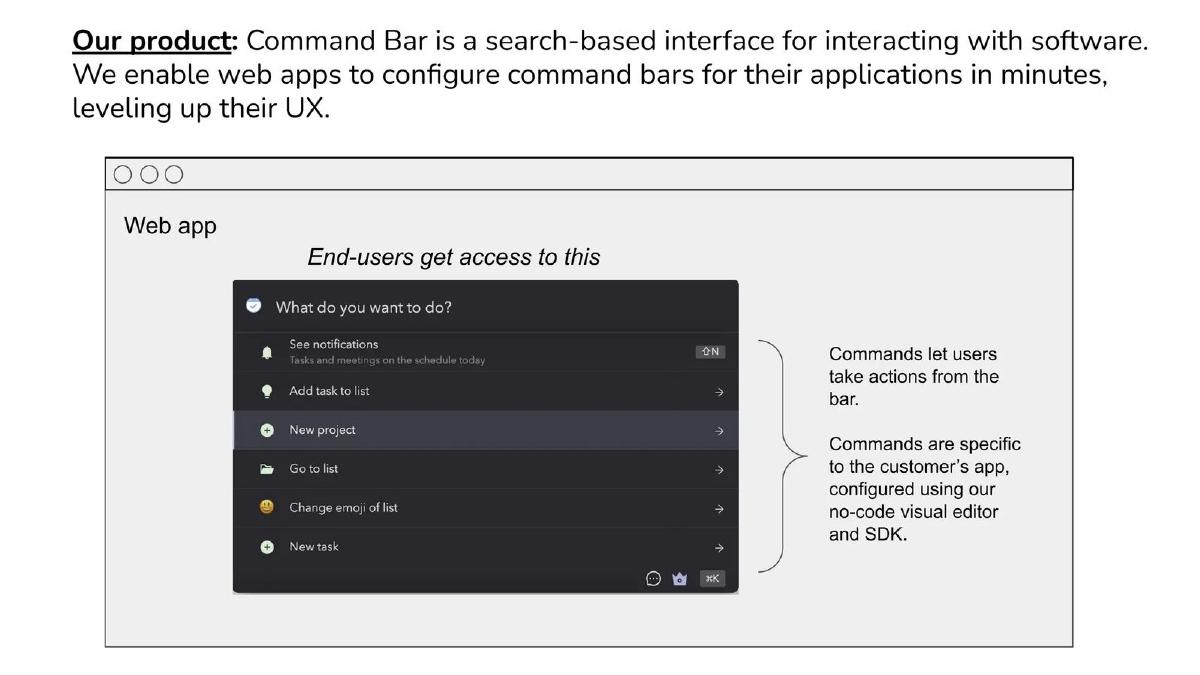
CommandBar product slide — slide 2
Seed stage (recorded). In-app search and command interface. End-user view with developer notes.
CommandBar deck, slide 2. Exact stored slide matched to this analysis.
Our analysis: The clearest example here: the investor sees the product as the end-user does and reads, in one note, what the paying developer does to set it up.
Evidence and limitation: A product mock and a clear split between end-user and customer; "in minutes" is not backed by a figure.
What a founder can adapt: Show what your customer's users see, then annotate what your customer configured to make it happen.
Supporting analysis
What the deck claims: "Our product: Command Bar is a search-based interface for interacting with software. We enable web apps to configure command bars for their applications in minutes, leveling up their UX." A mock web app labelled "End-users get access to this" with a command list ("See notifications", "Add task to list", "New project", "Go to list"). Side notes: "Commands let users take actions from the bar." "Commands are specific to the customer's app, configured using our no-code visual editor and SDK."
Presentation choice: Labelling who sees what ("End-users get access to this") answers the usual developer-tool question: who is the user and who is the buyer?
When it does not fit: Back "in minutes" with a real setup time from a customer.
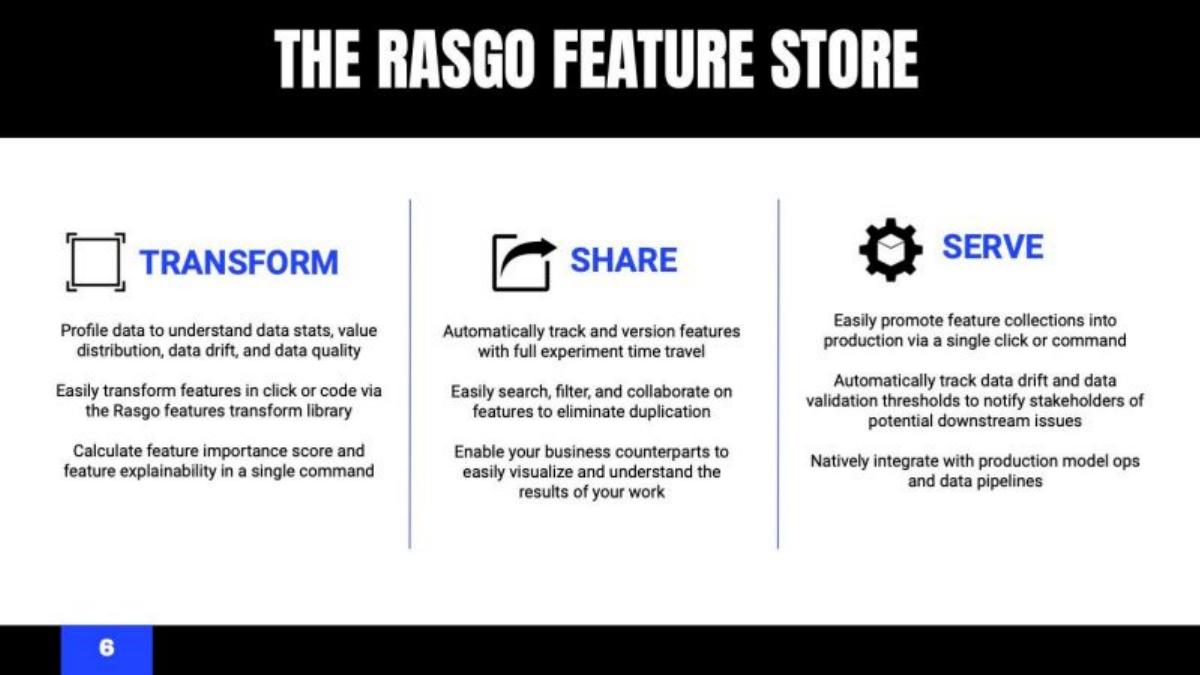
Series A (recorded, medium sector confidence). Machine-learning feature store. Three verbs.
Rasgo deck, slide 6. Exact stored slide matched to this analysis.
Our analysis: Organises a technical product around three actions a data scientist takes, in order.
Evidence and limitation: Three columns of capabilities; no screen or output.
What a founder can adapt: Name the two to four things users do with your product as verbs, in the order they do them.
Supporting analysis
What the deck claims: "The Rasgo Feature Store." "Transform: Profile data to understand data stats, value distribution, data drift, and data quality." "Share: Automatically track and version features with full experiment time travel." "Serve: Easily promote feature collections into production via a single click or command."
Presentation choice: Verbs are easier to remember than component names, and the order follows the work.
When it does not fit: Add one screen or output per verb; text alone doesn't prove the product exists.
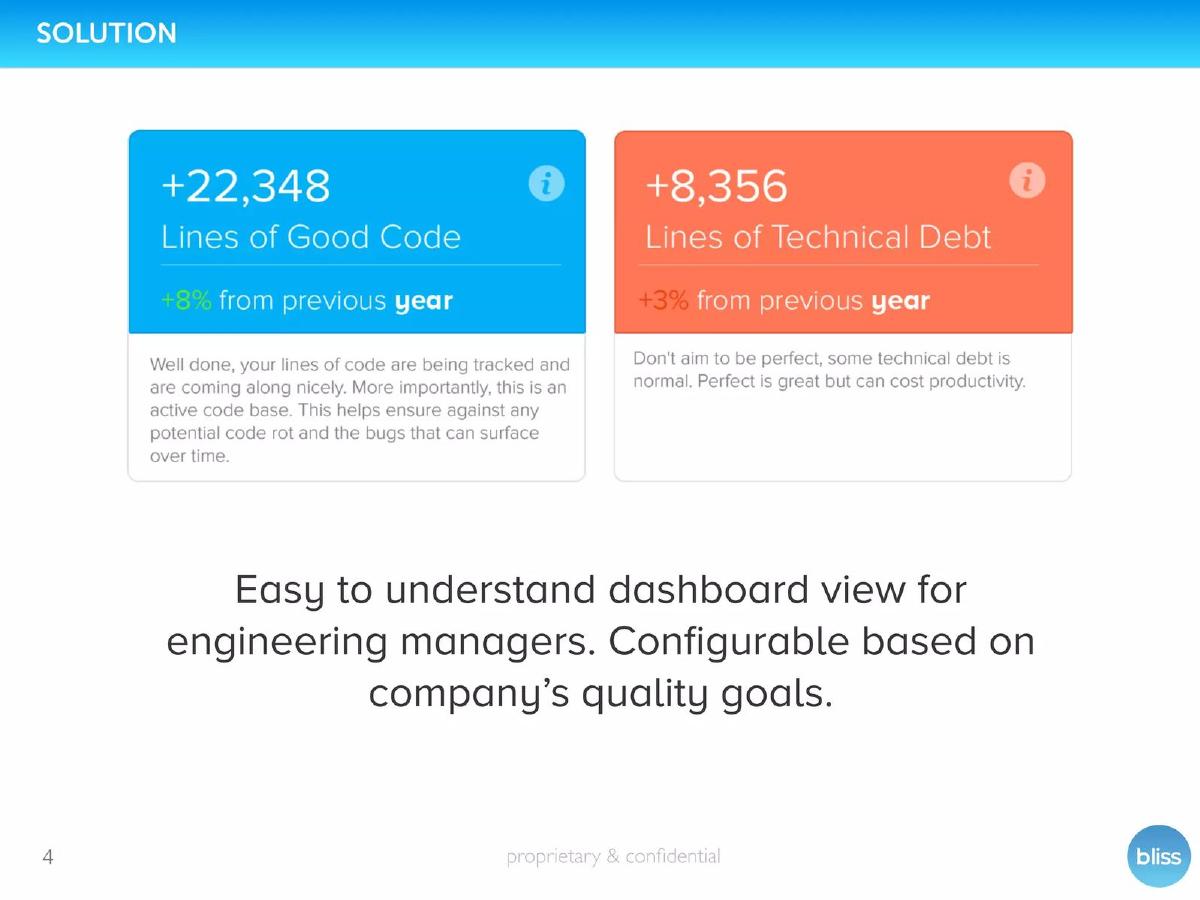
Seed stage (recorded). Engineering metrics for managers. Dashboard cards.
Bliss deck, slide 4. Exact stored slide matched to this analysis.
Our analysis: Shows what the buyer (the engineering manager) actually reads, not how the code analysis works.
Evidence and limitation: Two dashboard cards with figures; these appear to be sample figures, not a named customer's results.
What a founder can adapt: Show the one or two numbers your buyer checks every week, in your product's own cards.
Supporting analysis
What the deck claims: "Solution." Two cards: "+22,348 Lines of Good Code, +8% from previous year" and "+8,356 Lines of Technical Debt, +3% from previous year." "Easy to understand dashboard view for engineering managers. Configurable based on company's quality goals."
Presentation choice: Leading with the manager's view speaks to the person who pays.
When it does not fit: Say whether the figures are sample data or a real team's.
Series C (recorded, medium sector confidence). Data labeling for machine learning. Named components.
Scale deck, slide 6. Exact stored slide matched to this analysis.
Our analysis: Tells the investor the product has three parts but shows none of them.
Evidence and limitation: Three labels; "solved the data problem" is a claim with no figure.
What a founder can adapt: Replace each box with one small screen or output from that component.
Supporting analysis
What the deck claims: "Our Solution." "We've solved the data problem. Scale is an API-driven platform for reliable, high-quality labeled data." Three grey boxes: "Customer Platform", "Labeler Platform", "AI Engine". "There are 3 primary components to our product."
Presentation choice: Naming both the customer side and the labeler side does show it is a two-sided system.
When it does not fit: Don't use "solved" without a quality or speed figure beside it.
Stage not disclosed (recorded). Container deployment and management. Two icons.
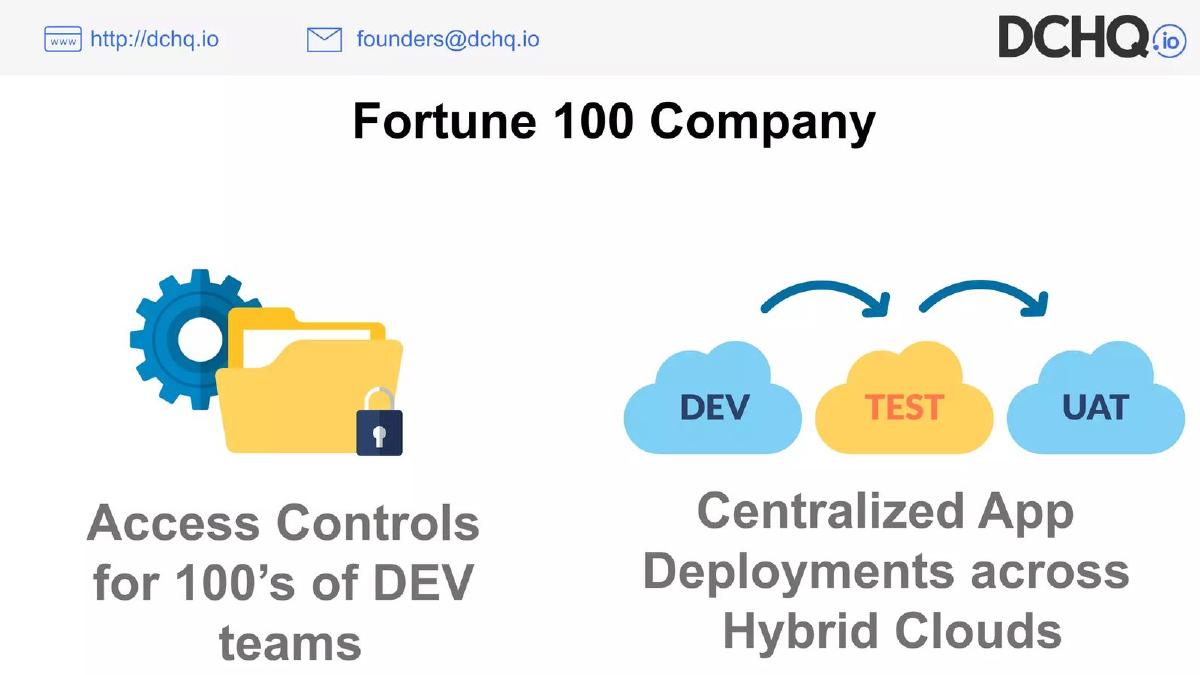
DCHQ deck, slide 5. Exact stored slide matched to this analysis.
Our analysis: Included for contrast: it names a customer type and two capabilities but shows neither the product nor what changed for the customer.
Evidence and limitation: Two phrases and icons; the customer is unnamed and no result is given.
What a founder can adapt: Show the deployment screen that customer uses and one result (teams onboarded, time to deploy).
Supporting analysis
What the deck claims: "Fortune 100 Company." "Access Controls for 100's of DEV teams." "Centralized App Deployments across Hybrid Clouds." Icons: a gear and folder; clouds labelled DEV, TEST, UAT.
Presentation choice: A Fortune 100 use case is a strong signal if it is backed up.
When it does not fit: Don't rely on icons to stand in for the product.
How the product is presented, whether something real is shown, and whether the developer and end-user sides are separated.
Example
Product
Presented as
Real screen or output
Developer vs user
CommandBar
In-app command bar
End-user view + setup notes
Mock screen
Yes
Render
Cloud hosting
Lifecycle map
No
Engineering teams
Rasgo
Feature store
Three verbs
No
Data teams, not split
Bliss
Engineering metrics
Dashboard cards
Yes
Managers
Rapid API
API marketplace
Code in, block out
Illustration
Developers
Scale
Data labeling
Three boxes
No
Customer and labeler named
DCHQ
Container deployment
Icons + phrases
No
No
Key Takeaways
Show both sides: what the developer sets up and what their users get.
Place the product on the workflow engineers already follow.
Show code or effort before and after, if the product removes work.
A labelled box diagram is not a product; show a screen, a config or an output.
Build your developer tool product slide
Start with who touches the product, then show what each of them sees.
Developer side. What the engineer installs, writes or configures, shown as real code or a config screen.
User side. What their users or managers see as a result.
Workflow. Which stages of the engineering work you cover.
Work removed. The code, steps or time before and after.
Copyable framework: The developer [configures X] (screen or code). Their [users/managers] get [result] (screen). It covers [stages]. Before: [effort]. After: [effort].
Illustrative example 1 — written by us
Before: Access Controls for 100's of DEV teams. Centralized App Deployments across Hybrid Clouds. [icons]
After: [Screenshot: deployment view across DEV, TEST, UAT] Caption: [customer type] deploys [number] apps across [clouds]; [result, e.g. time to deploy before and after].
What improved: Our illustrative rewrite; not DCHQ's wording. Bracketed parts are placeholders to fill with real facts. It replaces icons with the product and adds a result.
What this guide adds
The library already has a general product slide guide, product slides by stage, and SaaS, fintech, healthcare, edtech, climate, food, media, marketplace, AI and real estate product guides. The SaaS guide covers business software used by non-technical teams; this page covers tools whose buyer or user is an engineer, where the product often has no screen of its own.
Sector labels come from the sector recorded for each published teardown (high confidence for Render, Bliss and DCHQ; medium for CommandBar, Rasgo, Rapid API and Scale, which are also tagged SaaS or AI). None of these seven slides appears in another guide. Other slides from the Bliss, Rasgo and Scale decks are used elsewhere in the library for different lessons.
Four ways developer tool decks show the product
Two views (CommandBar, Bliss): what the end-user or manager sees, with what the developer configures labelled beside it.
The engineering lifecycle (Render): the product's features placed on the stages engineers already work through.
Before and after (Rapid API) or verbs (Rasgo): the work removed, or the three things the product does.
Named components (Scale, DCHQ): boxes or icons with labels. Easy to make, but the investor sees no product.
Common mistakes
Boxes instead of product. Labelled components don't show the product exists.
Buyer and user blurred. Say who configures it and who benefits.
Unreadable feature lists. Two features per stage in large type beats eight in small type.
Unbacked speed claims. "In minutes" needs a real setup time.
Diagnostic checklist
Developer and user sides named.
A real screen, config, code or output.
Features placed on a known workflow.
Work removed shown before and after.
Sample data labelled as sample.
Frequently asked questions
How we chose these examples
Corpus: published pitch deck teardowns on StartupFundraising.com. Founder-uploaded private decks are excluded.
Selection (2026-09-27): we took teardowns whose recorded sector is developer tools (high or medium confidence) with a stored slide image and readable text mentioning the product, platform, features or how it works. We viewed twelve candidate slides, left out slides already used in other guides, slides that were not about the product (a values manifesto from Platform.sh, a customer tweet from Twilio, a hardware positioning slide) and duplicates from the same deck, and kept seven that show different ways of presenting a developer product. DCHQ is included as a weaker example for contrast.
Sector is the category recorded for each teardown (confidence given in the section above). Stages as recorded: CommandBar, Bliss and Rapid API, seed; Rasgo, Series A; Render, Series B; Scale, Series C; DCHQ, not disclosed.
Review: stored slide images were checked on 2026-09-27 and matched to company, deck and slide number, and quoted text was read from the images (editorial model review). No person has yet completed an editorial review of this page.
Claims and figures are as shown on the slides; we have not verified them. We make no claim that any slide caused a fundraising outcome.