CommandBar’s 7-slide Seed deck is a study in efficiency, eschewing standard templates for a rigorous, four-part logical thesis. The company defines itself as a search-based interface for software, aiming to solve the 'suboptimal UI' problem that currently supports billion-dollar incumbents like WalkMe and Zendesk. By citing early market signals—a customer with $30k MRR paying $500/month—and comparing their potential ACV to Algolia’s $20k-$40k range, they provide a concrete roadmap for value capture. The deck is notably light on traditional metrics and lacks a formal 'Ask' slide, relying inste…
Key takeaways
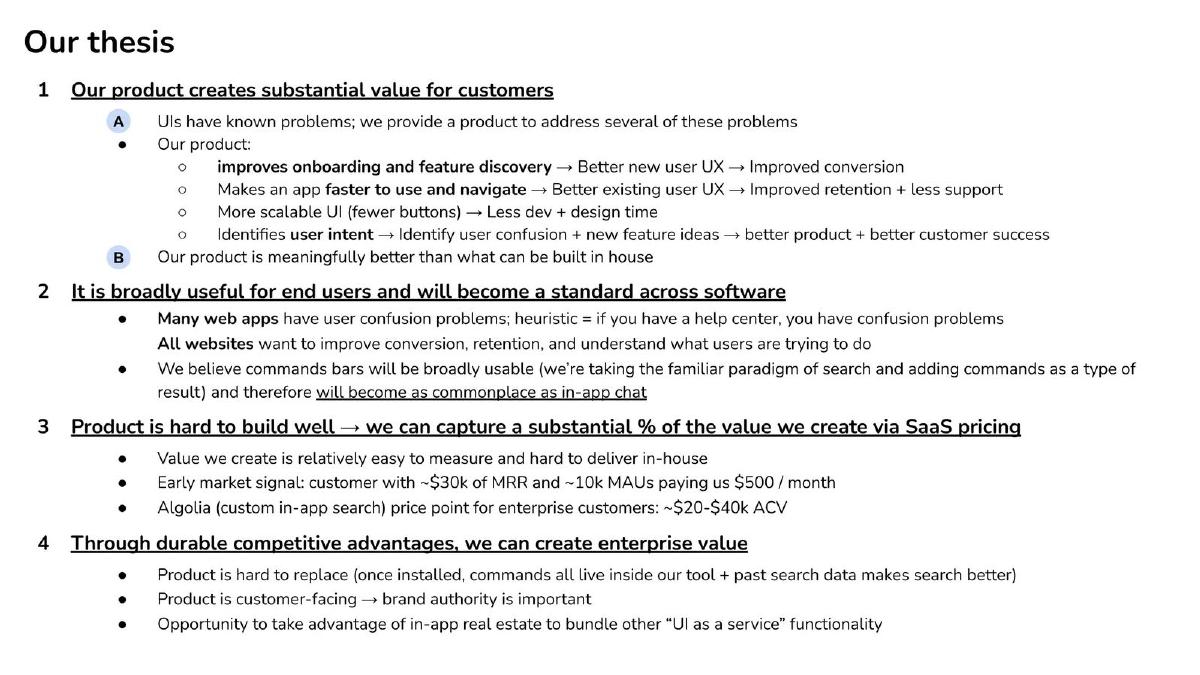
- The deck uses a structured four-point thesis on Slide 4 to argue for the product's value, scalability, and defensibility.
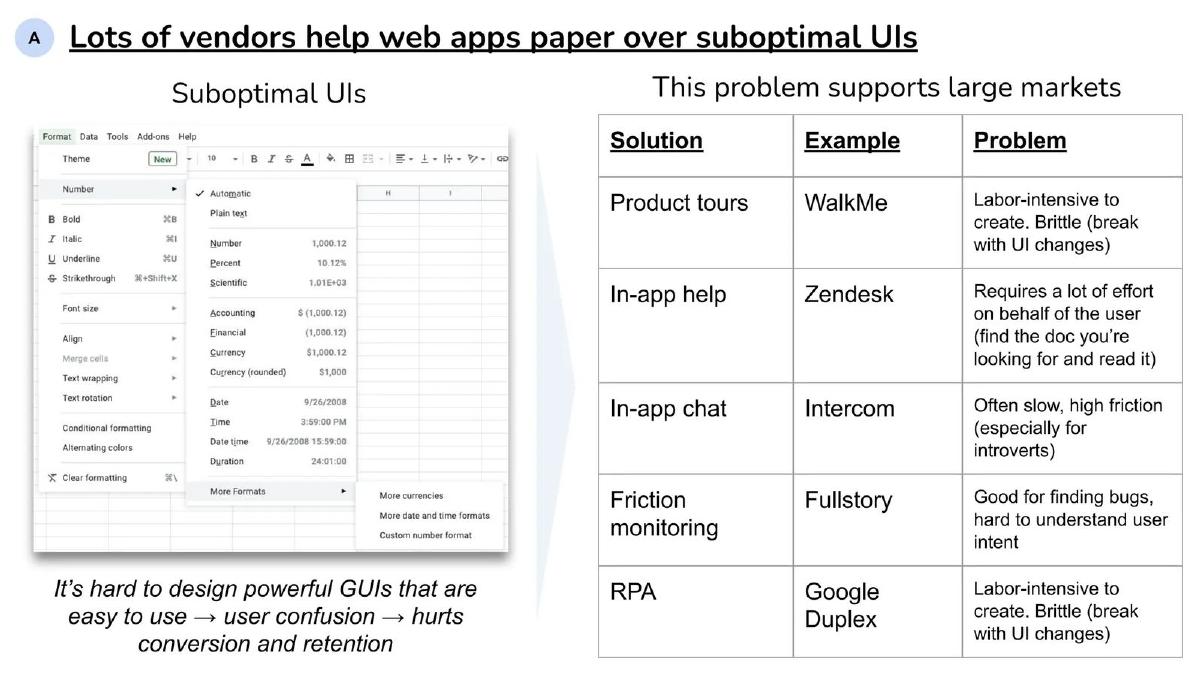
- CommandBar positions itself against the 'suboptimal UI' problem, citing competitors like WalkMe, Zendesk, and Intercom on Slide 5.
- Early traction is quantified on Slide 4 with a specific customer example: ~10k MAUs paying $500 per month.
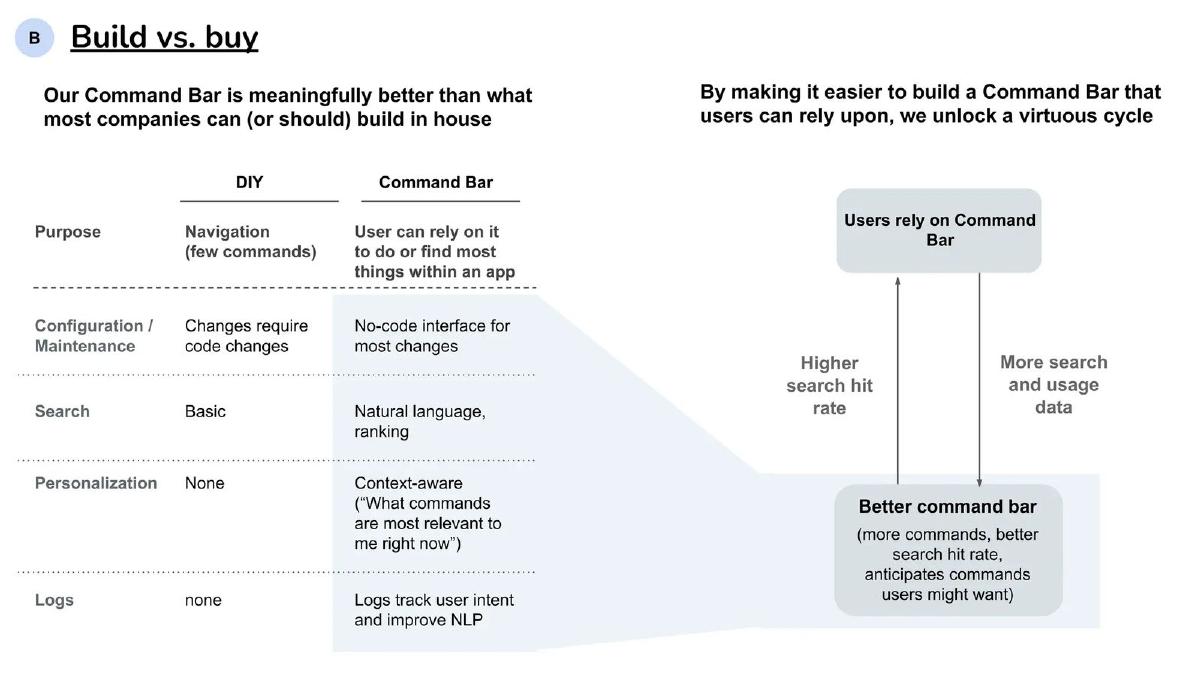
- The 'Build vs. Buy' analysis on Slide 6 highlights no-code configuration and natural language ranking as key differentiators over DIY solutions.
- The team slide (Slide 7) uses a timeline to show 8 years of collaboration across Princeton, McKinsey, and previous startups like codePost.
- The product is framed as a future industry standard, with Slide 4 predicting command bars will become as 'commonplace as in-app chat.'
- Defensibility is argued through data network effects, where past search data makes the tool harder to replace over time (Slide 4).
- The deck completely omits a financial 'Ask' slide, a roadmap, and a traditional market size (TAM) slide.
Slide 1: Title Slide
The deck opens with a minimalist title slide containing only the company name, CommandBar , in a plain sans-serif font against a white background. There is no tagline, date, or presenter information. This sets a tone of functional simplicity that mirrors the product's value proposition.
Slide 2: Product Definition
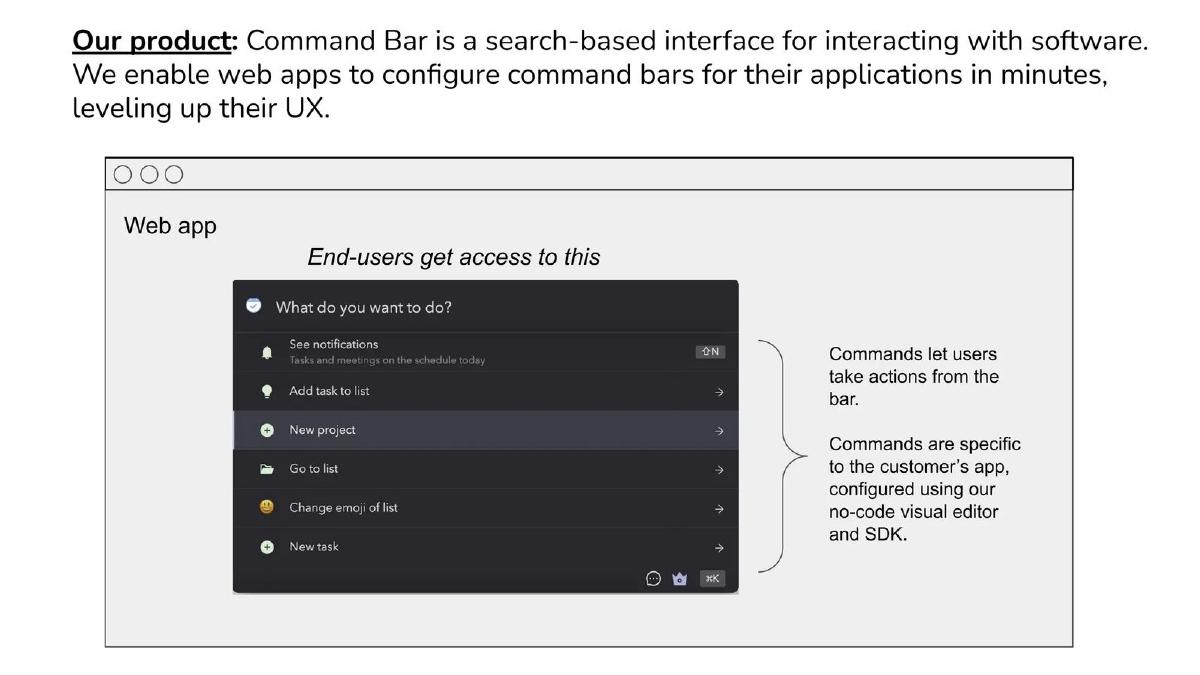
Slide 2 defines the product immediately: "Command Bar is a search-based interface for interacting with software." The slide explains that they enable web apps to configure these bars in minutes. The visual component shows a mock-up of a command bar within a generic "Web app" interface. The mock-up includes specific actions like "See notifications," "Add task to list," and "New project." Annotations on the right clarify that these commands are specific to the customer's app and are configured using a "no-code visual editor and SDK." This slide establishes the 'what' and the 'how' before diving into the business logic.
Slide 3: The Demo
Slide 3 is a placeholder for a "Demo." In a live pitch, this is where the founders would show the product in action. In the static deck, it serves as a transition point, signaling that the technical feasibility has been proven before moving into the strategic thesis.
Slide 4: Our Thesis
This is the most information-dense slide in the deck, outlining a four-part argument for the company's existence. Point 1 claims the product creates value by improving onboarding, making apps faster to navigate, and identifying user intent. Point 2 argues for broad utility, suggesting command bars will become "as commonplace as in-app chat." Point 3 addresses value capture, noting that the product is hard to build well. They cite a specific traction metric: a customer with "~$30k of MRR and ~10k MAUs paying us $500 / month." They also benchmark against Algolia’s "~$20-$40k ACV" for enterprise customers. Point 4 focuses on enterprise value and defensibility, stating the product is "hard to replace" once installed due to the accumulation of search data.
Slide 5: The Problem Landscape
Slide 5 contextualizes CommandBar within the broader software ecosystem. It uses a table to show how other companies "paper over suboptimal UIs." It lists WalkMe (Product tours), Zendesk (In-app help), Intercom (In-app chat), Fullstory (Friction monitoring), and Google Duplex (RPA). For each, it identifies a flaw—such as being "labor-intensive," "brittle," or "high friction." The slide concludes that it is hard to design powerful GUIs, and the resulting user confusion hurts conversion and retention, creating a massive market for a better solution.
Slide 6: Build vs. Buy
Slide 6 addresses the inevitable investor question: "Why wouldn't a company just build this themselves?" It compares a "DIY" approach to "Command Bar." The DIY version is characterized by basic search, code-heavy maintenance, and no personalization. CommandBar offers "Natural language, ranking," a "No-code interface," and "Context-aware" personalization. The right side of the slide illustrates a "virtuous cycle" where higher search hit rates lead to more usage data, which in turn creates a better command bar that anticipates user needs.
Slide 7: The Team
The final slide focuses on the founders' history. Rather than listing individual accolades, it shows a unified path. The timeline starts at Princeton Computer Science and moves through McKinsey, Bain Capital, and AngelList . It highlights that the group has founded two previous entities together: Basis and codePost . The headline emphasizes their long-term relationship: "We’ve known each other for 8 years and have spent the bulk of that time working together." This slide aims to de-risk the investment by proving the team can execute and stay together.
What CommandBar Does Well
The CommandBar deck is an excellent example of a thesis-driven pitch . Instead of following the standard 'Problem-Solution-Market-Team' template, it builds a logical case for why this specific product category is inevitable. By anchoring their value to established categories like in-app chat (Intercom) and search-as-a-service (Algolia), they help investors visualize the potential scale without needing a traditional TAM slide.
The use of a "Build vs. Buy" slide is particularly effective for developer-tool or UI-infrastructure startups. It preemptively strikes at the most common objection from technical investors. Furthermore, the team slide is a masterclass in establishing founder-team fit . By showing a literal pipeline of their shared history, they present themselves as a single, battle-tested unit rather than a collection of individuals.
What is Missing from the Deck
The most glaring omission is a formal 'Ask' slide . There is no mention of the amount being raised, the valuation, or the intended use of funds. While this information is often shared in the email body or during the meeting, its absence in the deck makes the document feel more like a strategic white paper than a fundraising tool.
Additionally, there is no roadmap . Investors generally want to see what the product becomes in 18-24 months. While Slide 4 mentions the opportunity to bundle other "UI as a service" functionality, it lacks a concrete timeline or feature set. The deck also lacks broad market metrics . While the Algolia comparison is smart, the deck doesn't quantify the total number of web apps that could benefit from this, leaving the investor to do the math on the total addressable market.
What Founders Should Copy
Founders should emulate the structured logic of Slide 4 . Instead of vague claims about "disruption," CommandBar breaks its value proposition into four testable hypotheses. This allows an investor to agree with the logic step-by-step. If an investor agrees that UIs are suboptimal (Point 1) and that this will become a standard (Point 2), the investment becomes a matter of 'when' rather than 'if.'
The competitive table on Slide 5 is also worth copying. It doesn't just list competitors; it categorizes them by the type of solution they provide and explains the specific friction points of those categories. This positions CommandBar not just as a better tool, but as a superior approach to an entire class of problems. Finally, the traction-by-example method (Slide 4, Point 3) is a great way for early-stage companies to show product-market fit when they don't yet have an aggregate dashboard of impressive MRR growth.
Frequently asked questions
- What is the core problem CommandBar aims to solve?
- According to Slide 5, the core problem is 'Suboptimal UIs.' The deck argues that it is difficult to design powerful graphical user interfaces (GUIs) that remain easy to use. This leads to user confusion, which negatively impacts conversion and retention. They position their search-based interface as a way to 'paper over' these UI flaws more effectively than existing solutions like product tours or in-app help docs.
- How does CommandBar justify its pricing and market potential?
- On Slide 4, the company uses a two-pronged approach. First, they cite an early signal: a customer with $30k MRR and 10k MAUs paying them $500/month. Second, they anchor their potential value to Algolia, noting that custom in-app search command points for enterprise customers range from $20k to $40k ACV. This suggests a clear path to high-value SaaS contracts.
- What makes CommandBar's product defensible against in-house development?
- Slide 6 outlines the 'Build vs. Buy' argument. A DIY solution is described as having basic search and requiring code changes for updates. In contrast, CommandBar offers a no-code interface, natural language ranking, and context-aware personalization. Slide 4 adds that the product becomes harder to replace once installed because it accumulates search data that improves the tool's performance over time.
- How is the team's background presented?
- Slide 7 uses a flow-chart style timeline rather than individual headshots. It emphasizes that the founders have known each other for 8 years. Their collective pedigree includes Princeton Computer Science, McKinsey, Bain Capital Private Equity, and AngelList. It also shows they previously founded Basis and codePost together, suggesting a high level of execution certainty and 'founder-team fit.'
- What are the most significant omissions in this deck?
- The deck is missing several standard slides: there is no 'Ask' slide detailing how much they are raising or the terms, no financial projections, no detailed roadmap of future features, and no traditional TAM/SAM/SOM market sizing. It relies almost entirely on the logical strength of its 'Thesis' to carry the pitch.