Web3 Product Slides: 7 Real Crypto Pitch Deck Examples
How crypto and blockchain startups show their product: four steps beside the wallet screen, a live insurance app on a test network, a mining dashboard.
Web3 Product Slides: Real Crypto Pitch Deck Examples
Seven product slides from web3 decks (bitcoin cashback, flight-delay insurance on Ethereum, browser-based mining, a crypto exchange, fractional ownership of real assets, anime crowdfunding with a token, and on-chain fund management), shown in full. Crypto products are hard to picture, so investors want to see who uses it, what they do, where the money or token moves, and what the blockchain adds. The stronger slides show a real screen or a clear flow of money; the weaker ones list steps in text.
TL;DR
A web3 product slide should show what the user sees and where the money moves, in plain words. Lolli numbers four steps beside its wallet and reward screens and says merchants pay the commission. Etherisc shows its flight-delay insurance app running on an Ethereum test network. JSEcoin shows its mining dashboard between a list of apps and the two ways people use it. FTX lays out six trading products with a note under each. Koia explains fractional ownership in four steps from buying the asset to returning proceeds. Twilight Coin draws how fans, creators and distributors exchange items and its token. Superfund lists steps for fund managers and depositors in text, the weaker example here.
Web3 product slides
Each example shows the exact stored slide above its analysis and links to the full teardown. Stronger examples first. Claims and figures are as shown on the slides; we have not verified them.
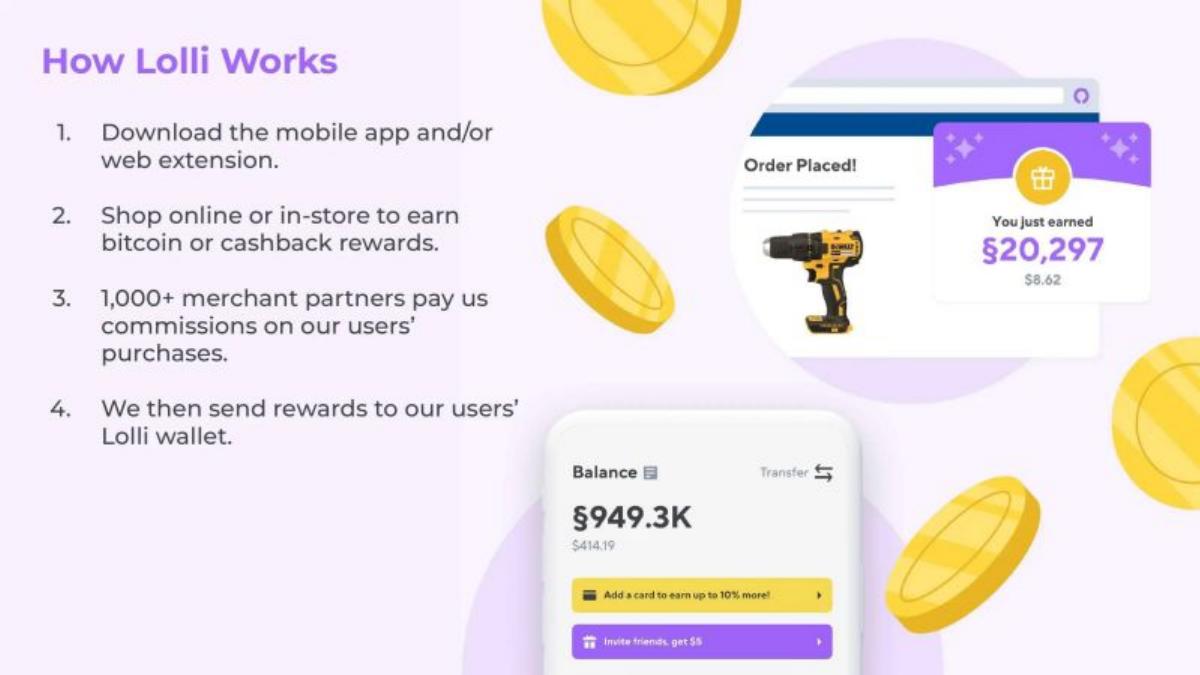
Lolli product slide — slide 5
Series B (recorded). Bitcoin and cashback rewards for shopping. Four steps beside the app.
Lolli deck, slide 5. Exact stored slide matched to this analysis.
Our analysis: The clearest example here: the steps cover the user, the merchant and the money, and the screens show a reward landing.
Evidence and limitation: Four steps, real screens with amounts, and a merchant count (1,000+); no volume on this slide.
What a founder can adapt: Number what the user does, add the step where you get paid, and show the screen where value arrives.
Supporting analysis
What the deck claims: "How Lolli Works." "1. Download the mobile app and/or web extension." "2. Shop online or in-store to earn bitcoin or cashback rewards." "3. 1,000+ merchant partners pay us commissions on our users' purchases." "4. We then send rewards to our users' Lolli wallet." Screens show "Order Placed!", "You just earned" a reward shown in satoshis and dollars ($8.62), and a wallet balance ($414.19).
Presentation choice: Step 3 answers "who pays?" inside the product slide, so crypto reads as a normal cashback business.
When it does not fit: Show the dollar value next to any crypto unit; unfamiliar units alone confuse readers.
Stage not recorded. Flight-delay insurance on Ethereum. The live app.
Etherisc deck, slide 3. Exact stored slide matched to this analysis.
Our analysis: It proves the product runs by showing a real screen and saying where and when it launched.
Evidence and limitation: A screenshot of a working app with its web address and launch date; no policy numbers.
What a founder can adapt: Show your working screen with the address and the date it went live.
Supporting analysis
What the deck claims: "Flight delay insurance, fdd.etherisc.com." "First operational insurance application on the Ethereum blockchain in September 2016 for devcon2." "Fully automated insurance process with a great user experience." The app shows "Apply for Policy" with a flight search ("JFK - New York, NY, USA John F Kennedy Intl Airport") and a sidebar with "Morden Testnet", a block number, contract and account.
Presentation choice: A web address and the test network details let an investor check it exists.
When it does not fit: Say what happens after purchase (the automatic payout); the screen only shows the first step.
Seed (recorded). Browser-based cryptocurrency mining. The dashboard with two user types.
JSEcoin deck, slide 5. Exact stored slide matched to this analysis.
Our analysis: It pairs the screen with who uses it and how, and links every part so it can be checked.
Evidence and limitation: A real dashboard, links to each product and two user types; no user numbers on this slide.
What a founder can adapt: Put your main screen in the middle, your products on one side and your user types on the other.
Supporting analysis
What the deck claims: "Product." "Web Platform", "Desktop & Mobile Apps", "Blockchain Explorer", "3rd Party Software: Wordpress Plugin, Joomla Plugin, Woocommerce Gateway." "JSECOIN offers two mining pools." "Publishers place a code snippet on their website and visitors opt-in and mine while viewing their content." "Self-miners can use the platform or apps to mine from internet connected devices." A dashboard shows balances, a hash-rate chart and a "Stop Mining" button.
Presentation choice: Naming both user types (publishers and self-miners) explains the two sides of the network.
When it does not fit: Three columns is a lot; cut the link list if the screen already shows the product.
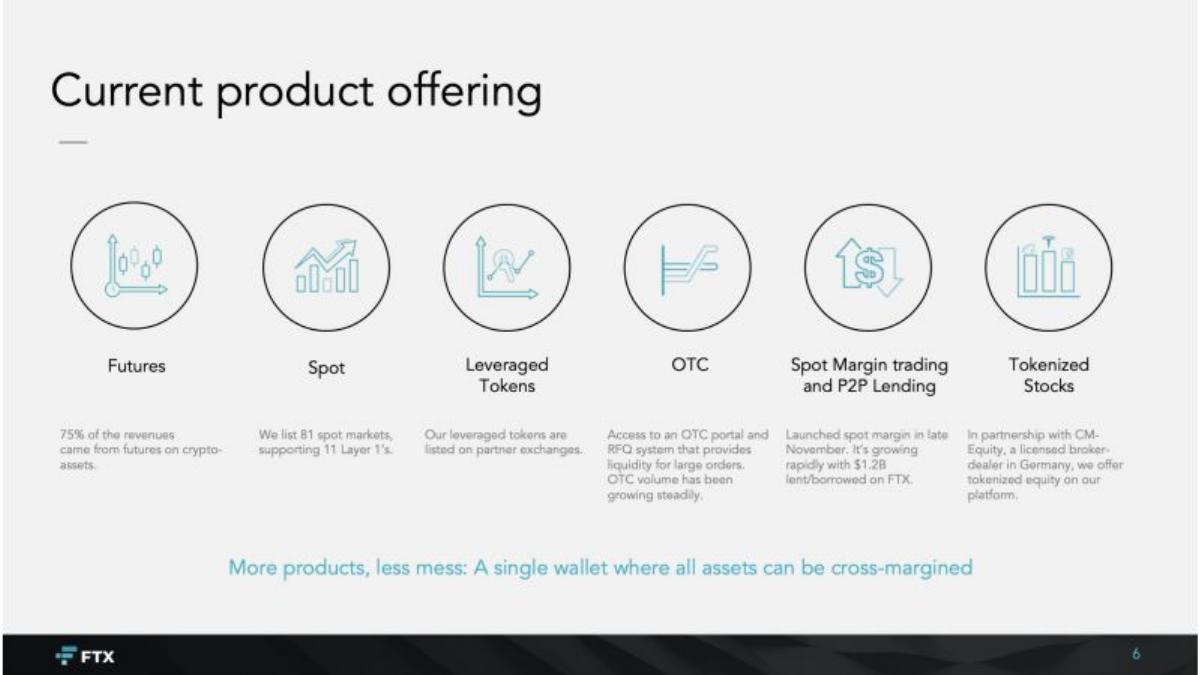
Series B (recorded). Crypto exchange. Six products in a row. FTX filed for bankruptcy in November 2022; the slide is shown for its format only.
FTX deck, slide 6. Exact stored slide matched to this analysis.
Our analysis: For a company with many products, one row with a fact under each shows breadth and which product earns most.
Evidence and limitation: Six products, each with a figure or status note, and one line on why they belong together.
What a founder can adapt: Line up your products, put one number under each, and end with why they belong together.
Supporting analysis
What the deck claims: "Current product offering." "Futures" ("75% of the revenues came from futures on crypto-assets"), "Spot" ("We list 81 spot markets, supporting 11 Layer 1's"), "Leveraged Tokens", "OTC", "Spot Margin trading and P2P Lending" ("$1.2B lent/borrowed"), "Tokenized Stocks." "More products, less mess: A single wallet where all assets can be cross-margined."
Presentation choice: The closing line ties the products into one reason to use a single account.
When it does not fit: Tiny grey notes are hard to read; the figures are the point, so make them larger.
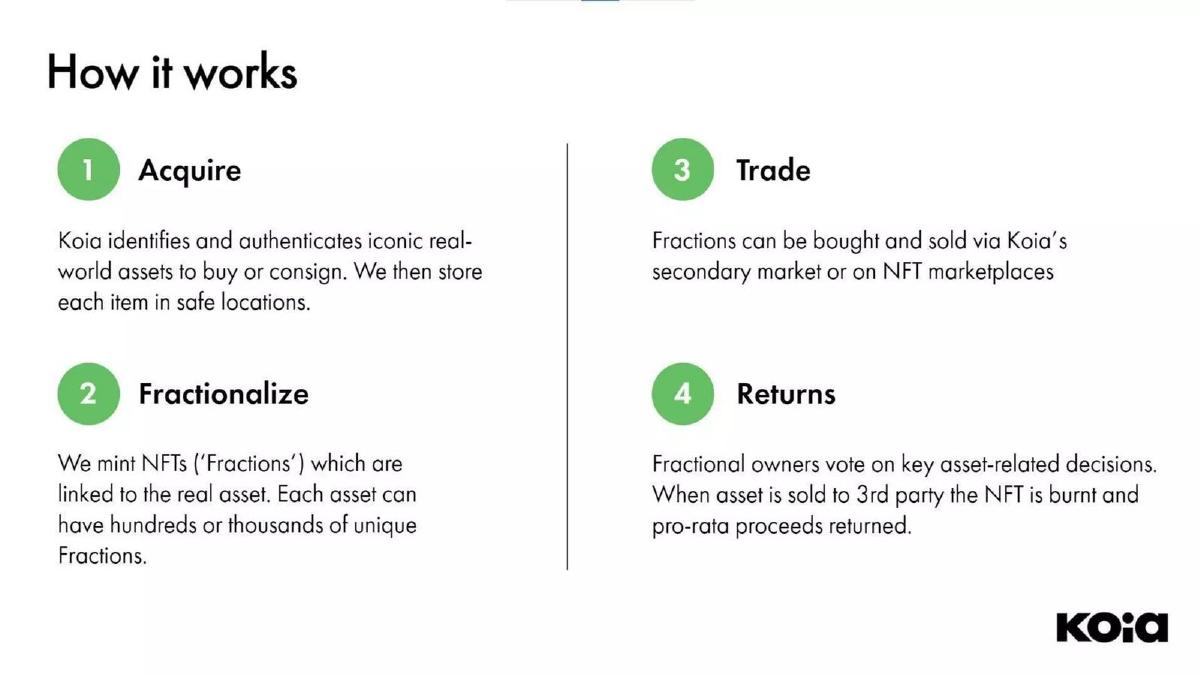
Pre-seed (recorded). Fractional ownership of real-world assets. Four numbered steps.
Koia deck, slide 6. Exact stored slide matched to this analysis.
Our analysis: It follows the asset from start to exit, so the investor sees how an owner gets money back.
Evidence and limitation: Four clear steps from purchase to payout; no screen or figures.
What a founder can adapt: Follow one asset or dollar through your product, ending with how the user is paid.
Supporting analysis
What the deck claims: "How it works." "1 Acquire: Koia identifies and authenticates iconic real-world assets to buy or consign. We then store each item in safe locations." "2 Fractionalize: We mint NFTs ('Fractions') which are linked to the real asset." "3 Trade: Fractions can be bought and sold via Koia's secondary market or on NFT marketplaces." "4 Returns: Fractional owners vote on key asset-related decisions. When asset is sold to 3rd party the NFT is burnt and pro-rata proceeds returned."
Presentation choice: Step 4 covers the exit, which most tokenization slides leave out.
When it does not fit: Add an example asset and a screen; four text blocks describe but don't show.
Stage not recorded (token sale). Anime crowdfunding and licensing with a token. A two-part flow diagram.
Twilight Coin deck, slide 5. Exact stored slide matched to this analysis.
Our analysis: It explains where the token fits: creators and distributors must hold it to issue items and licenses.
Evidence and limitation: A diagram of who pays whom and why the token is needed; no screen or figures.
What a founder can adapt: Draw each party once, label every arrow, and state in one line why your token is required.
Supporting analysis
What the deck claims: "Product." "Fundraising for Production: Fans purchase digital items." "Distribution License Management: Distributors purchase a digital license. Creators can receive reward." "TWC Deposit: Need to deposit TWC to issue digital items and digital licenses." Two diagrams show anime fans, creators, distributors and consumers exchanging deposits, digital items, licenses, rewards and money.
Presentation choice: A diagram of parties and flows makes a multi-sided token model readable.
When it does not fit: Keep arrows few and labelled; small icons and many arrows are hard to follow.
Pre-seed (recorded). On-chain accounts for fund managers and depositors. Text bullets (weaker example).
Superfund deck, slide 6. Exact stored slide matched to this analysis.
Our analysis: Splitting by user is right, but terms like "Smart Account" and "USDC" are unexplained and nothing is shown.
Evidence and limitation: Seven bullets split by user type; no screen, figures or diagram.
What a founder can adapt: Show the dashboard, and give each user type three short steps.
Supporting analysis
What the deck claims: "Product. How it works." "Fund Managers: Connect with your own wallet. Add clients with a single click, spinning up a Smart Account for them. Easily move depositor funds between different yield opportunities, on different chains." "From depositor side: Choose a Fund Manager, based on existing relationship or past performance. Deposit USDC into the Smart Account created by the Fund Manager. Co-manage key aspects of your funds and transactions. Monitor performance and transactions on your own personalised dashboard."
Presentation choice: Included for contrast: it mentions a dashboard without showing it.
When it does not fit: Explain crypto terms in plain words for investors outside the sector.
How the product is presented, whether a real screen appears, and whether the slide says who pays or where money moves.
Example
Product
Presented as
Real screen
Money flow shown
Lolli
Bitcoin cashback
Steps + screens
Yes
Merchants pay commission
Etherisc
Flight-delay insurance
Live app
Yes
No
JSEcoin
Browser mining
Dashboard + user types
Yes
Partly
FTX
Crypto exchange
Product row
No
Revenue share by product
Koia
Fractional real assets
Four steps
No
Proceeds returned
Twilight Coin
Anime crowdfunding token
Flow diagram
No
Yes
Superfund
On-chain fund accounts
Text bullets
No
Deposits only
Key Takeaways
Show a real screen, even an early or test-network version.
Say who pays and where the money or token goes.
Explain crypto terms in everyday words.
Separate the steps for each type of user.
Build your web3 product slide
Start with the screen your user sees, then show where the money or token goes.
Screen. The wallet, app or dashboard with a real amount on it.
Users. Each type of user and the two or three things they do.
Money. Who pays, who receives, and what you keep.
Why on-chain. What the blockchain does that a normal database would not.
Copyable framework: [Screen with amount] [User] [does what] in [n] steps. [Payer] pays [amount]; [recipient] receives [what]; we earn [fee]. On-chain because [reason].
Illustrative example 1 — written by us
Before: Fund Managers: Connect with your own wallet. Add clients with a single click, spinning up a Smart Account for them. From depositor side: Deposit USDC into the Smart Account created by the Fund Manager.
After: [Screenshot: depositor dashboard] Fund managers add a client in one click; each client gets their own account on the blockchain. Clients deposit dollars in a digital dollar (USDC) and can watch every trade. We earn [fee].
What improved: Our illustrative rewrite; not Superfund's wording. Bracketed parts are placeholders to fill with real facts. It adds the screen, explains the terms and states the fee.
What this guide adds
The library has a general product slide guide, product slides by stage, and sector product guides for fintech, marketplaces, consumer and others, but no web3 guide yet. This page looks at how crypto and blockchain products are shown to an investor.
Sector labels come from the sector recorded for each published teardown (high confidence for Lolli, JSEcoin, FTX and Twilight Coin; medium for Etherisc, Koia and Superfund). None of these seven slides appears in another guide. One other slide each from the Lolli and Superfund decks is used elsewhere in the library for a different lesson.
Four ways web3 decks show the product
Real screen (Lolli, Etherisc, JSEcoin): the app, wallet or dashboard, with words around it on how it is used.
Product lineup (FTX): each product in a row with one note on its size or status.
Flow of assets or tokens (Koia, Twilight Coin): numbered steps or a diagram of who gives what to whom.
Text by user type (Superfund): bullet steps for each side, with no screen.
Common mistakes
No screen. Crypto is abstract; a real screen proves the product exists.
Jargon. Terms like smart account or mint need a plain-words version.
No money flow. Investors want to know who pays and what you keep.
Token without a reason. Say why the token is needed, not just that it exists.
Diagnostic checklist
A real screen with an amount.
Steps for each type of user.
Who pays and your fee.
Why it needs a blockchain.
Frequently asked questions
How we chose these examples
Corpus: published pitch deck teardowns on StartupFundraising.com. Founder-uploaded private decks are excluded.
Selection (2026-09-27): we took teardowns whose recorded sector is web3, slides 2 to 8, with a stored slide image and readable text mentioning the product, app, wallet, features or how it works. We viewed nine candidate slides, left out slides already used in other guides, slides without a stored image (Digits, OurSong, Glow Labs), a slide of taglines only (ReCheck's products) and a security slide rather than a product slide (Monico), and kept seven that show different ways of presenting a web3 product. Superfund is included as a weaker example for contrast.
Sector is the category recorded for each teardown (high confidence for Lolli, JSEcoin, FTX and Twilight Coin; medium for Etherisc, Koia and Superfund). Stages as recorded: Lolli and FTX, Series B; JSEcoin, seed; Koia and Superfund, pre-seed; Etherisc and Twilight Coin, not recorded. FTX's November 2022 bankruptcy is public record; its slide is included only as a format example.
Review: stored slide images were checked on 2026-09-27 and matched to company, deck and slide number, and quoted text was read from the images (editorial model review). No person has yet completed an editorial review of this page.
Claims and figures are as shown on the slides; we have not verified them. We make no claim that any slide caused a fundraising outcome.