Rover's 10-slide deck is a concise example of a B2B SaaS platform targeting the retail sector during the peak of the iBeacon trend. The deck prioritizes traction and product utility over complex financial modeling, which is typical for an angel round. By highlighting 450+ retail locations and a community of 200+ developers, the founders established immediate credibility. The narrative moves quickly from the 'what' (beacons) to the 'how' (a CMS for proximity marketing) and the 'who' (experienced founders). While it lacks a formal 'Ask' slide and detailed unit economics, its strength lies in it…
Key takeaways
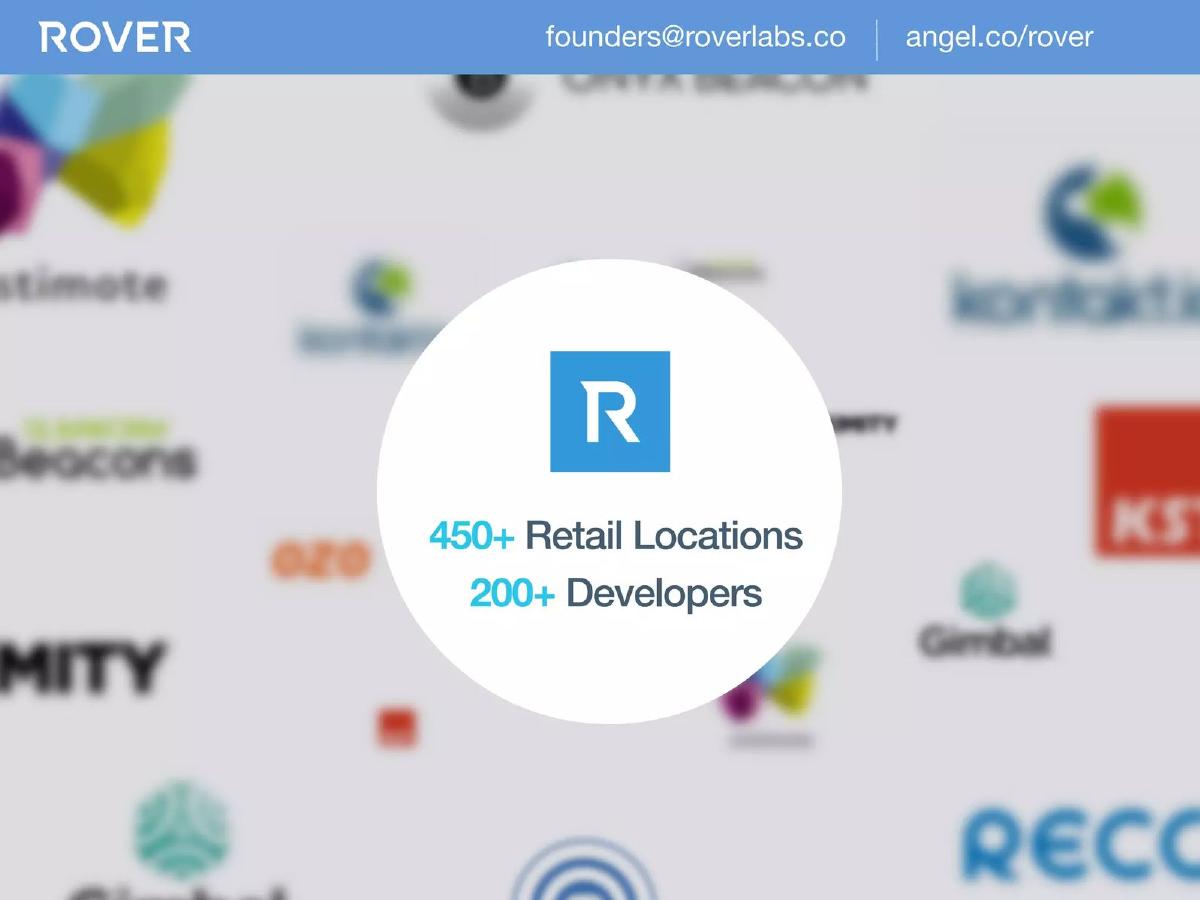
- The deck claims a presence in 450+ retail locations and a community of 200+ developers on slide 2.
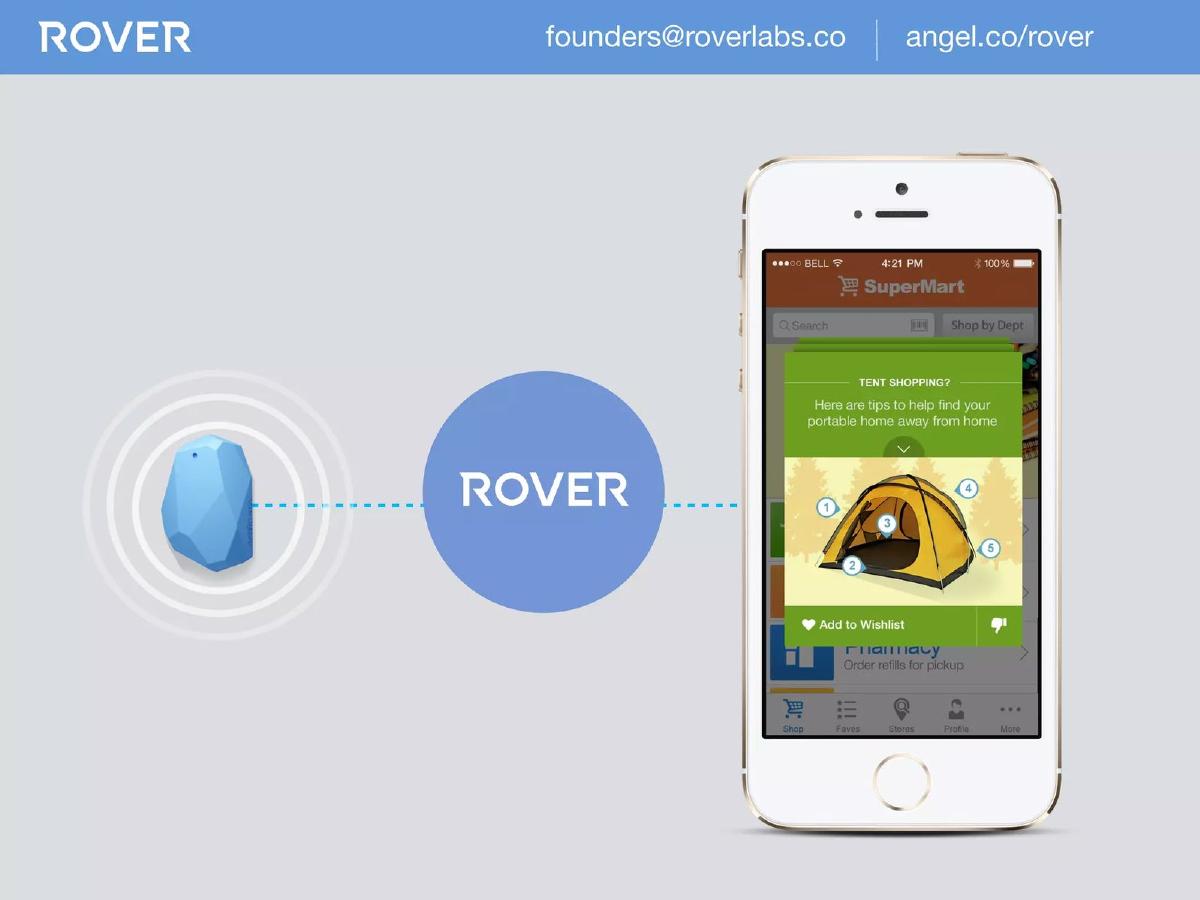
- Rover positions itself as the middleware between beacon hardware and consumer mobile apps on slide 3.
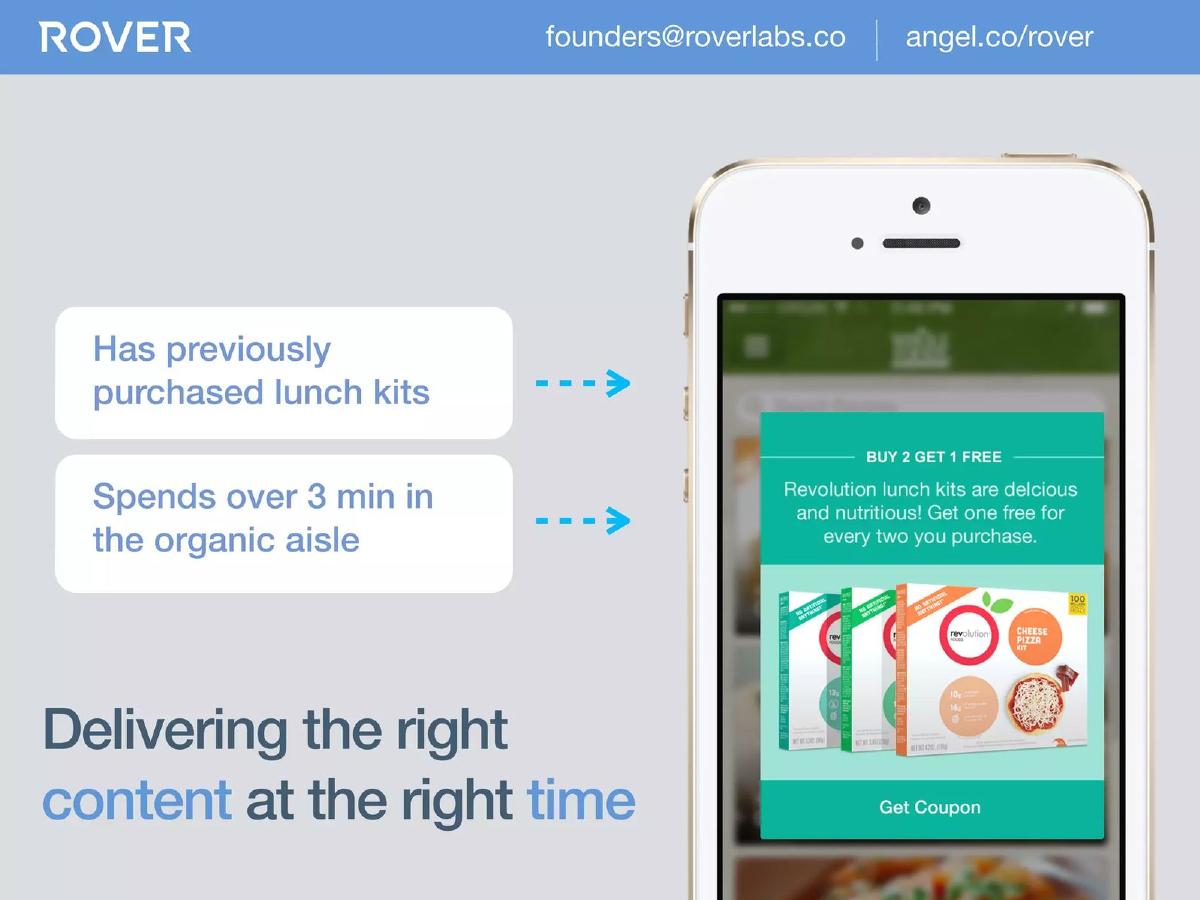
- The platform enables hyper-local targeting, such as triggering coupons after a user spends 3 minutes in a specific aisle, as shown on slide 4.
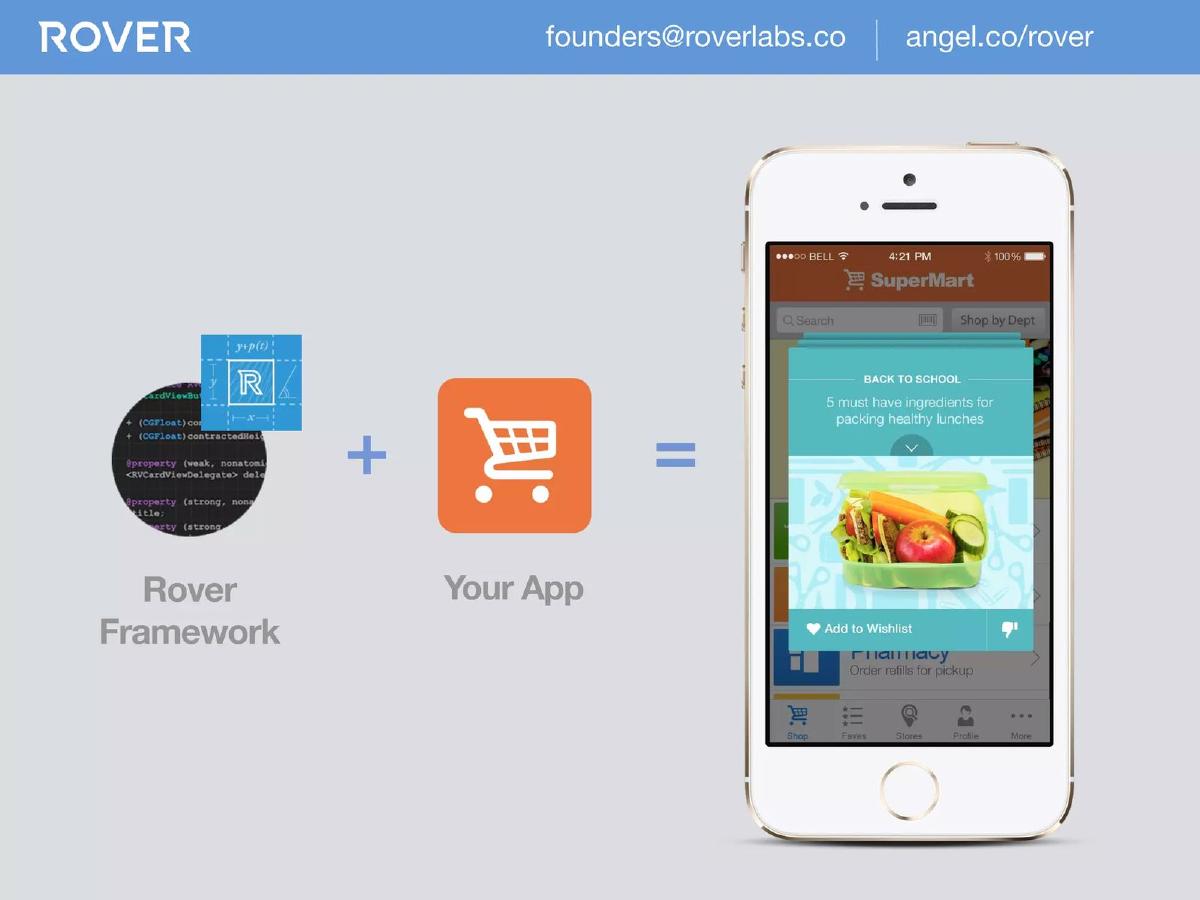
- The 'Rover Framework' is designed for easy integration into existing third-party retail apps, according to slide 5.
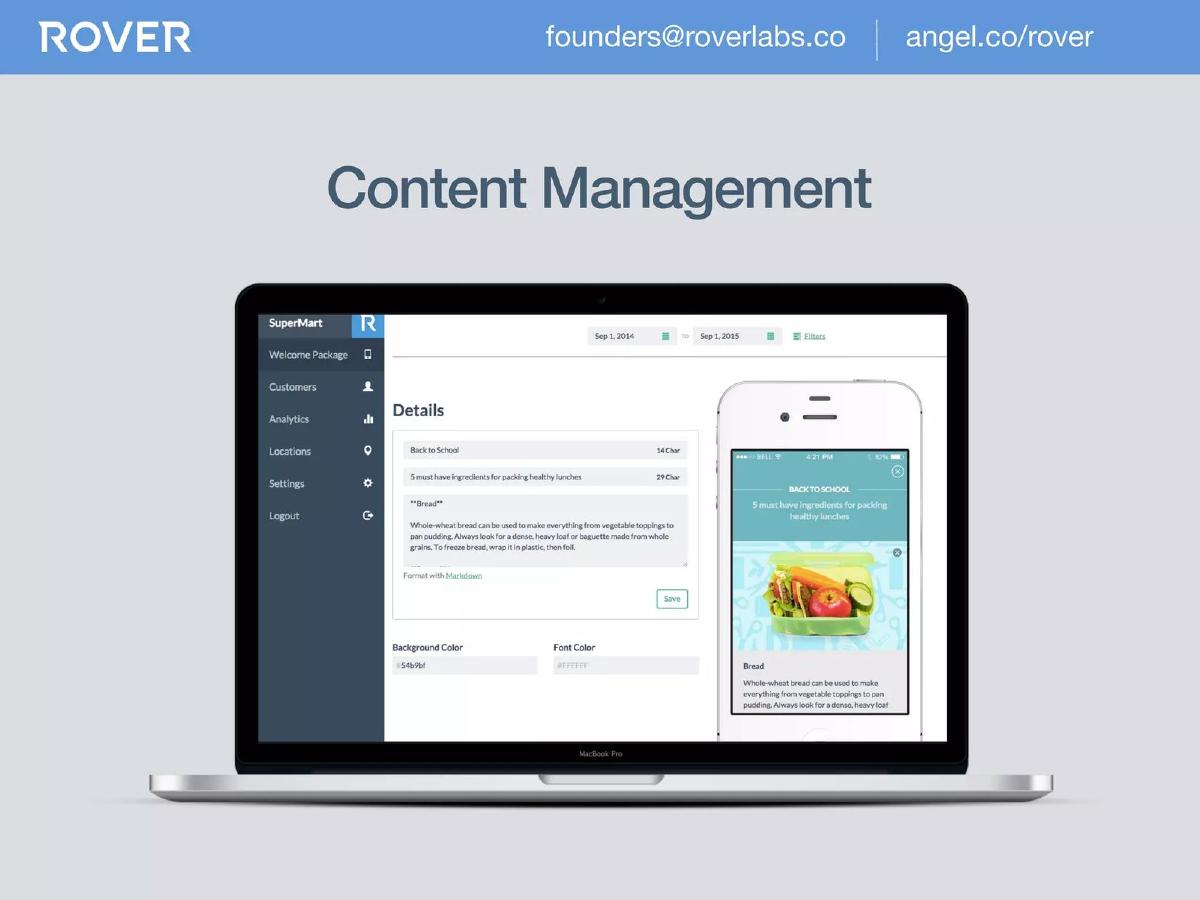
- A dedicated Content Management System (CMS) allows retailers to manage proximity-based messages without coding, as illustrated on slide 6.
- The company highlights partnerships with a 'Major National Grocer' (260+ locations) and a 'Women’s Retail' brand (400+ locations) on slide 7.
- The developer ecosystem is a core pillar of their growth strategy, with a dedicated portal at dev.roverlabs.co mentioned on slide 8.
- The founding team includes a CEO with retail marketing experience and a CTO who is a 2x entrepreneur with a previous exit, detailed on slide 9.
The 2014 Context: The iBeacon Gold Rush
To understand the Rover pitch deck, one must recall the retail technology landscape of 2014. Apple had recently introduced iBeacon, and the industry was enamored with the idea of 'proximity marketing.' Rover’s deck is a product of its time, focusing heavily on the bridge between physical hardware (beacons) and digital engagement (mobile apps). It doesn't waste time explaining why beacons are important; it assumes the investor already knows the trend and instead focuses on why Rover is the best platform for managing them.
Slide 1: Title and Tagline
The deck opens with a minimalist blue slide featuring the Rover logo and the tagline: 'Unleashing the potential of Beacons.' It includes contact information and an AngelList link. This is a standard, clean entry point that establishes the company's focus immediately. There is no ambiguity here; the company is about beacons.
Slide 2: The Traction Tease
Slide 2 is a 'Traction' slide placed unusually early in the deck. It features a blurred background of various beacon hardware logos (Estimote, Kontakt.io, Gimbal) with a central white circle stating: '450+ Retail Locations' and '200+ Developers.' By placing this second, Rover is signaling that they are not just an idea—they have already achieved significant distribution and developer interest. This helps de-risk the investment before the product is even explained.
Slide 3: The Functional Bridge
This slide provides a high-level architectural overview. On the left is a physical beacon; in the middle is the 'ROVER' logo; on the right is a smartphone running a 'SuperMart' app showing a tent promotion. The visual message is clear: Rover is the software 'glue' that connects hardware signals to user-facing mobile content. It positions Rover as a platform-agnostic middleware layer.
Slide 4: The Value Proposition (Contextual Marketing)
Slide 4 moves into the 'Why.' It uses a specific use case: a user who has 'previously purchased lunch kits' and 'spends over 3 min in the organic aisle.' This triggers a 'Buy 2 Get 1 Free' coupon for lunch kits. The headline, 'Delivering the right content at the right time,' is the classic pitch for proximity marketing. It demonstrates that Rover isn't just about location; it's about combining location with user behavior and history.
Slide 5: The Integration Story
One of the biggest hurdles for retail tech is integration. Slide 5 addresses this by showing 'Rover Framework' + 'Your App' = 'Enhanced Experience.' This is a crucial slide for a B2B SaaS company. It tells the investor that Rover doesn't require retailers to build a new app; it enhances the one they already have. This lowers the barrier to entry for potential enterprise clients.
Slide 6: Product Demo (The CMS)
Slide 6 introduces the 'Content Management' side of the platform. It shows a MacBook Pro displaying a dashboard where a non-technical user can edit text, change background colors, and format messages using Markdown. This is a key selling point: it moves the power of proximity marketing from the IT department to the Marketing department. The ability to update in-store experiences in real-time without an app store update is a significant value add.
Slide 7: Enterprise Proof Points
This slide doubles down on the traction mentioned in Slide 2 but provides more specificity. It lists a 'Major National Grocer' with 260+ locations and a 'Women’s Retail' brand with 400+ locations. While the names are omitted (likely due to NDAs), the scale is impressive for an angel-stage company. It proves that the 'Rover Framework' is stable enough for large-scale enterprise deployment.
Slide 8: The Developer Ecosystem
Rover recognizes that its growth depends on developers. Slide 8 highlights a 'Growing Enterprise Developer Community of 200+ Developers' and points to dev.roverlabs.co. By showing a dedicated developer portal, Rover demonstrates that they have built the necessary documentation and support infrastructure to scale through third-party implementation, rather than relying solely on their own professional services.
Slide 9: The Founders
The team slide is simple. John Coombs (CEO) is credited with 'Retail and Loyalty Marketing' experience. Sean Rucker (CTO) is described as a '2x Entrepreneur' with a 'Previous Exit.' This provides a balanced mix of domain expertise and entrepreneurial 'been-there-done-that' credibility. In an angel round, the team is often the most important factor, and this slide hits the necessary high notes.
Slide 10: Closing
The deck ends as it began, with the logo and contact info. It’s a standard bookend that leaves the 'Unleashing the potential of Beacons' message as the final thought.
What Works in the Rover Deck
Clarity of Purpose: Within the first three slides, any investor would understand exactly what Rover does. They are the software layer for beacons. In a crowded market, this level of clarity is a competitive advantage.
Traction-First Narrative: By leading with the number of locations and developers, Rover bypasses the 'will people use this?' question. They prove people are using it before they even explain how it works.
Focus on the 'Marketer' as the User: The inclusion of the CMS slide (Slide 6) is brilliant. It shows that the product is designed for the person who will actually be signing the checks—the marketing manager—rather than just the developer who integrates the SDK.
What is Missing from the Rover Deck
The 'Ask' and Use of Funds: The most glaring omission is a slide detailing how much money they are raising and what they plan to do with it. While the catalogue facts state they raised $100K, the deck itself doesn't ask for a penny. This suggests the deck may have been used as a teaser or as part of a larger conversation where the terms were discussed separately.
Business Model and Unit Economics: There is no mention of pricing. Is it per location? Per 'ping'? Per monthly active user? For a SaaS company, understanding the revenue model is essential for evaluating the investment's potential return.
Competitive Landscape: The beacon space in 2014 was incredibly crowded. Rover mentions hardware partners on Slide 2, but they don't address other software platforms that were competing for the same retail real estate. A 'Competitor Matrix' would have helped define their unique moat.
What Founders Should Copy
The 'Middleware' Positioning: If you are building a tool that integrates into other people's ecosystems, use the 'A + B = C' visual from Slide 5. It is the fastest way to communicate how your product fits into a customer's existing workflow.
The Use Case Slide: Slide 4 is a perfect example of a 'User Story.' It combines a persona (past purchaser), a trigger (3 minutes in an aisle), and an outcome (coupon). Founders should always include at least one slide that walks through a specific, high-value transaction enabled by their tech.
Minimalist Design: Rover avoids the 'wall of text' trap. Every slide has a single, clear message supported by a strong visual. This ensures that the investor stays focused on the founder's pitch rather than squinting to read bullet points.
Frequently asked questions
- How much did Rover raise with this deck?
- According to the catalogue facts, Rover raised $100,000 in an Angel Round in 2014. This is a relatively small amount for a tech startup, suggesting this deck was likely used for early-stage bridge funding or to close a specific group of angel investors.
- What is the core technology behind Rover?
- Rover is built on iBeacon technology, which uses Bluetooth Low Energy (BLE) to transmit signals to nearby smartphones. As shown on slide 3, Rover acts as the software layer that interprets these signals to trigger specific content within a retailer's mobile app.
- Who were Rover's primary customers at the time of this deck?
- The deck identifies two major customer segments on slide 7: a 'Major National Grocer' with over 260 locations and a 'Women’s Retail' brand with over 400 locations. This indicates they were successfully targeting enterprise-level retail chains.
- Is there a financial projection or 'Ask' slide in the deck?
- No. The 10-slide deck completely omits financial projections, use of funds, and a specific 'Ask' amount. This is common in very early-stage decks where the focus is on proving product-market fit and technical viability rather than long-term financial forecasting.
- What is the 'Rover Framework' mentioned on slide 5?
- The Rover Framework is an SDK (Software Development Kit) that developers can add to their existing apps. It simplifies the process of making an app 'beacon-aware,' allowing retailers to add proximity features without building the underlying infrastructure from scratch.