The VergeSense Series A deck is a masterclass in situational relevance. Raised in 2020, the 12-slide presentation ignores traditional startup narrative structures—such as team bios, competitive landscapes, or financial projections—to focus entirely on a specific, urgent use case: COVID-19 workplace safety. By showcasing a 'Social Distancing Score' and 'Smart Cleaning Planner,' VergeSense transformed a general facility management tool into an essential compliance platform. The deck relies heavily on high-fidelity product mockups and dashboard screenshots to prove technical readiness. While it…
Key takeaways
- The deck focuses exclusively on COVID-19 use cases, positioning the product as a solution for social distancing and safe office re-entry (Slide 1).
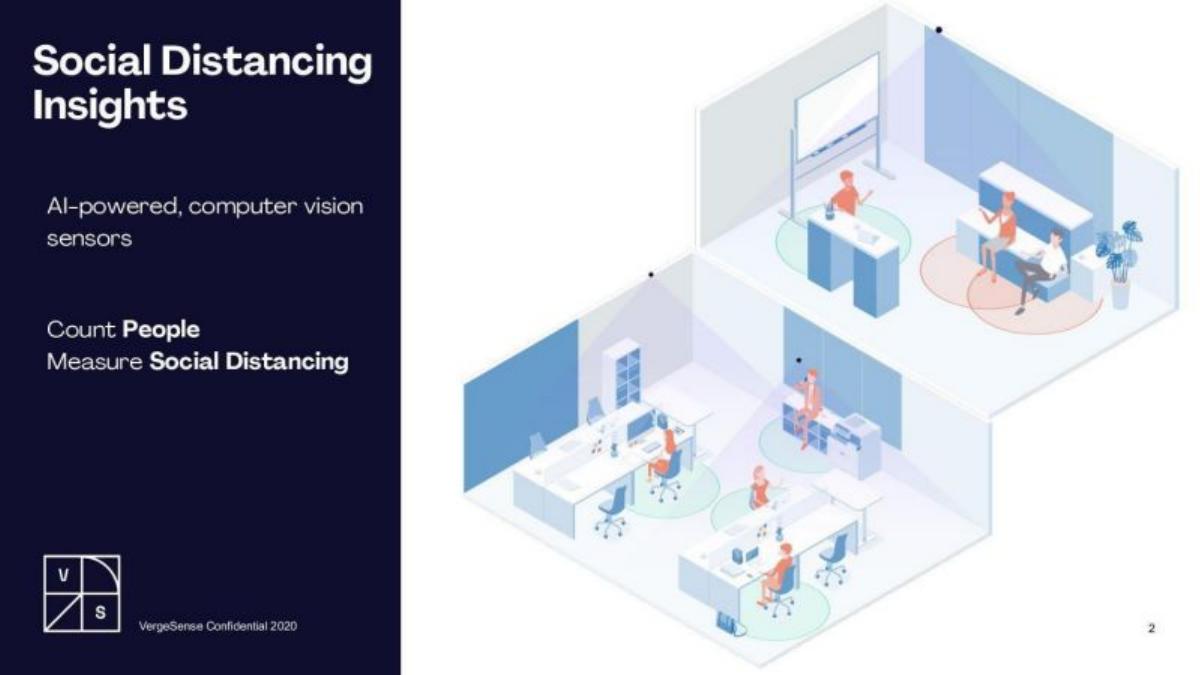
- VergeSense uses AI-powered computer vision sensors to count people and measure physical distance in real-time (Slide 2).
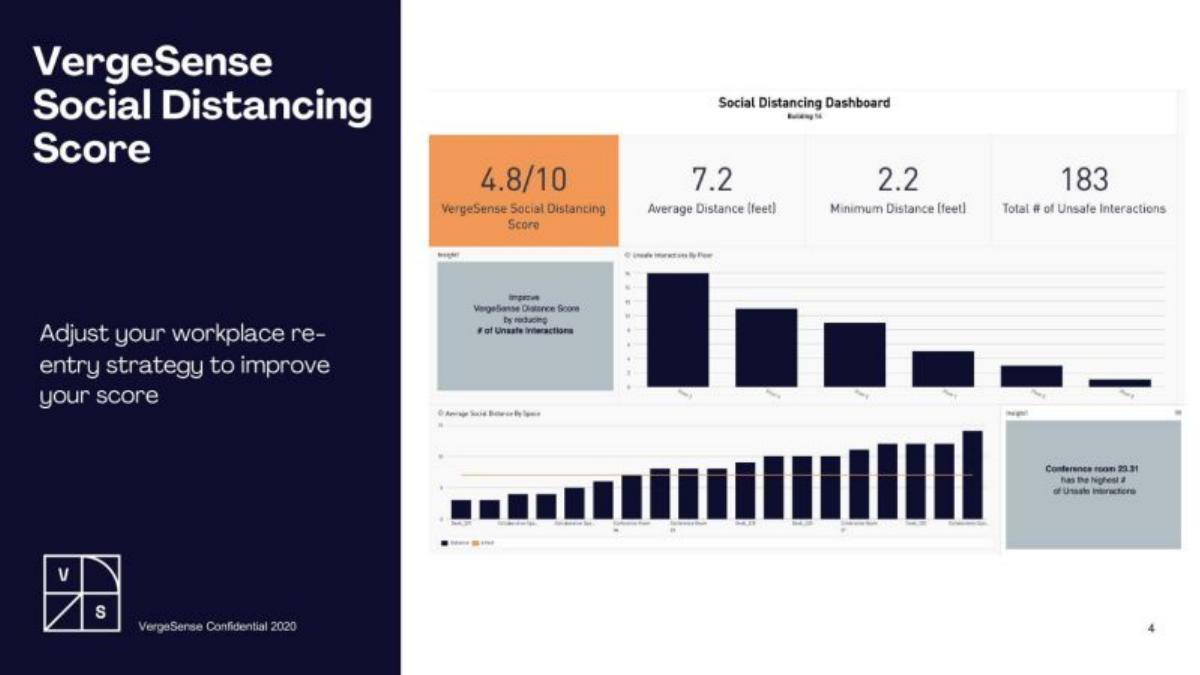
- The product introduces a proprietary 'Social Distancing Score' to help facility managers quantify workplace safety (Slide 4).
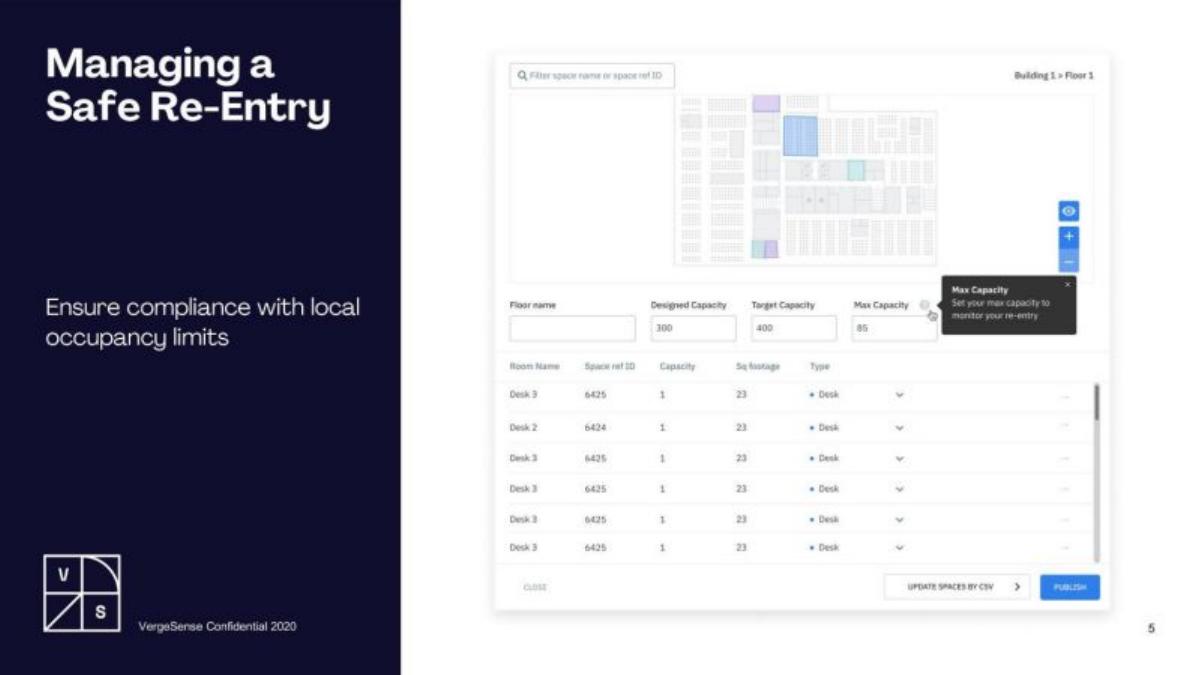
- The platform enables compliance monitoring by setting max capacity limits at the floor and room level (Slide 5).
- Operational efficiency is addressed through a 'Smart Cleaning Planner' that directs janitorial staff based on actual desk usage (Slide 8).
- The deck highlights a 'Hands-free Check-In' feature to reduce physical contact with shared surfaces in meeting rooms (Slide 9).
- Strategic depth is signaled through a list of eight major integration partners, including JLL and OfficeSpace (Slide 10).
- The presentation completely omits a team slide, financial history, market sizing, and a specific funding ask.
The Pivot to Presence: A Product-First Series A
The VergeSense Series A deck, used to raise $9M in 2020, is an anomaly in the world of venture capital presentations. While most Series A decks spend significant time on the 'Why Now' (market trends) and the 'Who' (team expertise), VergeSense assumes the investor already understands the macro-environment of 2020. They dedicate nearly 100% of their real estate to the 'How'—specifically, how their existing computer vision technology solves the immediate crisis of office re-entry.
Slide 1: Title and Theme
The deck opens with a clear, bold statement: COVID-19 Use Cases . This immediately signals that the company is not pitching a generic analytics tool, but a timely solution for a global problem. The branding is minimalist, featuring the VergeSense logo and a geometric pattern that persists throughout the deck.
Slide 2: Social Distancing Insights (The Tech)
Slide 2 introduces the core technology: AI-powered, computer vision sensors . The slide uses an isometric illustration to show how these sensors sit in an office environment. The value proposition is distilled into two verbs: Count People and Measure Social Distancing . By showing the sensors as small black dots on the ceiling, the deck emphasizes that the hardware is unobtrusive.
Slide 3: Heatmapping and Spatial Awareness
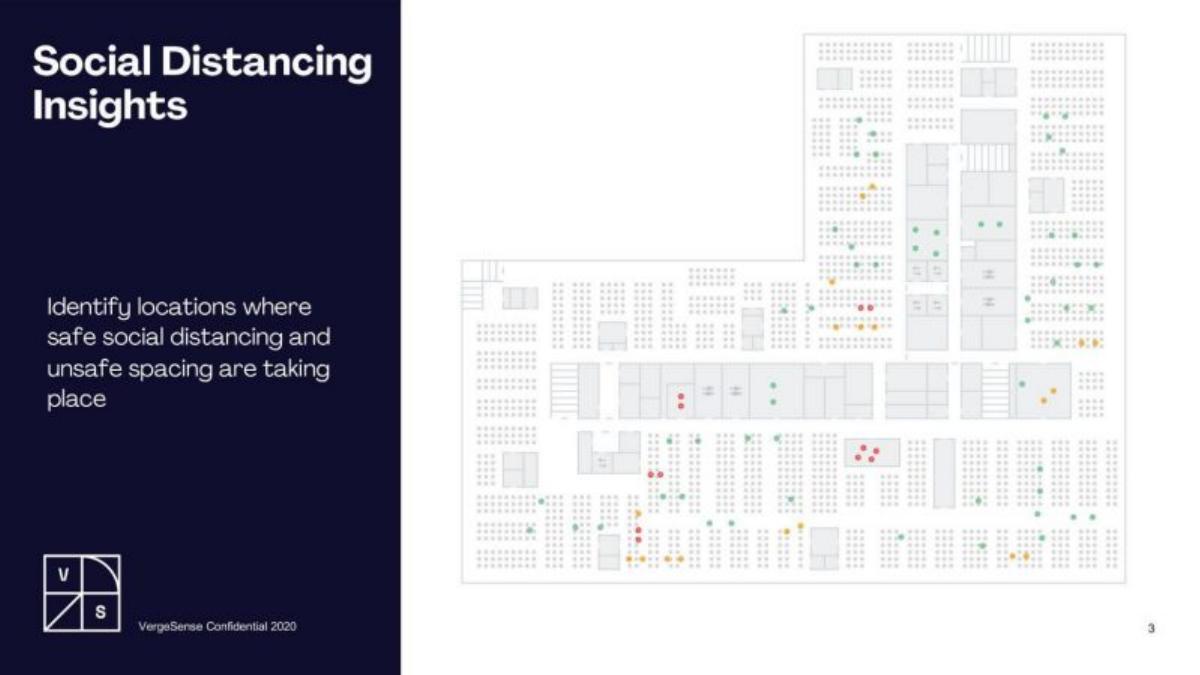
This slide moves from the conceptual to the practical. It displays a floor plan with color-coded dots (green, orange, red). The text states the goal is to Identify locations where safe social distancing and unsafe spacing are taking place . This is a classic 'show, don't tell' slide that demonstrates the granularity of their data.
Slide 4: The Social Distancing Score
VergeSense introduces a proprietary metric on Slide 4: the VergeSense Social Distancing Score . The dashboard mockup shows a score of 4.8/10 , alongside metrics like Average Distance (7.2 feet) and Total # of Unsafe Interactions (183) . This is a brilliant move for a Series A company; by creating a 'score,' they position themselves as the authority and the standard-setter for workplace safety.
Slide 5: Managing Safe Re-Entry
Slide 5 focuses on compliance. It shows a software interface where a manager can set Max Capacity for a floor (set to 85 in the example). The slide explicitly mentions ensuring compliance with local occupancy limits , which was a major legal and HR concern for enterprises in 2020.
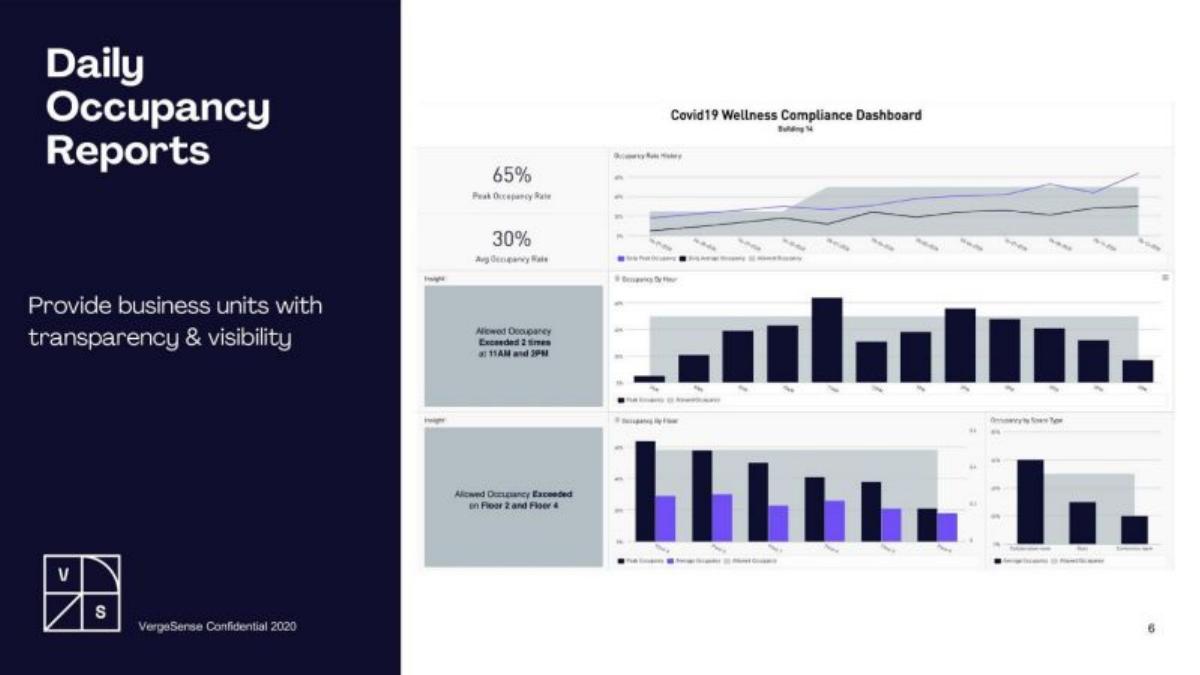
Slide 6: Daily Occupancy Reports
Transparency is the theme of Slide 6. It showcases a Covid19 Wellness Compliance Dashboard . Key metrics include a 65% Peak Occupancy Rate and a 30% Avg Occupancy Rate . The dashboard also highlights specific failures, such as 'Allowed Occupancy Exceeded 2 times at 11AM and 2PM.' This slide proves the platform can provide historical audits, not just real-time views.
Slide 7: Real-Time Alerts
Slide 7 moves into active management. It shows mobile notifications: 'Conference Room Occupancy Exceeded!' and 'Floor Occupancy Exceeded!' . This demonstrates that the system is an 'active' participant in facility management, allowing workplace services teams to intervene the moment a safety threshold is crossed.
Slide 8: Smart Cleaning Planner
One of the most practical applications is found on Slide 8. The Smart Cleaning Planner uses real-time usage data to optimize janitorial schedules. Instead of cleaning every desk every night, the system identifies which desks were actually used. This presents a clear ROI case by potentially reducing cleaning costs while increasing safety for high-traffic areas.
Slide 9: Hands-free Check-In Experience
Slide 9 addresses the 'touch' aspect of the pandemic. By using API integration , VergeSense enables Auto check-in for meetings . The slide shows an iPad outside a conference room, noting that the system can Reduce the need to touch shared surfaces . This expands the product's utility from a 'monitoring' tool to a 'user experience' tool.
Slide 10: Integration Partners
This is arguably the most important 'business' slide in the deck. It lists eight major partners: Spacewell, Comfy, iOffice, OfficeSpace, JLL, Robin, Teem, and Serraview . For a Series A investor, this list validates that VergeSense is already integrated into the workflows of the biggest players in real estate and facility management. It suggests a 'moat' built on ecosystem density.
Slide 11-12: Conclusion and Appendix
The deck ends with a simple THANK YOU / STAY SAFE slide (Slide 11). Slide 12 is a promotional slide for the hosting platform (bestpitchdeck.com) and was not part of the original investor presentation.
What VergeSense Did Right
1. Extreme Focus: In 2020, every enterprise was terrified of the liability and logistical nightmare of reopening offices. VergeSense didn't pitch 'workplace efficiency' (their original pre-pandemic angle); they pitched 'safety and compliance.' They met the market exactly where it was hurting.
2. Product Maturity: The deck is almost entirely composed of high-quality screenshots and dashboards. This gives the impression of a 'plug-and-play' solution that is ready for enterprise deployment, which is critical for a Series A raise.
3. Quantifiable Value: By inventing the 'Social Distancing Score,' they gave facility managers a KPI to report to their CEOs. Startups that provide 'must-report' metrics are much harder to churn than those that provide 'nice-to-know' data.
What is Missing from the Deck
1. The Team: There is no mention of the founders or their backgrounds. Usually, for a $9M raise, investors want to see deep expertise in AI, hardware, or PropTech. This omission suggests this deck might have been a 'Product Addendum' used alongside a more traditional business deck, or that the founders had already established such strong relationships with the investors that a team slide was redundant.
2. Financials and Traction: There are no numbers regarding revenue, growth, or the cost of the hardware. Investors would typically want to know the 'Unit Economics'—how much does a sensor cost to make, and what is the recurring SaaS fee per square foot?
3. The Market: There is no TAM (Total Addressable Market) slide. While the 'office' market is obviously huge, a standard deck would usually quantify the number of square feet or buildings they are targeting.
What Founders Should Copy
1. Use Isometric Illustrations: The illustrations on Slide 2 and Slide 9 are excellent for explaining how hardware interacts with a physical space without the clutter of real-world photography.
2. Lead with Integrations: If you have partners like JLL, put them in the deck. It is the fastest way to build institutional trust. It tells the investor that the 'big guys' have already vetted your tech.
3. Solve the 'Now' Problem: VergeSense is a lesson in agility. They took a general-purpose occupancy sensor and rebranded it as a 'COVID-19 Compliance' tool. Founders should always look for the most urgent, 'bleeding neck' problem their technology can solve and lead with that, even if it's a subset of their long-term vision.
Frequently asked questions
- What is the primary product VergeSense is selling?
- VergeSense sells an AI-powered workplace analytics platform. According to the deck, the system uses computer vision sensors to monitor occupancy, track social distancing, and provide data-driven insights for facility management. During the 2020 raise, this was specifically marketed as a 'Safe Re-Entry' solution for offices returning to work during the pandemic.
- How does VergeSense measure social distancing?
- As shown on Slide 4, the platform calculates a 'Social Distancing Score' (e.g., 4.8/10). It tracks metrics such as 'Average Distance (feet),' 'Minimum Distance (feet),' and the 'Total # of Unsafe Interactions.' This data is visualized through dashboards that identify which specific floors or conference rooms have the highest frequency of unsafe interactions.
- Does the deck include any financial data or traction metrics?
- No. This specific deck is entirely product-focused. It does not list Annual Recurring Revenue (ARR), growth rates, customer counts, or burn rate. It relies on the visual evidence of a working product and a list of high-profile integration partners on Slide 10 to imply market traction and technical validity.
- Who are VergeSense's partners?
- Slide 10 lists eight integration partners: Spacewell, Comfy, iOffice, OfficeSpace, JLL, Robin, Teem, and Serraview. These partnerships are crucial for a Series A PropTech company, as they demonstrate that VergeSense's hardware and data can be easily integrated into existing building management and room booking ecosystems.
- What is missing from this pitch deck?
- This deck is missing almost all standard 'VC' slides. There is no Team slide, no Problem/Solution narrative (beyond the COVID context), no Market Size (TAM/SAM/SOM), no Business Model, and no 'The Ask' slide. It functions more like a product deep-dive or a technical addendum than a standalone fundraising deck.