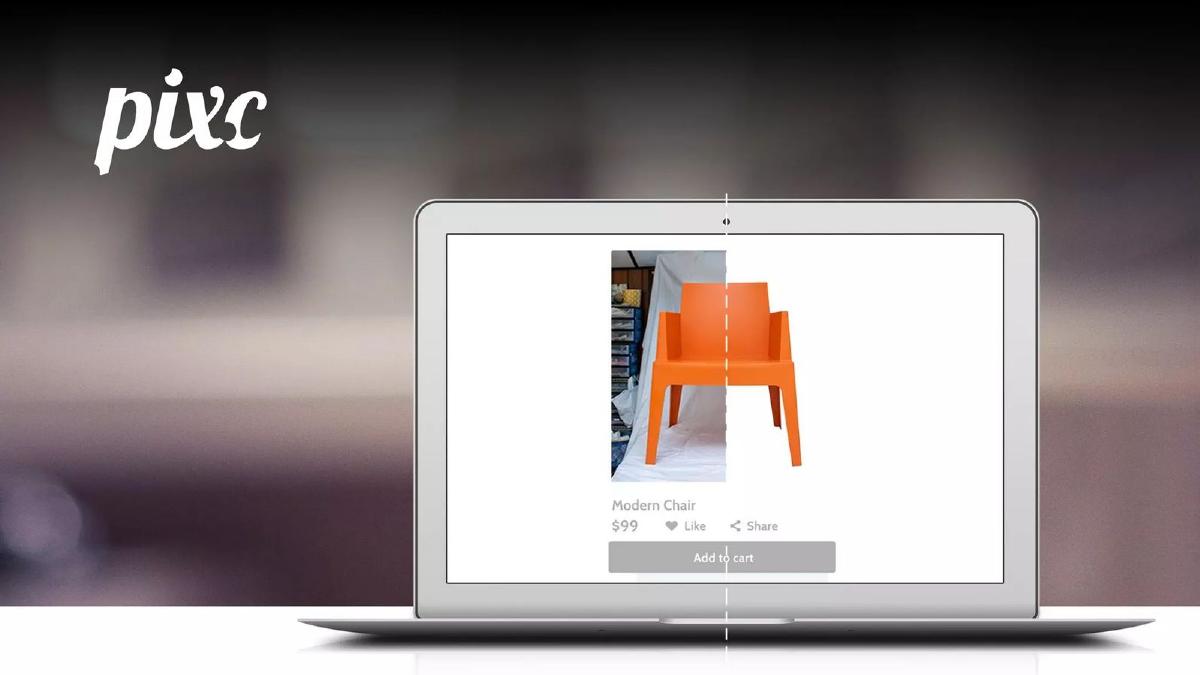
The Pixc pitch deck, presented as part of 500 Startups Batch 13, is a lean, 11-slide presentation (6 slides available for review) that prioritizes visual evidence over dense technical explanations. By focusing on a specific pain point—the time-consuming nature of product image management for online retailers—Pixc establishes immediate relevance. The deck relies heavily on a 'before and after' visual on the cover and a clear revenue growth chart spanning 1Q 14 to 2Q 15 to prove market fit. While it lacks detailed unit economics, a competitive landscape, or a specific financial ask in the revie…
Key takeaways
- The cover slide uses a split-screen visual of a 'Modern Chair' to demonstrate the product's core function: background removal and image optimization (Slide 1).
- The problem is framed through a specific persona: an online retailer uploading 70 new products weekly who lacks the time to manage content (Slide 2).
- Traction is quantified by 'thousands' of images processed and a customer base exceeding 2,500+ (Slide 3).
- The company demonstrates international reach early, citing customers in 14 different countries (Slide 3).
- A revenue growth chart shows a consistent upward trajectory from 1Q 14 through 2Q 15, though specific dollar amounts are omitted from the Y-axis (Slide 4).
- The team slide identifies three key roles: Holly Cardew (Founder & CEO), Sergey Kalaus (Full Stack Engineer), and Paula Jakubik (Community Manager) (Slide 5).
- The deck omits a formal 'Ask' slide, market size (TAM/SAM/SOM) data, and a competitor analysis in the provided sequence.
- Contact information, including an AngelList handle (@pixc), is consistently placed in the header of most slides to facilitate investor follow-up (Slides 2-5).
Introduction: The Demo Day Format
The Pixc pitch deck is a classic example of a Demo Day presentation. These decks are designed to be viewed on a large screen while a founder speaks, meaning they are light on text and heavy on visual impact. The goal is not to answer every possible question but to generate enough interest for a follow-up meeting. This teardown covers the 6 available slides from the 11-slide deck published via SlideShare for 500 Startups Batch 13.
Slide 1: The Visual Hook
The cover slide is exceptionally effective because it functions as a product demonstration without requiring a single word of explanation. It features the pixc logo in the top left and a laptop in the center. The laptop screen shows a 'Modern Chair' priced at $99 . A vertical dashed line bisects the image: the left side shows a raw, unedited photo of an orange chair against a cluttered background; the right side shows the same chair perfectly isolated on a crisp white background. This 'before and after' immediately identifies the company's value proposition: professionalizing e-commerce imagery.
Slide 2: The Relatable Problem
Slide 2 introduces the 'problem' through a specific user persona. Rather than citing broad industry statistics, it focuses on a single 'Online Retailer.' The slide notes that this retailer has 70 new products uploaded each week and Doesn't have time to manage content . The background image of a woman surrounded by colorful textiles reinforces the idea of a busy entrepreneur overwhelmed by the physical and digital demands of retail. This slide is strategically placed to make the investor empathize with the customer's pain point.
Slide 3: Traction and Scale
Slide 3 moves from the 'why' to the 'how well.' It uses a high-quality close-up of a camera lens as a background to maintain thematic consistency. The text provides three key data points: thousands of images processed, 2500+ customers, and a presence in 14 countries. By highlighting the number of countries, Pixc signals that their solution is not geographically constrained, which is a critical factor for venture scale. The '2500+' figure is particularly strong for a Batch 13 startup, suggesting significant early adoption.
Slide 4: The Growth Curve
Slide 4 is a dedicated 'Revenue Growth' slide. It features a line chart plotting 'Quarterly Revenue (USD)' against time, specifically from 1Q 14 to 2Q 15 . The chart shows a consistent upward trend. Notably, there is a sharp increase in the slope between 2Q 14 and 3Q 14 , followed by steady gains through 2Q 15 . While the slide follows the common startup practice of hiding the actual dollar amounts on the Y-axis, the visual 'up and to the right' trajectory is intended to prove that the business model is working and growing.
Slide 5: The Core Team
The team slide (Slide 5) is minimalist. It features black-and-white headshots of three individuals: Holly Cardew (Founder & CEO), Sergey Kalaus (Full Stack Engineer), and Paula Jakubik (Community Manager). The background is a bright, white-walled photography studio. While this slide establishes the core pillars of the company—leadership, technical execution, and customer engagement—it lacks the 'brag sheet' typically seen in decks, such as 'Ex-Google' or 'Stanford Alum.' It relies on the traction shown in previous slides to validate the team's capability.
Slide 6: The Call to Action
The final slide in the sequence is a simple contact slide. It repeats the pixc logo and provides two primary points of contact: founders@pixc.com and angel.co/pixc . The inclusion of the AngelList URL is a direct nudge for investors to view their fundraising profile. This slide serves as a placeholder during the Q&A portion of a pitch, ensuring the contact details remain visible to the audience.
What Works in the Pixc Deck
Clarity of Purpose: Within three seconds of looking at the cover slide, an investor knows exactly what Pixc does. The use of a 'before and after' image is the most efficient way to communicate a service-based software product.
Focus on Momentum: By highlighting 2,500+ customers and a 6-quarter revenue growth chart, the deck shifts the conversation from 'will this work?' to 'how big can this get?' The traction data is the strongest part of the presentation.
Persistent Branding: The inclusion of contact info and the AngelList handle on every slide (except the cover and final) is a smart tactical move for Demo Days, where the audience is constantly distracted.
What is Missing from the Pixc Deck
The 'How': The deck does not explain if the image editing is done via AI, a marketplace of human editors, or a hybrid model. Investors generally want to know the 'secret sauce' or the technical defensibility of the product.
Unit Economics: There is no mention of Customer Acquisition Cost (CAC), Lifetime Value (LTV), or margins. For a high-volume processing business, understanding the cost per image edited is vital to determining profitability.
Market Size: The deck lacks a TAM (Total Addressable Market) slide. While the '14 countries' metric hints at scale, it doesn't quantify the billions of dollars spent annually on e-commerce photography.
Competitive Landscape: There is no mention of how Pixc differs from traditional photo editing agencies or emerging automated tools. A 'magic quadrant' or feature comparison list is omitted.
The Ask: The provided slides do not state how much money the company is raising or what the milestones for the next 18 months will be. This may have been delivered verbally or included in the missing 5 slides of the 11-slide original deck.
Founder Takeaways
Show, Don't Tell: If your product has a visual output, use a 'before and after' comparison on your very first slide. It eliminates the need for a complex 'Solution' slide later. · Use Personas for Problems: Instead of saying 'The e-commerce market is inefficient,' describe a specific retailer uploading 70 items a week. It makes the problem tangible. · Highlight Global Reach: Even if your revenue is modest, showing customers in multiple countries (like Pixc's 14 countries) proves your product has universal utility. · Keep Demo Day Decks Lean: This deck averages fewer than 15 words per slide. This forces the audience to listen to the founder rather than reading the screen.
Frequently asked questions
- What is the primary service Pixc offers based on the deck?
- Based on the visual evidence in Slide 1 and the problem statement in Slide 2, Pixc offers automated or outsourced image editing for e-commerce. The cover shows a raw photo of a chair being converted into a clean, white-background product shot. The problem slide highlights that retailers uploading high volumes of products (70+ per week) struggle with content management, implying Pixc automates the professionalization of these images.
- How does Pixc demonstrate market validation?
- Pixc uses three specific metrics on Slide 3 to show validation: 'thousands' of images processed, '2500+' customers, and a presence in '14 countries.' This combination suggests the product is scalable, has a paying user base, and possesses global appeal rather than being limited to a single geographic market.
- Is the revenue growth shown in the deck significant?
- Slide 4 displays a 'Revenue Growth' chart from 1Q 2014 to 2Q 2015. While the Y-axis (Quarterly Revenue USD) lacks specific numerical values, the slope of the line shows a steady increase with a significant jump between 2Q 14 and 3Q 14. This visual representation is designed to show momentum and product-market fit rather than provide a full financial audit.
- What information is missing from the Pixc team slide?
- Slide 5 identifies the CEO, a Full Stack Engineer, and a Community Manager. However, it omits professional backgrounds, previous company exits, or educational credentials. In a standard pitch, these details are usually included to build 'founder-market fit' credibility. The current version relies on the names and faces alone.
- Why is the AngelList handle included on almost every slide?
- This deck was produced for a 500 Startups Demo Day. In such environments, investors are viewing dozens of pitches in a single session. By placing 'AngelList @pixc' and 'founders@pixc.com' in the top right corner of Slides 2, 3, 4, and 5, the founders ensure that an interested investor can find their profile and initiate due diligence immediately without waiting for the final slide.