The Doxly pitch deck, presented at a Startup Alley event, is a lean, product-focused presentation that prioritizes the 'problem-solution' narrative. By visualizing the chaotic 'Typical M&A Deal Process' (Slide 2), the company establishes a clear pain point: the fragmented nature of legal transactions involving disparate tools like email, notepads, and physical document management systems. The solution is presented as a 'Secure Portal' (Slide 3) that integrates project management, data rooms, and signature tracking. While the deck excels at showing the user interface and specific features like…
Key takeaways
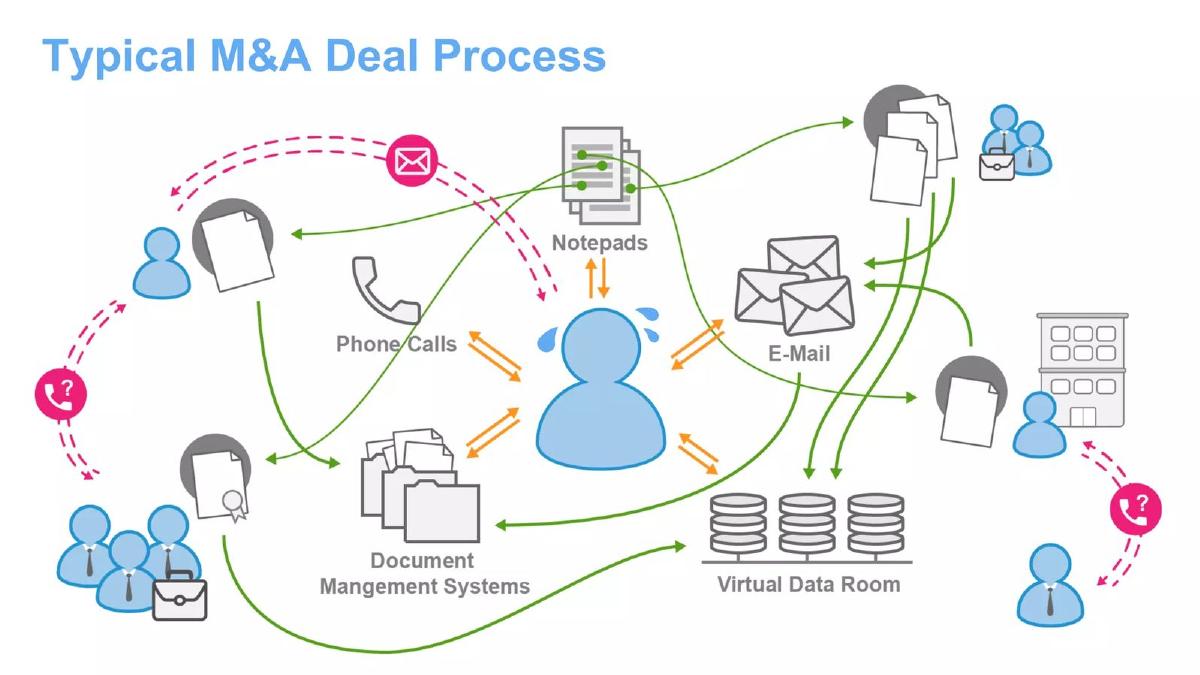
- The deck uses a complex flow chart on Slide 2 to visualize the friction in current M&A workflows, highlighting the reliance on fragmented tools like phone calls and notepads.
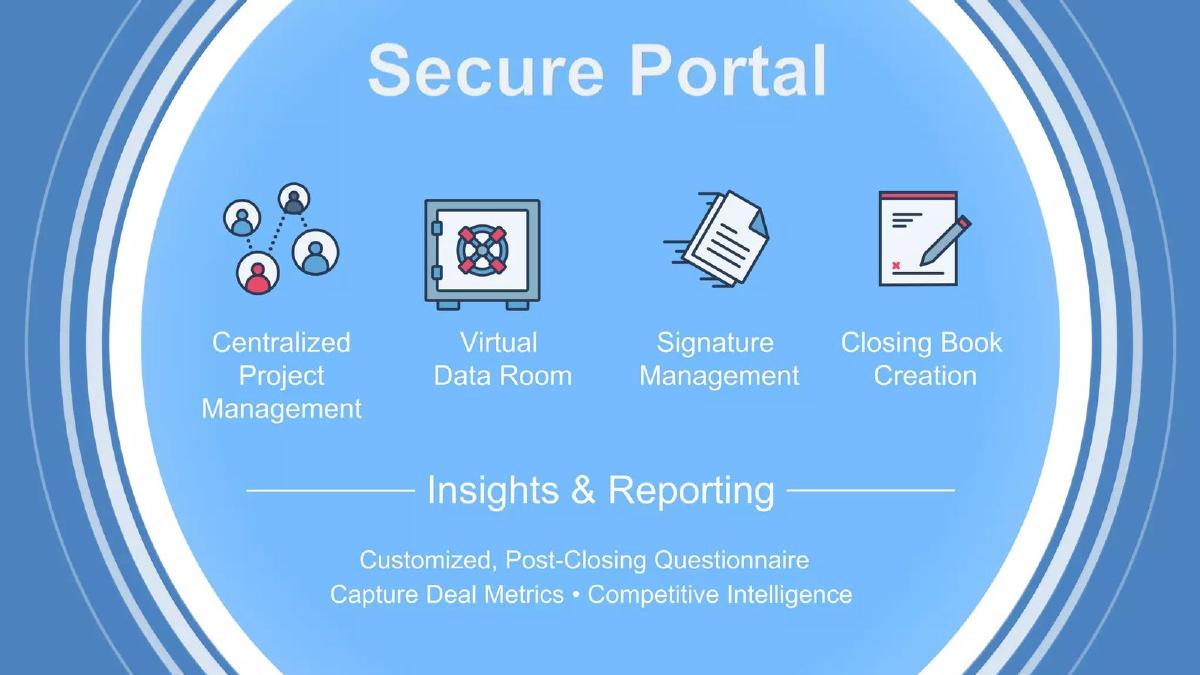
- Slide 3 introduces a four-pillar solution: Centralized Project Management, Virtual Data Room, Signature Management, and Closing Book Creation.
- The platform includes a 'Post-Closing Questionnaire' and 'Competitive Intelligence' features mentioned on Slide 3 to provide value beyond the transaction close.
- Product screenshots on Slide 4 demonstrate a 'Customizable Diligence Request List' and an integrated chat function for internal and external communication.
- Slide 5 highlights 'Click-to-Close Creation,' suggesting a significant reduction in the manual labor required to compile final deal documents.
- The deck lacks a team slide, providing no information on the founders' legal or technical expertise.
- There is no mention of business model, pricing, or go-to-market strategy in the provided slides.
- The presentation concludes on Slide 6 with only a website URL, omitting any specific fundraising targets or milestones.
Doxly Pitch Deck Analysis
Doxly’s presentation is a classic example of a product-led pitch. Rather than leading with big-picture market trends or founder pedigree, the deck dives straight into the operational weeds of M&A. This approach is highly effective for a specialized vertical like legal tech, where the audience needs to believe the founder understands the specific, painful nuances of the workflow.
Slide 1: Title Slide
The deck opens with a minimalist blue slide. There is no text, logo, or tagline on this specific slide in the provided sequence. While it serves as a visual palette cleanser, it provides no immediate context for the viewer.
Slide 2: The Problem - Typical M&A Deal Process
This is the strongest slide in the deck from a narrative perspective. It uses a chaotic diagram to illustrate the 'Typical M&A Deal Process.' The slide identifies several points of friction: Phone Calls , Notepads , E-Mail , Document Management Systems , and Virtual Data Rooms . The central figure is depicted with sweat droplets, surrounded by orange arrows indicating a constant barrage of fragmented information. By visualizing the 'mess,' Doxly sets the stage for a solution that promises order and centralization.
Slide 3: The Solution - Secure Portal
Slide 3 introduces the Doxly 'Secure Portal.' It breaks the value proposition into four functional icons: Centralized Project Management , Virtual Data Room , Signature Management , and Closing Book Creation . Below these, it adds a layer of 'Insights & Reporting,' which includes a 'Customized, Post-Closing Questionnaire' and the ability to 'Capture Deal Metrics' and 'Competitive Intelligence.' This suggests that Doxly isn't just a storage tool, but a data-capture tool that provides value after the deal is done.
Slide 4: Product Deep Dive - Virtual Data Room
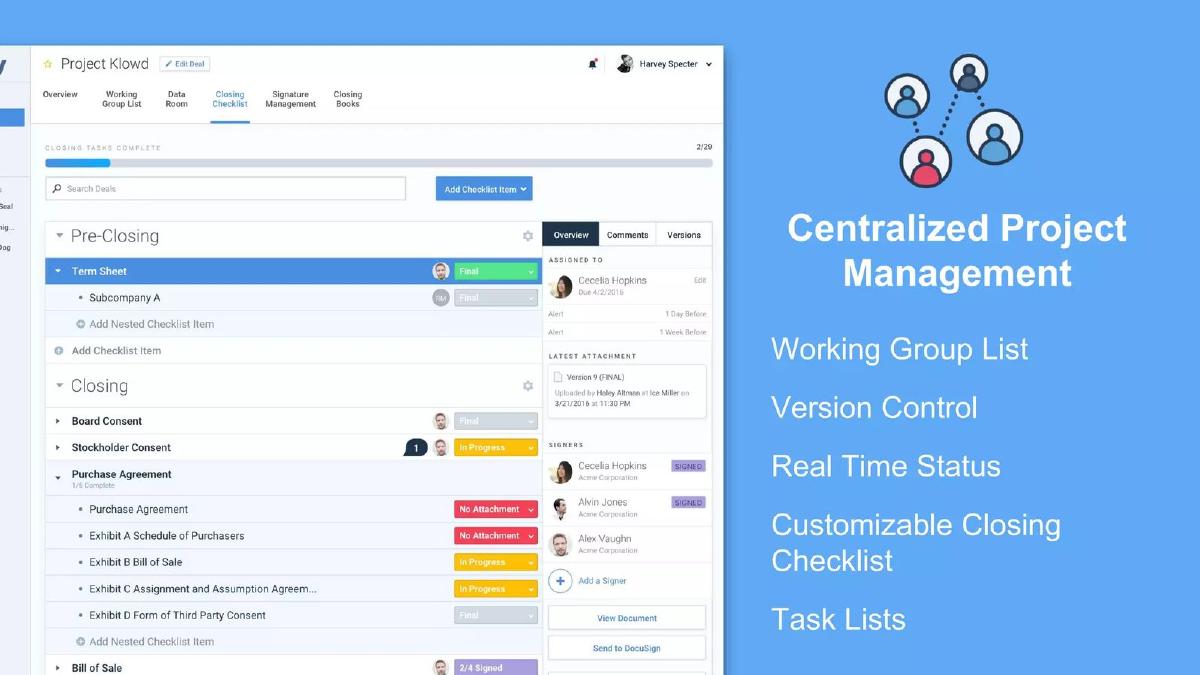
This slide moves from icons to an actual user interface (UI) screenshot. The UI shows a project named 'Project Panda' managed by a user named 'Harvey Specter' (a nod to the legal drama Suits). The slide lists specific features: Customizable Diligence Request List , Review Tracker , Document Notes , and Bulk Email Upload . The screenshot shows a clean, folder-based hierarchy with status indicators (e.g., '11/11 Reviewed') and an integrated chat sidebar. This demonstrates that the product is built and functional, showing exactly how a user would interact with diligence tasks.
Slide 5: Product Deep Dive - Closing Book Creation
Slide 5 focuses on the 'Closing Book Creation' feature, which is often a manual, multi-day task for paralegals. The slide highlights Click-to-Close Creation and Multiple Formatting Options . The screenshot shows a checklist of documents like 'Series Seed Preferred Stock Purchase Agreement' and 'Stockholders' Agreement.' The tagline 'On-Demand, at Closing, with Invoice, Whenever!' emphasizes the flexibility and time-saving nature of the automation.
Slide 6: Conclusion and Contact
The final slide is a simple 'Thank You' with the Doxly logo and the website www.doxly.com . It is notable for what it does not include: there is no call to action, no mention of a funding round, and no contact information for a specific individual. This suggests the deck may have been intended for a general audience at a conference rather than a private 1-on-1 investor meeting.
What Works in the Doxly Deck
Visualizing the Chaos: The 'Typical M&A Deal Process' slide is an excellent way to build empathy with the user. Anyone who has worked on a deal recognizes that mess of emails and phone calls. By visualizing it, Doxly makes the need for their product feel urgent.
Feature Specificity: Instead of using vague terms like 'innovation' or 'efficiency,' the deck lists specific legal workflow tasks like 'Closing Book Creation' and 'Diligence Request List.' This speaks the language of the target customer (lawyers) and shows a deep understanding of the domain.
Clean UI: The screenshots provided on Slides 4 and 5 show a modern, intuitive interface. In the legal tech space, which is often dominated by legacy software with poor UX, a clean and easy-to-use interface can be a significant competitive advantage.
What is Missing from the Doxly Deck
The Business Case: The deck is entirely product-focused. There is no information on the business model (SaaS vs. per-deal pricing), the market size (how many M&A deals happen annually?), or the competitive landscape (how does this differ from Intralinks or Datasite?).
The Team: Investors invest in people, especially in early-stage startups. This deck provides zero information on who is building Doxly. Without knowing if the founders have a background in law or enterprise software, it is difficult for an investor to assess the 'founder-market fit.'
Traction and Ask: There are no metrics regarding how many deals have been closed using Doxly, how many law firms are currently piloted, or what the growth trajectory looks like. Furthermore, the deck does not state how much money the company is looking to raise or what milestones that money will help them achieve.
What You Should Copy from Doxly
The 'Before and After' Narrative: Use a slide like Doxly’s Slide 2 to show the current, broken state of your industry. If you can make the investor feel the pain of the current process, the solution (Slide 3) becomes much more compelling.
Contextual Screenshots: Don't just show a screenshot of your dashboard. Show a screenshot of a specific, high-value task being completed. Doxly’s choice to show the 'Closing Book' checklist is smart because that is a specific 'aha' moment for their target user.
Consistent Branding: The deck uses a consistent color palette and clean iconography throughout. This professional polish helps build trust, especially in industries like law or finance where attention to detail is paramount.
Final Thoughts
The Doxly 'Startup Alley' pitch is a highly effective product demo disguised as a pitch deck. It excels at identifying a specific workflow pain point and showing exactly how the software solves it. However, as a standalone fundraising tool, it is incomplete. It lacks the financial, strategic, and human elements required to move an investor from 'interested in the product' to 'ready to write a check.' Founders should use this deck as a template for how to explain a complex workflow, but must ensure they supplement it with the missing business fundamentals.
Frequently asked questions
- What specific problem is Doxly trying to solve?
- Doxly targets the inefficiency of the M&A deal process. As shown on Slide 2, the current state involves a messy web of communication across emails, phone calls, and disparate document systems. Doxly aims to centralize these workflows into a single portal to reduce the manual overhead and risk associated with closing complex legal transactions.
- What are the core features of the Doxly platform?
- According to Slide 3 and Slide 4, the platform includes a Virtual Data Room (VDR), signature management, centralized project tracking, and automated closing book creation. It also features a diligence request list, document notes, and a bulk email upload tool to streamline the ingestion of deal documents.
- Does the deck provide any information on the company's traction or customers?
- No. The provided slides are strictly focused on the problem and the product interface. There are no slides detailing current revenue, number of law firms using the platform, or specific deal volumes processed to date. This makes it difficult to assess the company's current market position from this deck alone.
- Who is the intended user of this software?
- While not explicitly stated, the features like 'Closing Book Creation' and 'Diligence Request List' strongly imply that the primary users are corporate attorneys, paralegals, and M&A professionals who manage the administrative and legal heavy lifting of business acquisitions.
- What is missing from this pitch deck that an investor would need?
- This deck is missing almost all standard investment metrics. It lacks a market size (TAM/SAM/SOM) slide, a competitive landscape analysis, a team slide, unit economics, and a clear 'Ask' detailing how much capital is being raised and for what purpose.